5
Display Panel Icons
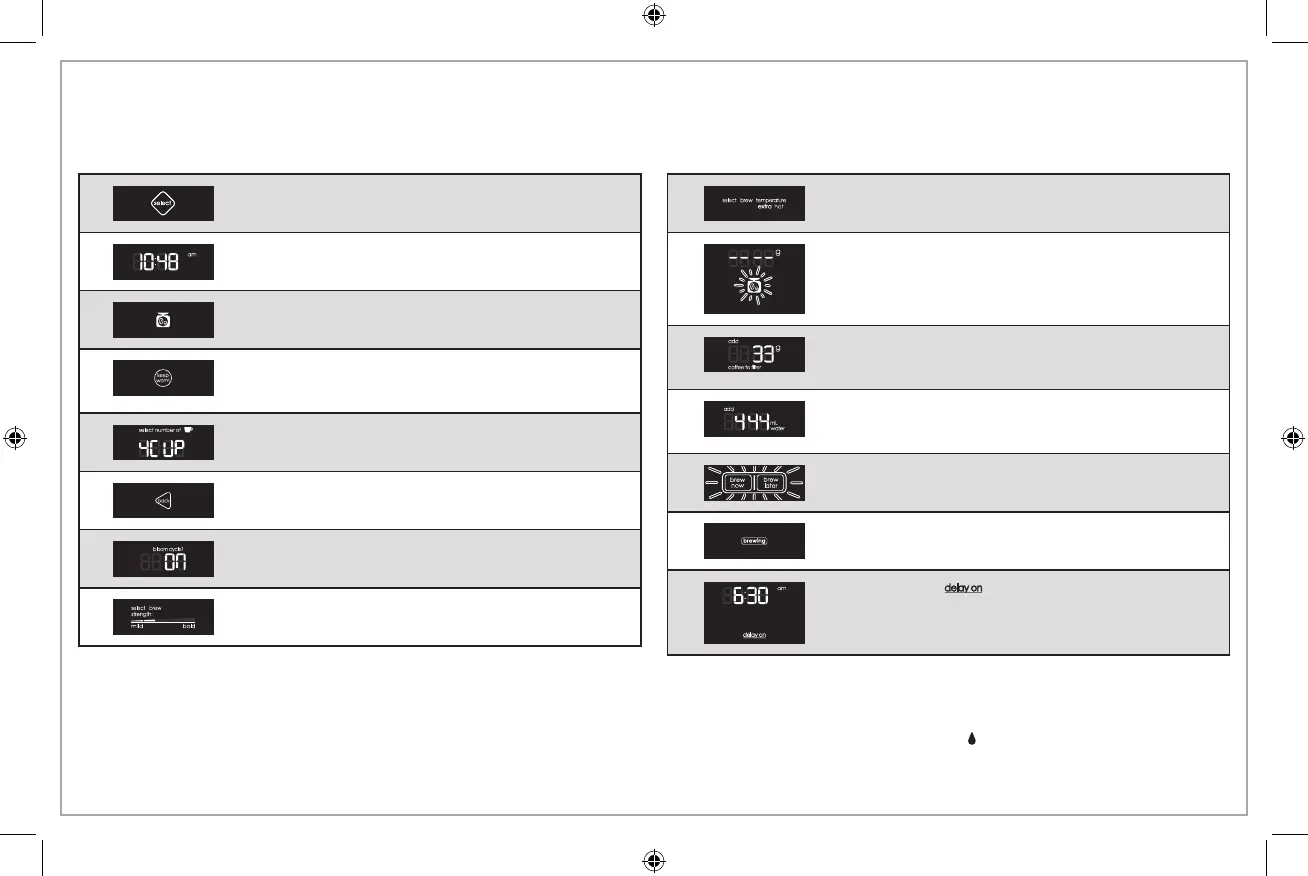
DISPLAY FUNCTION
Select Button: Press to toggle through options; press
and hold to select an option.
Time of Day: Coffee Maker will show time of day
once set.
Scale Button: Press to tare (zero out) scale before
adding ground coffee.
Keep Warm Button: Press to manually turn on/off
keep warm function. Keeps brewed coffee warm for
up to 2 hours.
Cups to Brew: Adjust from 2 to 8 cups using select
button.
Back Button: Press to return to a previous step.
Bloom Cycle: Turn on or off using select button. Brew
time will be longer with bloom cycle turned on.
Brew Strength: Press select button to choose
between 5 brew strengths, ranging from mild to bold.
DISPLAY FUNCTION
Brew Temperature: Choose “hot” or “extra hot” using
select button.
Scale: Coffee Maker shows blank grams and scale
button flashes. Press scale button to tare or zero out
scale.
Add Coffee: Coffee Maker shows amount of ground
coffee to be added to brew basket based on desired
brew strength and number of cups selected to brew.
Add Water: Coffee Maker shows amount of water
to be added to water reservoir based on number of
cups selected to brew.
Ready to Brew: Brew now/Brew later buttons
alternately flash when ready to brew.
Brewing: Coffee is brewing.
Brew Later: “ ” will illuminate on display when
unit is set to brew later.
NOTES:
• Blooming is a process of slowly pouring a stream of hot water to
saturate ground coffee, which causes grounds to swell. This process
extracts CO2 (carbon dioxide) from grounds and removes acidity,
producing a richer, more full-bodied cup of coffee.
• Shower Head is designed to evenly soak ground coffee for a more
balanced, richer, and cleaner flavor.
• Drip Stop must be in open position ( ) when starting to brew,
otherwise coffee will overflow.





 To Next Page