5
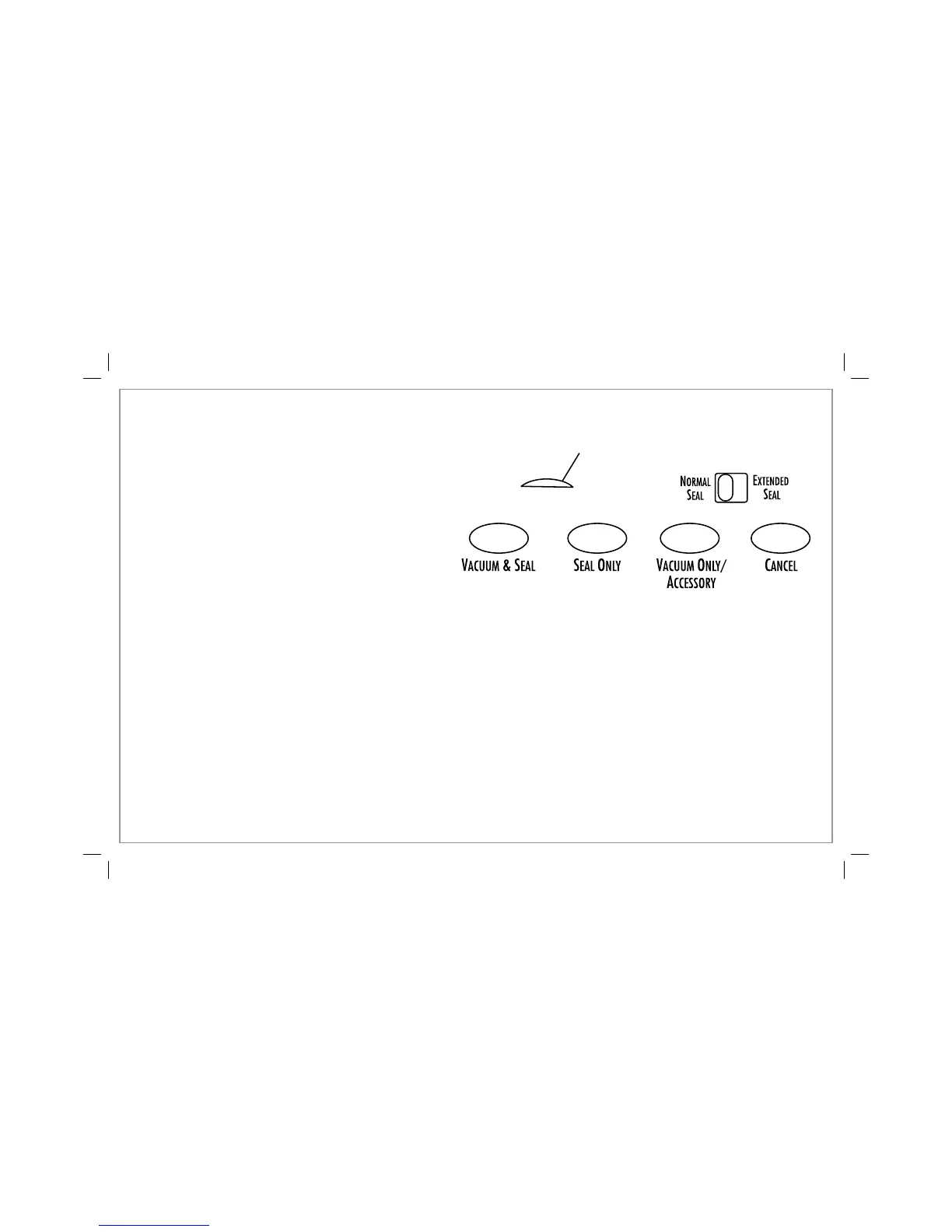
Control Panel
Power Light: The power light will remain illuminated when the
vacuum sealer is plugged into an outlet.
Normal/Extended Seal Switch: Use the normal or extended
seal switch to adjust the seal time when vacuum-sealing
thicker bags or bags with moisture.
Vacuum & Seal Button: Press this button to start the vacuum
pump and activate the seal bar heating element.
Seal Only Button: Press this button to seal bags without
vacuuming air out of them, when making bags from rolls.
Vacuum Only/Accessory Button: Press this button when
vacuum-sealing crushable or fragile items to monitor the
amount of air being removed from the bag; also use with
any external accessories (sold separately).
Cancel Button: Press this button to stop the vacuum/seal
process at any time in the cycle.
Before You Start Vacuum-Sealing
A vacuum bag is sealed when the two layers of the bag are heated from the heat-seal bar causing the bag to be permanently sealed.
NOTICE: THIS VACUUM SEALER IS INTENDED TO BE USED ONLY WITH HEAT-SEAL BAGS. FOR BEST RESULTS, AND TO AVOID
DAMAGING THE VACUUM SEALER, USE ONLY HEAT-SEAL BAGS. DO NOT USE HOUSEHOLD PLASTIC BAGS!
Power Light



 To Next Page