5
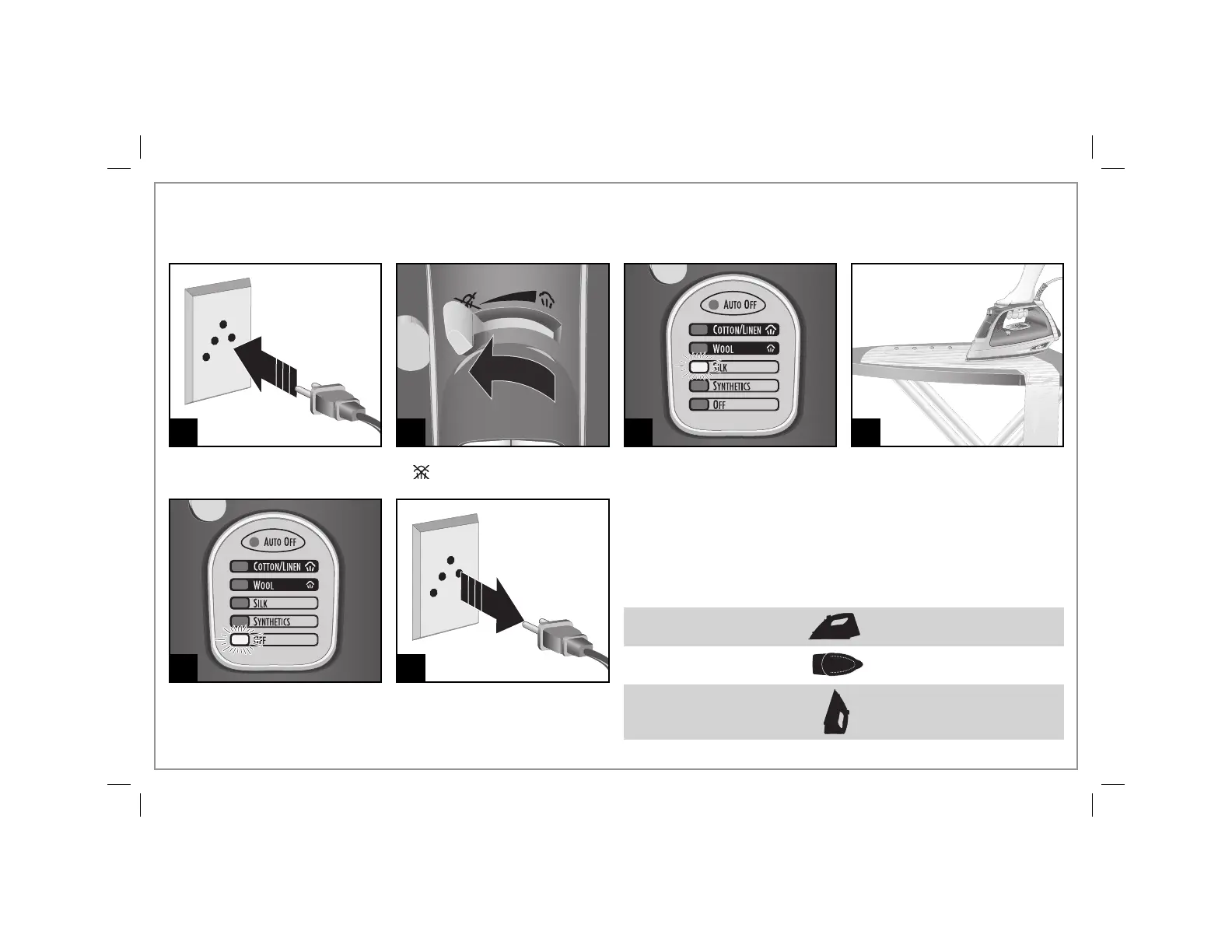
How to Dry Iron
1 2 3 4
Press Temperature Settings Button
to select desired temperature.
Allow 2 minutes for iron to reach
maximum temperature. The light
will blink while preheating.
To turn iron off, press
Temperature Settings Button
until OFF is illuminated. The light
will stay on until iron is unplugged.
5
IRON POSITION
Resting on soleplate
Resting on either side
Resting on heel
POSITION SENSING/AUTO SHUTOFF
The iron will turn off automatically when left in the following positions.
The Auto Shutoff time varies based on the iron’s position.
MOTIONLESS TIME
30 seconds
30 seconds
15 minutes
NOTE: Moving the iron will reset the Auto Shutoff sensor.
Set the Adjustable Steam Switch
to (Dry Iron).
6




 To Next Page