5
Control Panel
Keep Warm
When this icon is lit, coffee in Carafe is
automatically kept warm for 2 hours.
Add Water
When this icon is lit, Coffee Maker is out of water.
Add water to Reservoir and touch (Power ON/
OFF) button to resume brewing.
How to Set Time
1. When plugged in, unit will flash -:--.
2. Press (Time) button for 2 seconds and release. Hour will flash.
3. Press and hold (Time) button to scroll through hours. Release when
desired hour is reached. Hours will flash three times and switch to minutes.
4. Press and hold (Time) button to scroll through minutes. Release when
desired minutes are reached. Minutes will flash three times and time will be
set.
NOTE: Touch (Time) button to make time display disappear or reappear.
How to Set Auto Brew for Hot Single-Serve, Iced Single-Serve or Carafe
Coffee Maker will brew how Coffee Maker is set up when Auto Brew turns on
automatically. For instance, if Coffee Maker is set to make a 10-cup carafe of
coffee or 8 oz. Hot Single-Serve coffee, that is what it will brew.
NOTE: Time must be set first before programming (see How to Set Time).
1. Press and hold (Auto Brew) button to set auto brew time. Unit will flash
19:99.
2. Press and hold (Auto Brew) button to scroll through hours. Release
when desired hour is reached. Hours will flash three times and switch to
minutes.
3. Press and hold (Auto Brew) button to scroll through minutes. Release
when desired minutes are reached. Minutes will flash three times and time
will be set.
4. Once Auto Brew time is set, touch (Auto Brew) button until illuminated
green to activate automatic brewing. Auto Brew mode will be turned on
and will brew at selected time.
NOTE: Touch (Auto Brew) button to cancel automatic brewing.
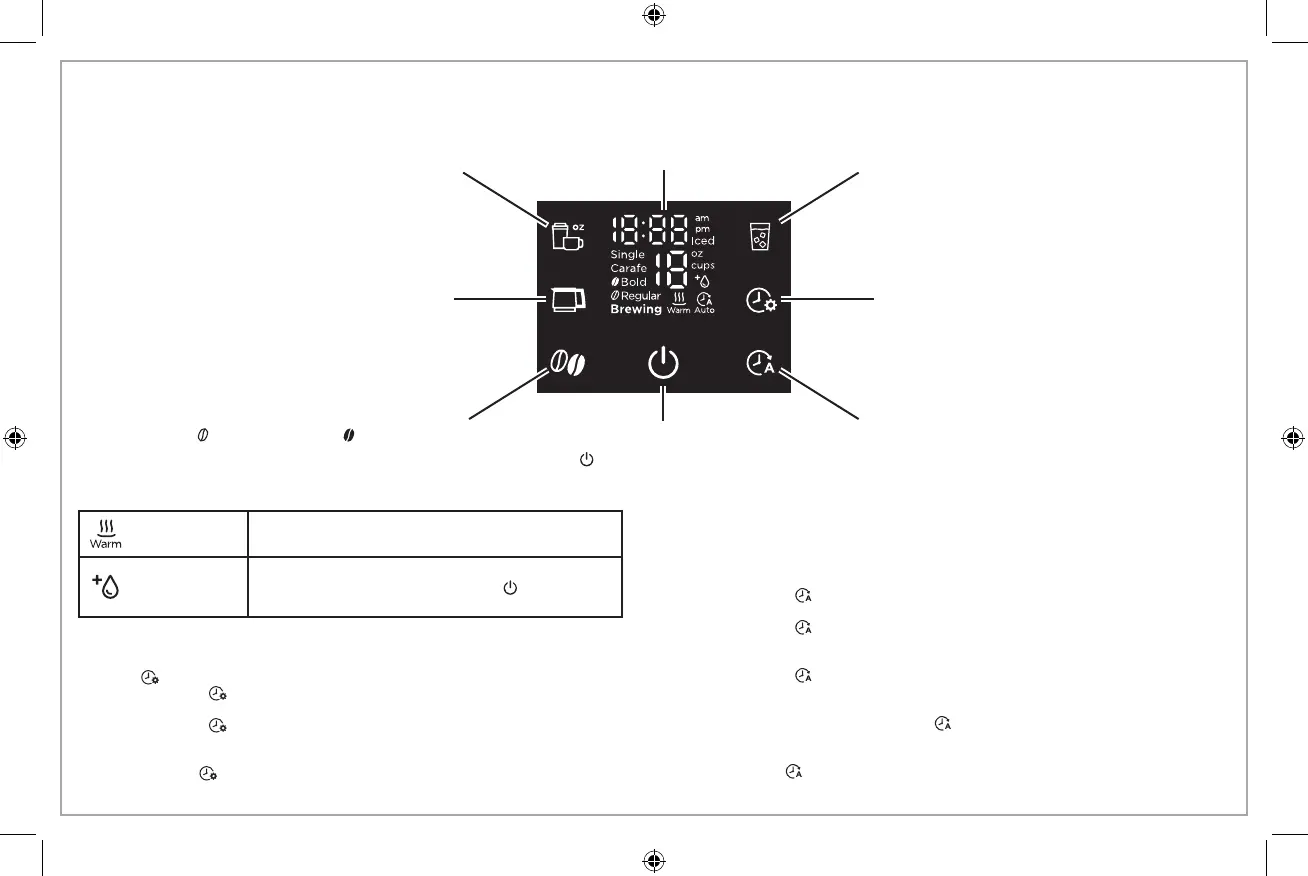
Display
NOTE: A slower, intentional button touch works best.
Hot Single-Serve button: Touch to make a
single cup of hot coffee and cycle through
cup sizes (8–14 oz.). See page 7 for more
information.
Carafe button: Touch to make coffee in Carafe
and cycle through cup sizes (2–12 cups). See
page 9 for more information.
Brew Strength button: Touch to select regular
strength ( ) or bold strength ( ) hot coffee.
Coffee Maker may pause during brewing to
increase coffee flavor.
Iced Single-Serve button: Touch to make a
single cup of iced coffee and cycle through
cup sizes (10–14 oz.). See page 8 for more
information.
Time button: Press and hold to set time (see
below). Touch to turn clock display on or off.
Auto Brew button: Press and hold to set Auto
Brew time (see below). Touch to turn Auto Brew
function on or off.
Power ON/OFF button: Touch to
start or stop making coffee. The
icon ( ) is red when making
coffee or in Keep Warm mode.





 To Next Page