4 © HAMILTON 2007, KHAKI SuNSeT / KHAKI TwILIgHT
© HAMILTON 2007, KHAKI SuNSeT / KHAKI TwILIgHT 5
Khaki Twilight
Your watch displays the times of twilight end and twilight start on the 1
st
, 11
th
and 21
st
of the month for the city of
New York. Your watch displays 3 time zones: local time «T1», a second time zone «T2» on the dial and a third time
zone «T3» on the interior rotating bezel optionally with the «twilight» function.
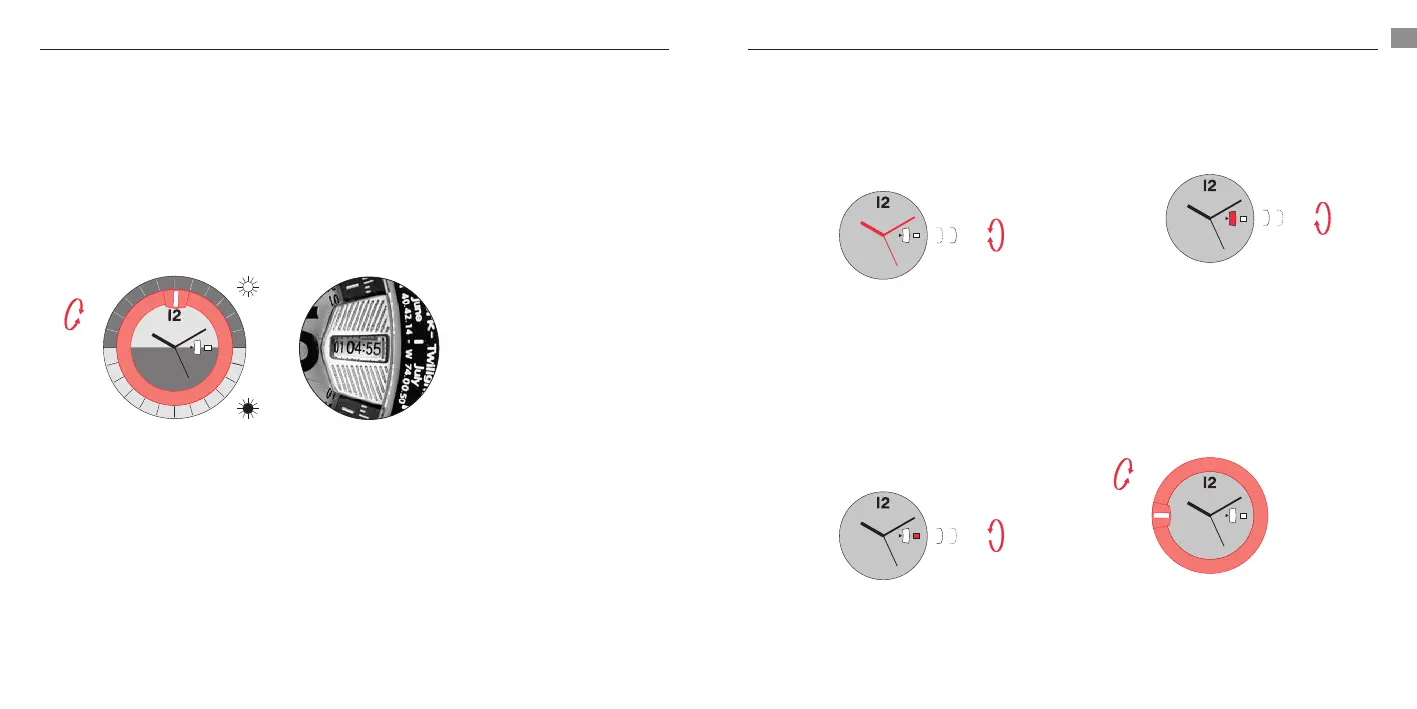
«Twilight» function: Dawn and Dusk
. Unscrew crown B.
. To display the time of dawn (Twilight Start), turn the crown until the viewing window of the interior rotating
bezel is aligned with the desired month and day in the upper half of the bezel.
To display the time of dusk (Twilight End), turn the crown until the viewing window of the interior rotating
bezel is aligned with the desired month and day in the lower half of the bezel.
24
3
1
23
24
3
1
23
24
3
1
23
p2
p1
p1
24
3
1
23
11
10
09
08
07
06
05
04
03
02
01
24
1
23
11
10
09
08
07
06
05
04
03
02
01
01
04:55
J
a
n
u
a
r
y
F
e
b
r
u
a
r
y
M
a
r
c
h
A
p
r
i
l
M
a
y
J
u
n
e
J
u
l
y
A
u
g
u
s
t
S
e
p
t
e
m
b
e
r
O
c
t
o
b
e
r
N
o
v
e
m
b
e
r
D
e
c
e
m
b
e
r
J
a
n
u
a
r
y
F
e
b
r
u
a
r
y
M
a
r
c
h
A
p
r
i
l
M
a
y
J
u
n
e
J
u
l
y
A
u
g
u
s
t
S
e
p
t
e
m
b
e
r
O
c
t
o
b
e
r
N
o
v
e
m
b
e
r
D
e
c
e
m
b
e
r
3
TIME
ZONE
TIME
ZONE
TIME
ZONE
TIME
ZONE
Ex. New York, July 1
Dawn = 4.55 a.m.
. Screw the crown back down.
Settings (Khaki Sunset / Khaki Twilight)
Setting local time
. Unscrew crown A.
. Pull out the crown completely to position (p).
The seconds hand stops.
. Adjust the time by turning the crown in the
desired direction.
24
3
1
23
24
3
1
23
24
3
1
23
p2
p1
p1
24
3
1
23
11
10
09
08
07
06
05
04
03
02
01
24UTC
1
23
L
O
N
D
O
N
M
A
S
C
A
T
M
A
N
I
L
L
A
N
A
D
I
L
O
S
A
N
G
E
L
E
S
G
A
N
D
E
R
11
10
09
08
07
06
05
04
03
02
01
J
21:12
3
. Push the crown completely back in and screw
it down again: the seconds hand starts again,
allowing precise synchronization with a time
signal.
Setting the date
. Unscrew crown A.
. Pull out the crown to position (p).
. Turn the crown counterclockwise until the desired
date is displayed.
24
3
1
23
24
3
1
23
24
3
1
23
p2
p1
p1
24
3
1
23
11
10
09
08
07
06
05
04
03
02
01
24UTC
1
23
L
O
N
D
O
N
M
A
S
C
A
T
M
A
N
I
L
L
A
N
A
D
I
L
O
S
A
N
G
E
L
E
S
G
A
N
D
E
R
11
10
09
08
07
06
05
04
03
02
01
J
21:12
3
. Push the crown completely back in and screw it
down again.
Setting time zone «T» on the dial
. Unscrew crown A.
. Pull out the crown to position (p).
. Turn the crown clockwise to adjust the time for
time zone «T».
24
3
1
23
24
3
1
23
24
3
1
23
p2
p1
p1
24
3
1
23
11
10
09
08
07
06
05
04
03
02
01
24UTC
1
23
L
O
N
D
O
N
M
A
S
C
A
T
M
A
N
I
L
L
A
N
A
D
I
L
O
S
A
N
G
E
L
E
S
G
A
N
D
E
R
11
10
09
08
07
06
05
04
03
02
01
J
21:12
3
. Push the crown completely back in and screw it
down again.
Setting time zone «T» on the interior
rotating bezel
. Unscrew crown B.
. Turn the crown until the desired time dierence
on the interior rotating bezel is positioned at 12
o’clock on the dial.
24
3
1
23
24
3
1
23
24
3
1
23
p2
p1
p1
24
3
1
23
11
10
09
08
07
06
05
04
03
02
01
24UTC
1
23
L
O
N
D
O
N
M
A
S
C
A
T
M
A
N
I
L
L
A
N
A
D
I
L
O
S
A
N
G
E
L
E
S
G
A
N
D
E
R
11
10
09
08
07
06
05
04
03
02
01
J
21:12
3
Ex. Time dierence of +3 hours
Read the local time 10.10 a.m.
and time «T» 01:10 p.m.
. Screw the crown back down.













 To Next Page