16
CUSTOM:
Press ◄/► to choose CUSTOM then press ENTER to conrm
and enter to four Custom mode of V :30/:30R, V1:00/1:00R…7,
V2000m/3:00R…4, V1:40/:20R…9.
A) V30/:30R: Training 30 seconds, Rest 30 seconds. Press START/
STOP to start the training.
B) V1:00/1:00R…7: Training one minute, Rest one minute, Repeat
7 times. Press START/STOP to start the training.
C) V2000m/3:00R…4: Training 2000m, Rest three minutes, Repeat
4 times. Press START/STOP to start the training.
D) V1:40/:20R…9: Training one minute fourty seconds, Rest 20
seconds, Repeat 9 times. Press START/STOP to start the training.
RACE:
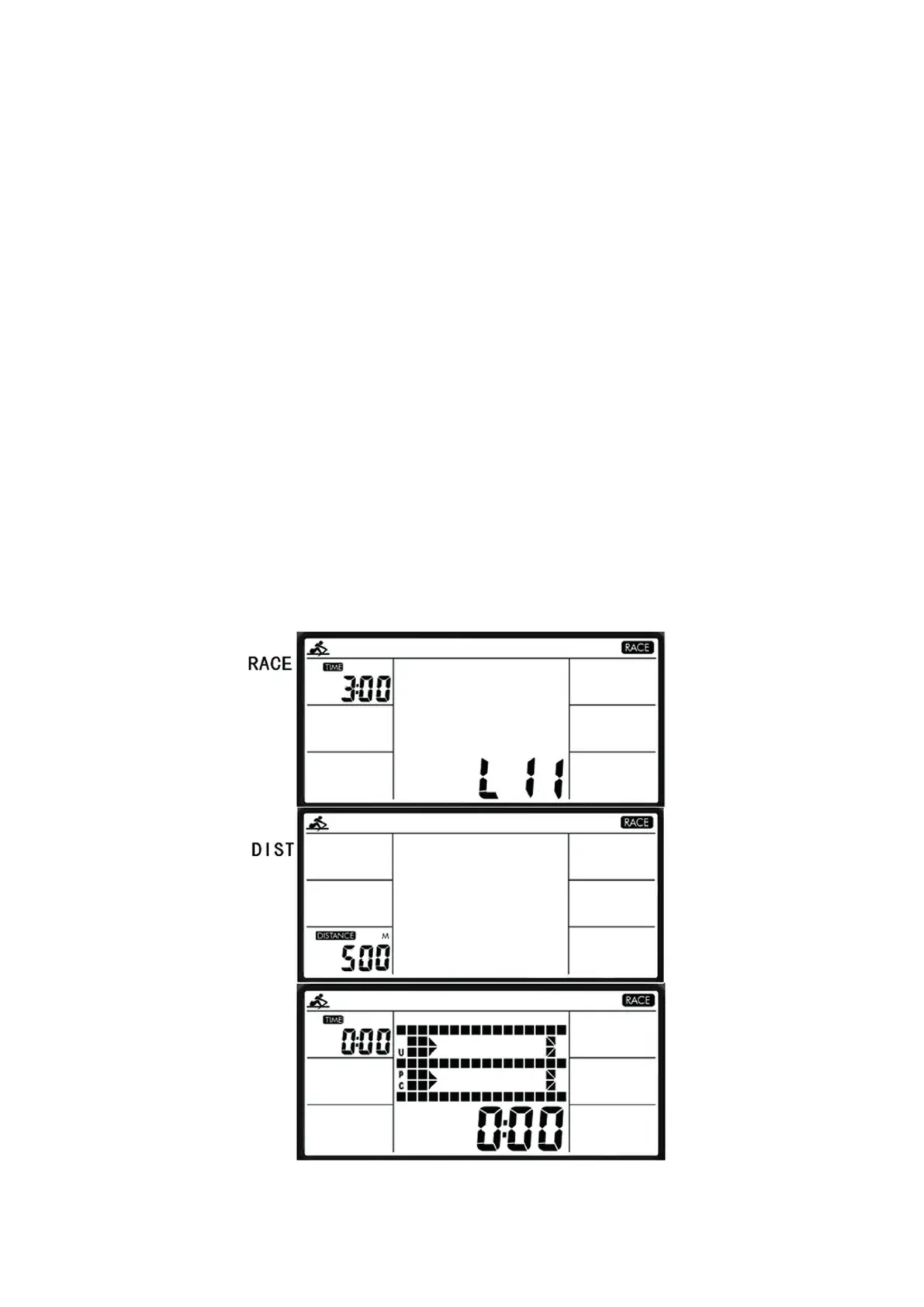
Press ◄/► to choose RACE then press ENTER to conrm. Use
◄/► to select between L1~L15. Press ENTER to conrm and
enter DISTANCE setting, DISTANCE will blink then press ◄/►to
adjust. Press ENTER to conrm then press START to train.
The dot-matrix will show U and PC graphic to race.
Following the list for the 500m/times:
L1: 8:00 L6: 5:30 L11: 3:00
L2: 7:30 L7: 5:00 L12: 2:30
L3: 7:00 L8: 4:30 L13: 2:00
L4: 6:30 L9: 4:00 L14: 1:30
L5: 6:00 L10: 3:30 L15: 1:00
CUSTOM:
Drücken Sie ◄/► um CUSTOM anzuwählen und bestätigen mit
ENTER. Sie können aus den folgenden vier Modi wählen.
V :30/:30R, V1:00/1:00R…7, V2000m/3:00R…4, V1:40/:20R…9.
A) V30/:30R: Training 30s, Pause 30s. Drücken Sie START/STOP
und ihr Training beginnt.
B) V1:00/1:00R…7: Training 1min, Pause 1min, 7 Durchgänge.
Drücken Sie START/STOP und ihr Training beginnt.
C) V2000m/3:00R…4: Training 2000m, Pause 3min, 4 Durchgänge.
Drücken Sie START/STOP und ihr Training beginnt.
D) V1:40/:20R…9: Training 1:40min, Pause 20s, 9 Durchgänge.
Drücken Sie START/STOP und ihr Training beginnt.
RACE:
Drücken Sie ◄/► um RACE auszuwählen und bestätigen Sie
mit ENTER. Wählen Sie nun mit den ◄/► die unterschiedlichen
500m Zeiten aus, welche die Geschwindigkeit vorgeben und in
der Folgenden Tabelle aufgezeigt werden. Bestätigen Sie die
Eingabe mit ENTER. Es blinkt DISTANCE, mit den ◄/►-Tasten
wählen Sie ihre Trainingsentfernung aus. Ihr Training beginnen
Sie mit dem drücken der START/STOP-Taste.
L1: 8:00 L6: 5:30 L11: 3:00
L2: 7:30 L7: 5:00 L12: 2:30
L3: 7:00 L8: 4:30 L13: 2:00
L4: 6:30 L9: 4:00 L14: 1:30
L5: 6:00 L10: 3:30 L15: 1:00





 To Next Page