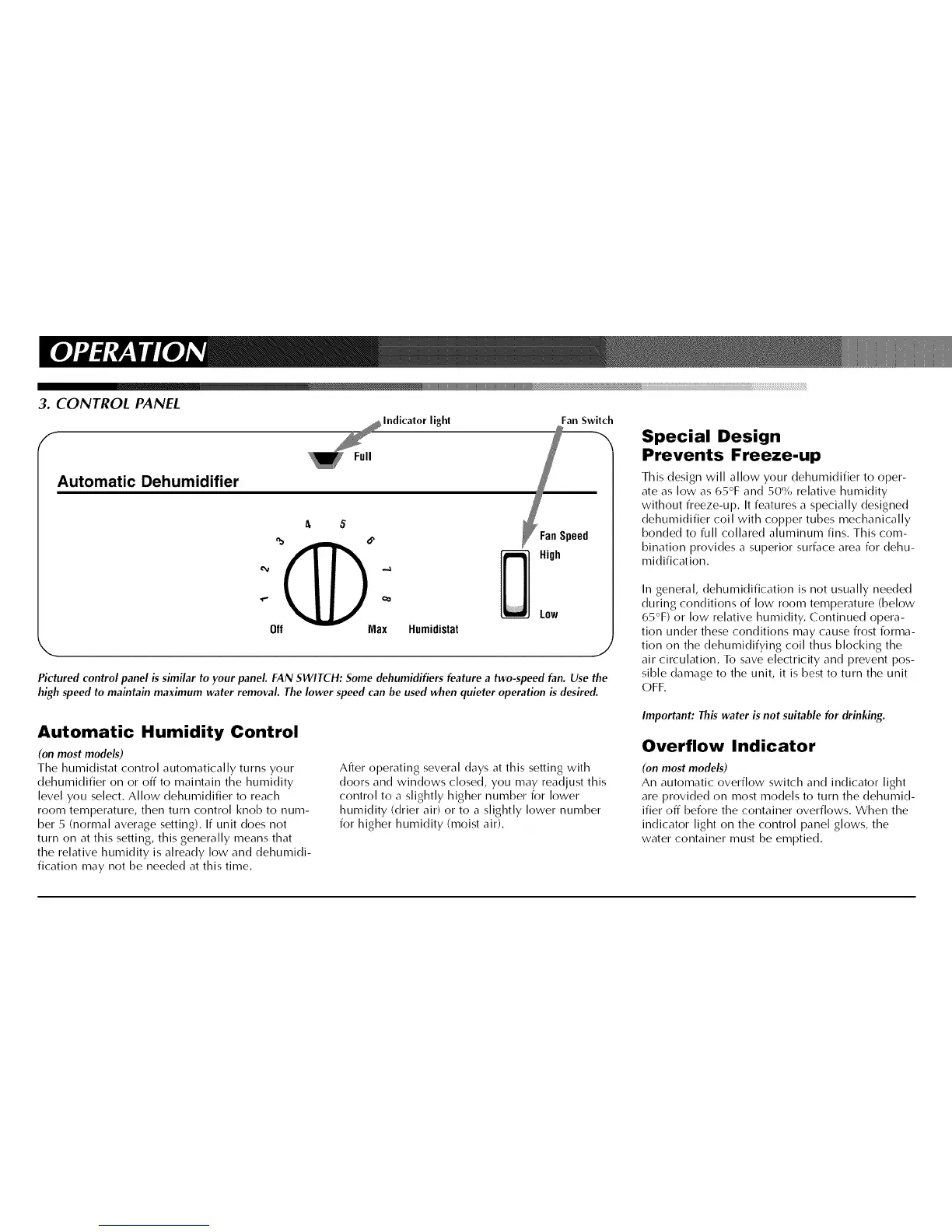
3. CONTROL PANEL
/
Automatic Dehumidifier
Off Max Humidistat
light Fan Switch
Speed
High
Low
,J
Pictured control panel is similar to your panel. FAN SWITCH: Some dehumidifiers feature a two-speed fan. Use the
high speed to maintain maximum water removal. The lower speed can be used when quieter operation is desired.
Special Design
Prevents Freeze-up
This design will allow your dehumidifier to oper-
ate as low as 65°F and 50% relative humidity
without freeze-up. It features a specially designed
dehumidifier coil with copper tubes mechanically
bonded to full collared aluminum fins. This com-
bination provides a superior surface area for dehu-
midification.
In general, dehumidification is not usually needed
during conditions of low room temperature (below
65°F) or low relative humidity. Continued opera-
tion under these conditions may cause frost forma-
tion on the dehumidifying coil thus blocking the
air circulation. To save electricity and prevent pos-
sible damage to the unit, it is best to turn the unit
OFF.
Automatic Humidity Control
(on most models)
The humidistat control automatically turns your
dehumidifier on or off to maintain the humidity
level you select. Allow dehumidifier to reach
room temperature, then turn control knob to num-
ber 5 (normal average setting). If unit does not
turn on at this setting, this generally means that
the relative humidity is already low and dehumidi-
fication may not be needed at this time.
After operating several clays at this setting with
doors and windows closed, you may readjust this
control to a slightly higher number for lower
humidity (drier air) or to a slightly lower number
for higher humidity (moist air).
Important: This water is not suitable for drinking.
Overflow Indicator
(on most models)
An automatic overflow switch and indicator light
are provided on most models to turn the dehumid-
ifier off before the container overflows. When the
indicator light on the control panel glows, the
water container must be emptied.


 To Next Page
 Loading...