23
2022_001
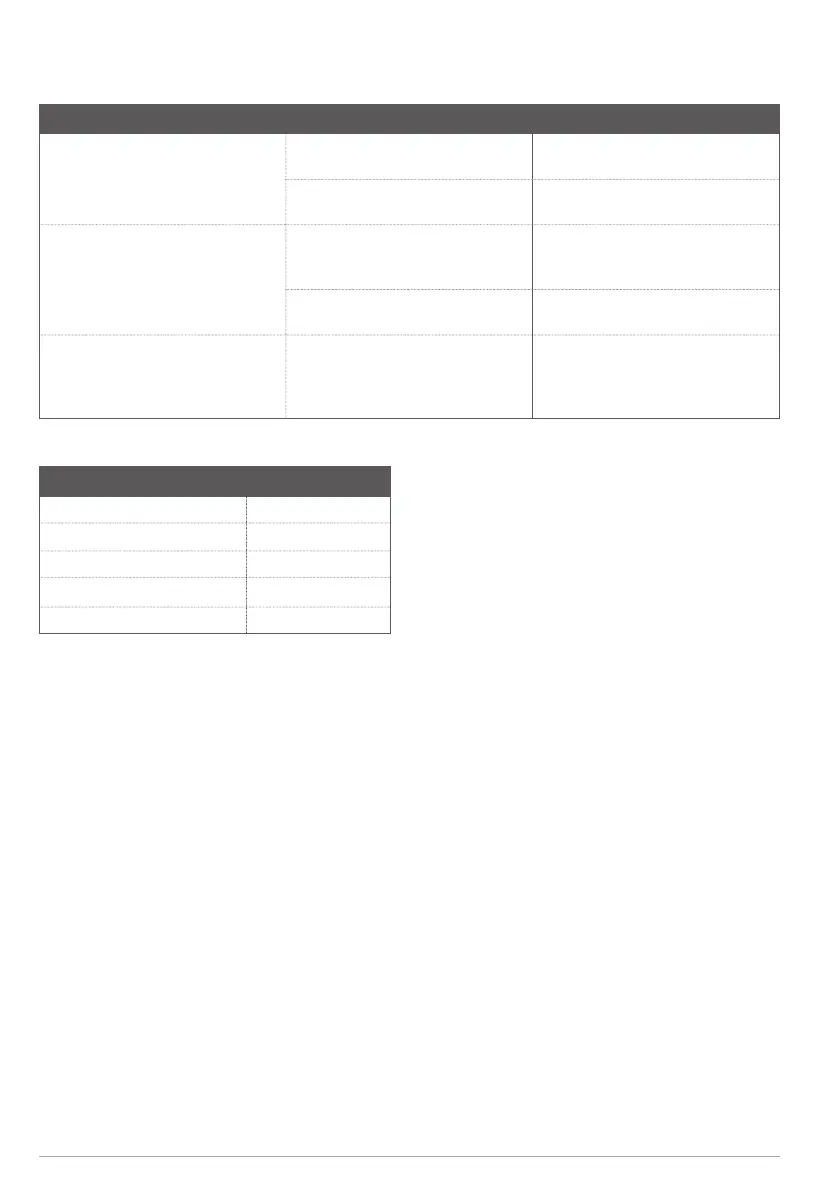
7 Troubleshooting
Problem Cause Action
The product does not start. The power plug is not connected to a
power source.
Make sure that the power plug is fully
connected to a power source.
The power cord is damaged or
defective.
Speak to an authorized service center.
The product does not charge the
battery.
There is bad connection between the
product and the battery.
Do a check of all cables and
connections. Clean the battery
terminals if it is necessary.
The clips cables are damaged or
defective.
Speak to an authorized service center.
The product does not charge the
battery, the error code “LO” shows in
the display and a warning signal is
heard.
The voltage in the battery is too low. Only charge 12 V batteries.
8 Technical data
Technical data
Rated voltage 230 V ~ 50Hz
Output voltage 12 V (DC)
Charging current 1/3/5/10 A
Display Yes
Alarm function/warning signal Yes


 To Next Page