HANLIM HL-616 CD Micro System
The HANLIM HL-616 is a versatile CD Micro System designed for flexible audio playback, offering a range of functions including Bluetooth connectivity, FM radio, CD player, USB player, and a 3.5 mm auxiliary input. It features a white backlit display for clear input and status indication, powerful stereo speakers, and a headphone jack for private listening. The system is equipped with DSP sound technology and two-way wooden speakers for enhanced audio quality.
To ensure safe operation and prevent fire or shock hazards, it is crucial to follow all safety guidelines. The power cord should be fully inserted into an outlet to prevent blade exposure. The device should not be exposed to rain or moisture. The unit uses a Class 1 laser for reading Compact Discs and is equipped with safety switches to prevent laser exposure when the CD door is open. However, invisible laser radiation is present if the safety interlocks fail or are defeated, so direct exposure to the laser beam should be avoided. Do not attempt to defeat or bypass the safety switches.
The exclamation point within a triangle on the device or in the manual indicates important operating and maintenance instructions. The lightning flash with an arrowhead symbol warns of uninsulated dangerous voltage that could pose a risk of electric shock.
The device should not be exposed to water (dripping or splashing), and no objects filled with liquids, such as vases, should be placed on it. Read all safety and operating instructions before use and retain them for future reference. Follow all warnings and instructions on the device and in the manual.
Placement and Ventilation
When placing the CD Micro System on lacquered or natural finish furniture, protect the surface with a cloth or other protective material. Avoid exposure to direct sunlight, temperature extremes, and moisture.
The cabinet features slots and openings for ventilation, ensuring reliable operation and protection from overheating. These openings must not be blocked or covered. Do not place the system on a bed, sofa, rug, or similar surface that could obstruct ventilation.
Disconnecting Power
Unplug the apparatus during lightning storms or when it will be unused for long periods. The rating label of the CD Micro System is located on the back.
Technical Specifications
- Power Output (RMS): 30W (2x15W)
- Max. Power Output: 40W
- Woofer: 2x4"
- Treble: 2x1"
- Frequency Response: 40Hz-20KHz
- Impedance: 4Ω
- S/N: 80dB
- FM Frequency Range: 87.5-108MHz
- MP3/WMA Bit Rate: 32-320Kbps (MP3), 40-320Kbps (WMA)
- Rated Voltage: AC100-240V, 50/60Hz
- Power Consumption: ≤30W
Package Contents
- CD Micro System
- AC Cord
- User's Manual
- Quick Start Guide
Setup and Connections
Connecting the AC cord:
- Ensure your local AC power source matches the voltage shown on the bottom plate of the CD Micro System.
- Insert the small connector of the AC cord into the AC IN jack on the back of the system.
- Plug the AC cord into a wall power outlet.
- Note: Unplug the AC cord when not in use. Power Electrical Specs: 100-240V ~ 50/60 Hz.
Connecting headphones:
- Plug headphones into the headphone jack on the back of the CD Micro System.
- Caution: Listening at high volumes can damage hearing. Turn the volume down before connecting headphones, then gradually increase to a comfortable level.
Usage Features
Playing the radio:
- Press Standby to turn on the system.
- Press MODE repeatedly to select RADIO mode.
- Press SCAN to automatically scan and save up to 20 FM stations as presets.
- Use CH+/CH- to skip between preset stations.
- Use TUN+/TUN- to tune to higher/lower frequencies.
- Press and hold TUN+/TUN- for two seconds to automatically tune to the next or previous station.
- Press PROG to save your favorite station.
- Adjust volume with VOLUME+/-.
- Press Standby to turn off.
- Improving reception: Fully extend the FM antenna and reposition it for best reception.
Playing CDs:
The system supports standard and 3" audio CDs, CD-Rs, and CD-RWs.
- Caution: Do not play DVDs, VCDs, or data CDs, as this may damage the unit.
- Press Standby to turn on.
- Press MODE repeatedly to select CD mode.
- Press the ▲ button to open the disc tray.
- Insert a CD, label side up.
- Press ▲ again to close the tray. Playback begins automatically and stops when finished.
- Press ■ (stop) to stop the CD. The total number of tracks appears on the display.
- Notes: If a CD is inserted incorrectly, is dirty, damaged, or absent, "NO" appears on the display. To prevent damage, never open the CD door while the CD is rotating and never touch the lens.
Pausing CD playback:
- Press ►II (play/pause) to pause. Playback stops, but the CD continues to spin, and the elapsed time of the current track is displayed.
- Press ►II (play/pause) again to resume normal playback.
Skipping or searching a CD track:
- During playback, press ►►I (next) or K◄ (previous) to skip tracks.
- Press ►► (fast forward) or ◄◄ (backward) to quickly search the current track.
Using repeat mode:
- Press REPEAT during playback to cycle through repeat modes: "ONE" (current track), "ALL" (all tracks), "RAN" (random playback).
- To cancel repeat mode, press REPEAT until "OFF" appears.
Playing USB flash drives:
- Press Standby to turn on.
- Press MODE repeatedly to select USB mode until "USB" appears.
- Connect the USB flash drive to the USB port.
- Note: Ensure the USB drive is fully inserted.
- Press ►II/SCAN to begin/pause playback.
- Press ■ to stop playback. The total number of tracks will appear.
Listening to an external audio device:
- Ensure the system is turned off.
- Plug one end of a 3.5 mm AUX cable (not included) into the AUX IN jack on the front.
- Plug the other end into the Line-out jack of an audio device (e.g., iPod, smartphone, MP3 player).
- Press Standby to turn on.
- Press MODE one or more times until "Line in" appears.
- Use the controls on the audio device to control playback.
Listening to a Bluetooth sound source:
Before use, pair your Bluetooth device with the CD Micro System.
- Notes: The system must be on to make a Bluetooth connection. Place the Bluetooth device within 33 ft. (10 m). Bluetooth is a convenient sound source connection.
Pairing your devices:
- Press MODE one or more times until "bt" appears on the display to select Bluetooth as the input source.
- On your device, navigate to Bluetooth settings, turn on Bluetooth, and search for available devices.
- Select "HL-616" from the device list. Repeat steps 1-2 if "HL-616" is not displayed.
- If a PIN code is requested, enter "0000".
- A tone will sound when the Bluetooth connection is established.
- Notes: The system connects and plays content from one device at a time. It automatically connects to the last connected device if in range. To connect a different paired device, turn off Bluetooth or unpair from the currently paired device and manually connect.
- Important: Ensure your connected device is outputting sound to the CD Micro System.
Reconnecting to a paired device:
When "bt" mode is selected, the system automatically connects to a previously paired device. If connection fails:
- If system is off: Turn it on. It will search for and reconnect to the last connected Bluetooth device.
- If Bluetooth device is out of range: Move it within 33 ft. (10 m).
- If Bluetooth device is off: Turn it on and ensure Bluetooth is active.
- If Bluetooth is off on your device: Turn it on.
- If connected to another device: Disconnect from the other device, set your device to pairing mode, and select "HL-616".
- If input source changed: Change the input source back to Bluetooth.
- Note: If a device doesn't automatically reconnect, you may need to reselect "HL-616" on your Bluetooth device.
Connecting to a different device:
- On your Bluetooth device, turn off Bluetooth or unpair the CD Micro System.
- Follow the pairing instructions (page 10) to connect a new device.
Receiving a phone call while playing music:
- Music stops automatically when a call is received.
- Music may resume playback after hanging up, depending on phone settings.
Troubleshooting
- System won't turn on: Unplug and replug. Check if AC outlet is working.
- CD player won't play: Ensure CD is inserted correctly (label side up), not paused, CD mode is selected, and it's a compatible CD (standard/3" audio CDs, CD-Rs, CD-RWs). Try a different CD.
- CD skips: Clean the CD (see "Cleaning discs" on page 15). Try a different CD. Ensure CD is not warped, scratched, or damaged. Move the system if affected by vibration/shock. Ensure it's a compatible CD.
- Noise/distorted FM radio: Extend FM antenna. Rotate system for best reception. Turn off nearby electrical appliances.
- No sound: Increase volume. Plug in AC power cord and press Standby. Select correct source. If in AUX mode, ensure playback device volume is not muted.
- Sound very low: If in AUX mode, turn up volume on both audio source and system.
- USB drive won't play: Disconnect and reinsert USB drive. Ensure it's not formatted in NTFS.
- Bluetooth won't connect: Shorten distance between devices. Turn devices off/on and re-pair. Ensure system is not paired to another device. Ensure both devices are in pairing mode. Ensure Bluetooth device is not paired to another device. Ensure "HL-616" is selected.
- Bluetooth keeps unpairing: Shorten distance between devices.
- "HL-616" not appearing: Shorten distance between devices. Put system into pairing mode and refresh Bluetooth device list. Ensure Bluetooth device is visible to other devices.
Maintenance Features
Care and handling of discs:
- Do not touch the playback side of the disc. Hold by the edges to avoid fingerprints. Never stick paper or tape on the disc.
- Store discs in their cases after playing. Avoid direct sunlight, heat sources, and leaving in a parked car exposed to direct sunlight.
Cleaning discs:
- Fingerprints and dust can cause poor sound quality. Clean discs with a clean cloth, wiping from the center out, before playing.
- Do not use strong solvents (alcohol, benzine, thinner, commercial cleaners, anti-static spray for vinyl records).
Cleaning the CD lens:
- A dirty CD lens can cause poor sound quality. Purchase a CD lens cleaner and follow its instructions to maintain output sound quality.
Cleaning your CD Micro System:
- To prevent fire or shock hazard, disconnect the system from the AC power source before cleaning.
- Clean the finish with a dust cloth. Use caution when cleaning plastic parts. Mild soap and a damp cloth can be used on the front panel.

 Need help?
 General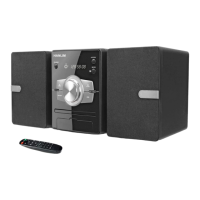

 To Next Page