/
R
L
SP EAKE RS OU TPU T
AC INPUT
110 -240 V~
50 /60H z
RI SK OF ELECT RIC S HOC K,
DO NOT OPE N!
CL ASS 1 LAS ER PRODUC T
FM ANT
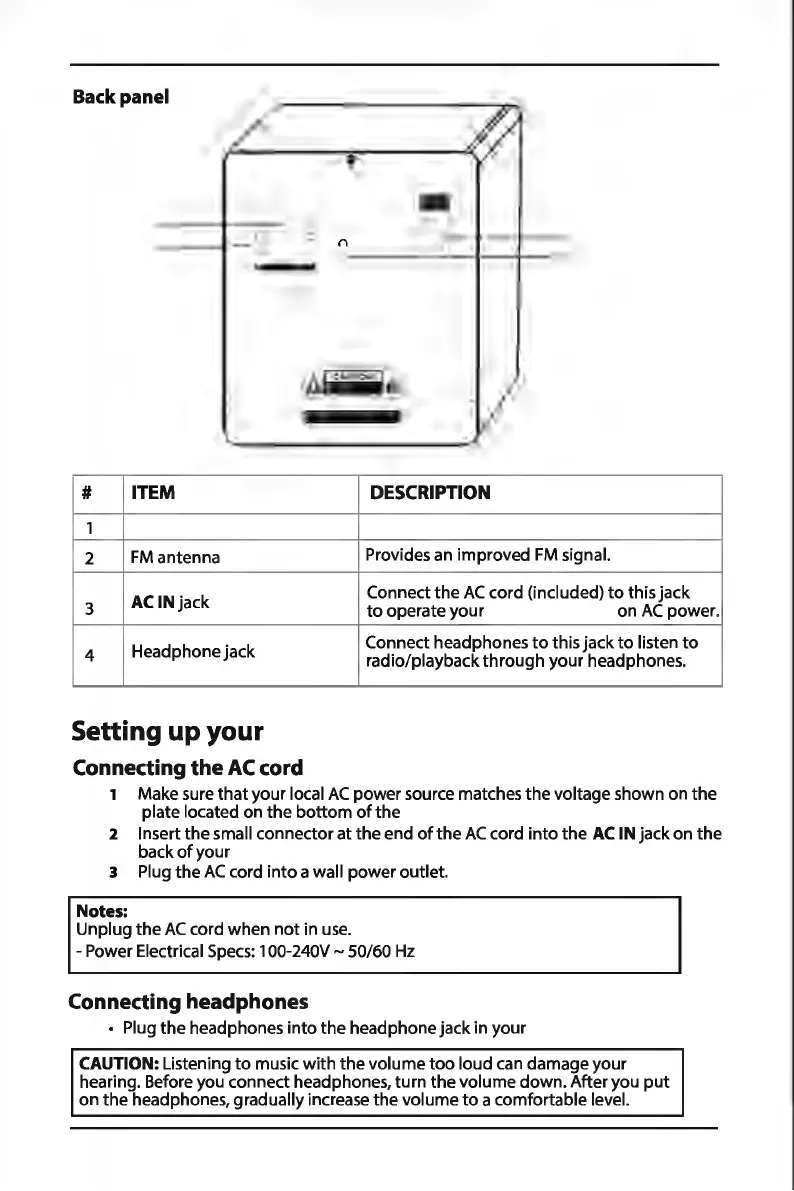
Back panel
0
# ITEM
1
2
FM
antenna
3
AC
IN jack
4
Headphone jack
Setting
up
your
Connecting
the
AC
cord
0
DESCRIPTION
Provides an improved
FM
signal.
Connect
the
AC
cord (included)
to
this jack
to
operate
your
on
AC
power.
Connect headphones
to
this jack
to
listen
to
radio/playback
through
your headphones.
1 Make sure
that
your local
AC
power source matches
the
voltage shown on
the
plate located on
the
bottom
of
the
2 Insert
the
small connector at
the
end
of
the
AC
cord
into
the
AC
IN jack
on
the
back
of
your
3 Plug
the
AC
cord
into
a wall
power
outlet.
Notes:
Unplug
the
AC
cord when
not
in
use.
- Power Electrical
Specs:
100-240V ~ 50/60
Hz
Connecting headphones
• Plug
the
headphones
into
the
headphone jack in your
CAUTION: Listening
to
music
with
the
volume
too
loud
can
damage your
hearing. Before you connect headphones,
turn
the
volume down. After you
put
on
the
headphones, gradually increase
the
volume
to
a comfortable level.


 To Next Page