EasyManua.ls Logo

Hannlomax HX- 311CD - User Manual

Hannlomax HX- 311CD
2 pages
Print Icon
To Next Page IconTo Next Page
Loading...
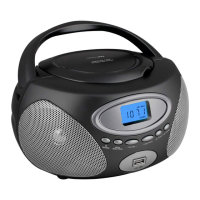
CD/MP3 Boombox with Radio and USB
Model : HX- 311CD
INSTRUCTION MANUAL
Note: Please read and follow these instructions before using your unit.
1. Read these instructions. Keep these instructions. Heed all warnings. Follow all instructions.
2. Do not use this apparatus near water.
3. Clean only with dry cloth.
4. Do not block any ventilation openings. Install in accordance with the manufacturer’s instructions.
5. Do not install near any heat sources such as radiators, heat registers, stoves, or other apparatus (including amplifiers) that produce heat.
6. Do not defeat the safety purpose of the polarized or grounding-type plug. A polarized plug has two blades with one wider than the other. A
grounding type plug has two blades and a third grounding prong. The wide blade or the third prong are provided for your safety. If the
provided plug does not fit into your outlet, consult an electrician for replacement of the obsolete outlet.
7. Protect the power cord from being walked on or pinched particularly at plugs, convenience receptacles, and the point where they exit from
the apparatus.
8. Only use attachments/accessories specified by the manufacturer.
9. Use only with the cart, stand, tripod, bracket, or table specified by the manufacturer, or sold with the apparatus.
When a cart is used, use caution when moving the cart/apparatus combination to avoid injury from tip-over.
10. Unplug this apparatus during lightning storms or when unused for long periods of time.
11. Refer all servicing to qualified service personnel. Servicing is required when the apparatus has been damaged in
any way, such as power-supply cord or plug is damaged, liquid has been spilled or objects have fallen into the
apparatus, the apparatus has been exposed to rain or moisture, does not operate normally, or has been dropped.
12. Grounding or Polarization – This product may be equipped with a polarized alternating-current line plug (a plug having one blade wider
than the other). This plug will fit into the power outlet only one way. This is a safety feature. If you are unable to insert the plug fully into the
outlet, try reversing the plug. If the plug should still fail to fit, contact your electrician to replace your obsolete outlet. Do not defeat the
safety purpose of the polarized plug.
13. Alternate Warnings – This product is equipped with a three-wire ground-type plug, a plug having a third (grounding) pin. This plug will only
into a grounding-type power outlet. This is a safety feature. If you are unable to insert the plug into the outlet, contact your electrician to
replace your obsolete outlet. Do not defeat the safety purpose of the grounding-type plug.
14. Ventilation – Slots and openings in the cabinet are provided for ventilation and to ensure reliable operation of the product and to protect it
from overheating, and these openings must not be blocked or covered. The openings should never be blocked by placing the product on
a bed, sofa, rug, or other similar surface. This product should not be placed in a built-in installation such as a bookcase or rack unless
proper ventilation is provided or the manufacturer’s instructions have been adhered to.
15. The MAINS plug or an appliance coupler is used as the disconnect device, the disconnect device shall remain readily operable.
16. : CLASS II apparatus with double insulation, and no protective earth provided.
17. Caution Marking and rating plate was located at bottom enclosure of the apparatus.
18. To reduce the risk of fire or electric shock, do not expose this apparatus to rain or moisture.
19. The apparatus shall not be exposed to dripping or splashing and that no objects filled with liquids, such as vases, shall be placed on
apparatus.
20. The mains plug is used as disconnect device. The mains plug of apparatus should not be obstructed OR should be easily accessed
during intended use. To be completely disconnect the power input, the mains plug or apparatus shall be disconnected from the mains.
21. Battery shall not be exposed to excessive heat such as sunshine, fire or the like.
22. Excessive sound pressure from earphones and headphone can cause hearing loss.
FCC NOTICE
This equipment has been tested and found to comply with the limits for a Class B digital device, pursuant to Part 15 of the FCC Rules. These
limits are designed to provide reasonable protection against harmful interference in a residential installation. This equipment generates, uses
and can radiate radio frequency energy and, if not installed and used in accordance with the instructions, may cause harmful interference to
radio communications.
However, there is no guarantee that interference will not occur in a particular installation. If this equipment does cause harmful interference to
radio or television reception, which can be determined by turning the equipment off and on, the user is encouraged to try to correct the
interference by one or more of the following measures:
– Reorient or relocate the receiving antenna.
– Increase the separation between the equipment and receiver.
– Connect the equipment into an outlet on a circuit different from that to which the receiver is needed.
Consult the dealer or an experienced radio/TV technician for help.
-1-
This device complies with part 15 of the FCC Rules. Operation is subject to the following two conditions :
(1) This device may not cause harmful interference, and (2) this device must accept any interference received, including interference that
may cause undesired operation.
LOCATION OF CONTROLS
1. Speaker 10. LCD display
2. POWER / SOURCE Button 11. CD door
3. MODE/MEMORY/PROG Button 12. Handle
4. VOLUME – Button 13. FM Telescope Antenna
5. VOLUME + Button 14. Battery Door
6. SKIP / TUN < Button 15. Aux-in Jack
7. SKIP / TUN > Button 16. AC Socket
8. M+ / STOP Button 17 USB Slot
9. PLAY / PAUSE Button
AC OPERATION
Connect the plug to the AC socket of the unit and the other end to a standard AC outlet.
ATTENTION
1. Do not plug or unplug the power cable while you have wet hands;
2. When planning not to use this unit for a long time, disconnect the power cable from the wall
outlet;
3. When disconnecting the power cord from the wall outlet, do not pull on the cord in order to
avoid shock risks caused by damaged cable.
BATTERY OPERATION
Disconnect the AC Cord Set completely. Open the Battery Compartment Door and insert 6
pieces UM-2 "C" size batteries into the battery compartment with battery polarity as shown
inside the battery compartment.
SEQUENCE OF FUNCTION MODE
The sequence of the function mode is : “CD → USB → AUX → FM Radio → AM Radio
-2-
Question and Answer IconNeed help?

Do you have a question about the Hannlomax HX- 311CD and is the answer not in the manual?

Summary

Location of Controls

AC and Battery Operation

AC Operation Attention

Important precautions when connecting and disconnecting the AC power cable.

Battery Operation

Instructions for disconnecting AC power and inserting batteries.

Sequence of Function Mode

FCC Notice

Auxiliary Input Connection

Radio Operation

Manual Station Selection

Step-by-step tuning to desired radio stations and volume adjustment.

Search Station Operation

Auto-search for strong signal radio stations and volume adjustment.

Antenna Usage

Tips for extending the FM antenna and using the built-in AM antenna.

FM Stereo Reception

Indication of FM stereo broadcast reception on the LCD display.

Memorize Radio Stations

Steps to tune, program, and store radio stations into memory.

Select Radio Station from Memory

Using the M+/STOP button to recall and play stored radio stations.

CD;MP3 Playback Function

CD;MP3 Programming

Setting a custom playback order for tracks on CDs or MP3 discs.

Playing MP3 Files via USB

Connecting a USB device and playing MP3 files.

Track Skipping

Navigating to the next or previous track during playback.

Playback Modes

Selecting different playback options like Repeat One, Repeat All, etc.

Specifications

Overview

The HANNLOMAX CD/MP3 Boombox with Radio and USB, Model: HX-311CD, is a versatile audio device designed for portable and home use, offering multiple playback options and radio functionality.

Function Description:

This boombox serves as a multi-source audio player, capable of playing audio CDs and MP3 discs, as well as MP3 files from a USB device. It also features an AM/FM radio tuner for listening to broadcast stations. An Aux-in jack allows connection of external audio devices, expanding its playback capabilities. The unit is equipped with a speaker for audio output and an LCD display for showing track information, radio frequencies, and current mode.

Important Technical Specifications:

  • Frequency Range:
    • AM: 520 - 1710 KHz
    • FM: 87.5 - 108 MHz
  • Power Supply:
    • AC: 120V ~ 60Hz
    • Battery: 6 pcs. "C" size (6 x 1.5V)
  • Connectivity: USB port, 3.5mm Aux-in jack.
  • Disc Compatibility: CD, MP3 disc.

Usage Features:

  • Controls: The device features clearly labeled buttons for various functions:
    • POWER / SOURCE Button (2): Turns the unit on/off and selects the audio source (CD, USB, AUX, FM Radio, AM Radio). The function mode sequence is CD → USB → AUX → FM Radio → AM Radio.
    • MODE/MEMORY/PROG Button (3): Used for programming CD/MP3 tracks, storing radio stations, and selecting folders on USB.
    • VOLUME - (4) and VOLUME + (5) Buttons: Adjust the volume level.
    • SKIP/TUN < (6) and SKIP / TUN > (7) Buttons: Used for skipping tracks, tuning radio stations (step-by-step or search), and navigating folders on USB.
    • M+ / STOP Button (8): Stops playback, stores radio stations in memory, and skips through memory stations.
    • PLAY/PAUSE Button (9): Plays and pauses audio playback.
  • CD/MP3 Playback:
    • To play a CD/MP3 disc, select CD mode, open the CD door (11), insert the disc with the printed side facing up, and close the door. Disc information will appear on the LCD display (10), and playback will start automatically.
    • For MP3 discs, the "FOLDER" function can be accessed by pressing and holding the MODE/MEM/PROG button, allowing users to select specific folders using the SKIP/TUN buttons.
    • Programming: Tracks from CD/MP3 discs can be programmed in STOP mode. Up to 20 tracks for CD and 99 tracks for MP3 can be stored.
    • Play Modes: Different play modes are available:
      • For Audio CDs: Repeat One, Repeat All, Normal.
      • For MP3 Files: Repeat One, Repeat Folder, Repeat All, Normal.
  • USB Playback:
    • Plug a USB device into the USB slot (17). The unit will read files and start playing from track 001.
    • Folder navigation is available by pressing and holding the MODE/MEM/PROG button and using the SKIP/TUN buttons.
  • Radio Operation:
    • Select AM or FM mode using the POWER / SOURCE button.
    • Manual Tuning: Use the SKIP/TUN buttons for step-by-step tuning.
    • Search Tuning: Press and hold the SKIP/TUN buttons for approximately 1 second to search for the next strong signal station.
    • Memorizing Stations: Up to 20 radio stations (20 for AM, 10 for FM) can be stored in memory using the MODE/MEMORY/PROG button.
    • Recalling Stations: Use the M+ / STOP button to skip through memorized stations.
    • Antenna: Fully extend the FM Telescope Antenna (13) for FM reception. The unit has a built-in antenna for AM reception; rotate the unit for best reception.
    • FM Stereo: "ST" will be shown on the LCD display when an FM Stereo Broadcast is tuned.
  • Aux-in Connection:
    • Select Aux-in mode. Connect an external audio device (e.g., smartphone, MP3 player) using a 3.5mm stereo audio cable (not supplied) to the Aux-in Jack (15).

Maintenance Features:

  • Cleaning: Clean the unit only with a dry cloth.
  • Ventilation: Ensure ventilation openings are not blocked to prevent overheating. Do not place the unit on soft surfaces or in enclosed spaces without proper ventilation.
  • Power Cord Protection: Protect the power cord from being walked on or pinched.
  • Servicing: Refer all servicing to qualified service personnel if the apparatus is damaged (e.g., damaged cord/plug, liquid spills, objects fallen into, exposure to rain/moisture, abnormal operation, dropped).
  • Battery Replacement: Open the Battery Compartment Door (14) and insert 6 "C" size batteries, observing correct polarity.
  • Safety:
    • Do not use the apparatus near water.
    • Avoid installing near heat sources.
    • Do not defeat the safety purpose of polarized or grounding-type plugs.
    • Unplug during lightning storms or when unused for long periods.
    • Do not expose to rain or moisture to reduce the risk of fire or electric shock.
    • Avoid dripping or splashing liquids on the apparatus.
    • Do not expose batteries to excessive heat.
    • Excessive sound pressure from earphones/headphones can cause hearing loss.

The device complies with part 15 of the FCC Rules, ensuring it does not cause harmful interference and accepts interference received. Specifications are subject to change without further notice.

Hannlomax HX- 311CD Specifications

General IconGeneral
BrandHannlomax
ModelHX- 311CD
CategoryCD Player
LanguageEnglish

Related product manuals