EasyManua.ls Logo

Hannlomax HX-313CD - User Manual

Default Icon
4 pages
Print Icon
To Next Page IconTo Next Page
Loading...
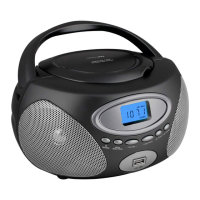
Portable CD/MP3 player with
Radio Cassette Recorder and USB Slot
Model : HX-313CD
INSTRUCTION MANUAL
Note: Please read and follow these instructions before using your unit.
WARNING
TO PREVENT ELECTRIC SHOCK; DO NOT USE THIS PLUG WITH AN EXTENSION CORD
RECEPTACLE OR OTHER OUTLET UNLESS THE BLADES CAN BE FULLY INSERTED TO
PREVENT BLADES EXPLOSURE.
TO PREVENT FIRE OR SHOCK HAZARD; DO NOT EXPOSE THIS APPLIANCE TO RAIN OR
MOISTURE.
The lighting flash with
arrowhead symbol, with an
equilateral triangle is
intended to alert the user
to the presence of
un-insulated dangerous
voltage within the products
enclosure that may be of
sufficient magnitude to
constitute a risk of electric
shock to persons.
CAUTION
The exclamation point
within an equilateral
triangle is intended to alert
the user to the presence of
important operating and
maintenance (servicing)
instruction in the literature
accompanying the
appliance.
RISK OF ELECTRIC SHOCK
DO NOT OPEN
CAUTION: TO REDUCE THE
RISK OF ELECTRIC SHOCK,
DO NOT REMOVE COVER
(OR BACK). NO USER
SERVICEABLE PARTS
INSIDE REFER SERVICING
TO QUALIFIED SERVICE
PERSONNEL.
IMPORTANT SAFETY INSTRUCTIONS
1. Read these instructions.
2. Keep these instructions.
3. Heed all warnings.
4. Follow all instructions.
5. Do not use this apparatus near water.
6. Clean only with dry cloth.
7. Do not install near any heat sources such as radiators, heat registers, stoves, or other
apparatus (including amplifiers) that produce heat.
8. Do not defeat the safety purpose of the polarized or grounding-type plug. A polarized plug has
two blades with one wider than the other. A grounding type plug has two blades and a third
grounding prong. The wide blade or the third prong are provided for your safety. If the provided
plug does not fit into your outlet, consult an electrician for replacement of the obsolete outlet.
9. Protect the power cord from being walked on or pinched particularly at plugs, convenience
receptacles, and the point where they exit from the apparatus.
10. Only use attachments/accessories specified by the manufacturer.
11. Use only with the cart, stand, tripod, bracket, or table specified by the
manufacturer, or sold with the apparatus. When a cart is used, use caution when
moving the cart/apparatus combination to avoid injury from tip-over.
12. Unplug this apparatus during lightning storms or when unused for long periods
of time.
13. Refer all servicing to qualified service personnel. Servicing is required when the apparatus has
been damaged in any way, such as power-supply cord or plug is damaged, liquid has been
spilled or objects have fallen into the apparatus, the apparatus has been exposed to rain or
moisture, does not operate normally, or has been dropped.
- 1 -
14. Grounding or Polarization – This product may be equipped with a polarized alternating-current
line plug (a plug having one blade wider than the other). This plug will fit into the power outlet
Question and Answer IconNeed help?

Do you have a question about the Hannlomax HX-313CD and is the answer not in the manual?

Summary

Important Safety Instructions

Location of Controls

Power On;Off Button

Controls the power state of the unit.

Volume Control Knob

Adjusts the audio volume level.

Function Switch

Selects the operating mode (Radio, CD/USB, Tape).

FM Telescope Antenna

Extendable antenna for FM radio reception.

Cassette Pause Button

Temporarily stops cassette playback.

Cassette Stop;Eject Button

Stops cassette playback and opens the compartment.

Cassette Forward Button

Fast forwards the cassette tape.

Cassette Rewind Button

Rewinds the cassette tape.

Cassette Play Button

Starts cassette playback.

Cassette Record Button

Initiates cassette recording.

CD Door Open Button

Opens the CD compartment door.

Tuning Knob

Adjusts the radio tuning frequency.

Carry Handle

Portable handle for carrying the unit.

Band Switch

Selects the radio band (AM/FM).

Folder Up Button

Navigates to the previous folder in MP3/USB.

FM Stereo Indicator

Indicates reception of FM stereo broadcast.

CD;USB Mode Selector

Selects CD or USB playback mode.

Speaker

Outputs audio sound.

Cassette Compartment

Area for inserting cassette tapes.

LCD Display

Shows information like track number, mode.

CD Skip Down Button

Skips to the previous track on CD/USB.

CD Play;Pause Button

Starts or pauses CD/USB playback.

CD Skip Up Button

Skips to the next track on CD/USB.

Remote Sensor

Receives signals from the remote control.

CD Program Button

Enters track programming mode for CDs.

CD Mode Button

Selects playback modes (Repeat, Random) for CD.

CD Stop Button

Stops CD/USB playback.

CD Door

The cover for the CD compartment.

Aux.;MP3 Line In

Input for external audio devices.

Battery Door

Compartment for backup batteries.

Stereo Phones Jack

Output for headphones.

AC Socket

Connection for AC power adapter.

USB Port

Port for connecting USB storage devices.

AC Operation

Battery Operation

Radio Operation

FM Stereo Indicator

Antenna

CD;MP3;USB Operation

Playing Audio CDs

Instructions for playing standard audio CDs.

Playing MP3 Discs

Instructions for playing MP3 discs, including folder navigation.

Playing MP3 Files with USB

Instructions for playing MP3 files from a USB device.

Skip Mode

Different Play Mode

Programming

In case of Playing Audio CD

Steps to program tracks for Audio CD playback.

In case of Playing MP3

Steps to program tracks for MP3 playback, including directories.

Cassette Operation

Tape Playback

Instructions for playing cassette tapes.

Fast Forward and Rewind

How to fast forward or rewind cassette tapes.

Auto Stop System

Explanation of the automatic stop feature for tapes.

Recording From Radio

Recording From CD;MP3 Player

Recording From USB Storage Device

Stereo Headphone Jack

MP3;AUX IN Connection

Remote Control

Button Functions

Description of remote control button functions.

Care and Maintenance

Precautions

General precautions for unit care and maintenance.

Specifications

Hannlomax HX-313CD Specifications

General IconGeneral
BrandHannlomax
ModelHX-313CD
CategoryCD Player
LanguageEnglish

Related product manuals