User’s Manual
INSTALLATION INSTRUCTIONS
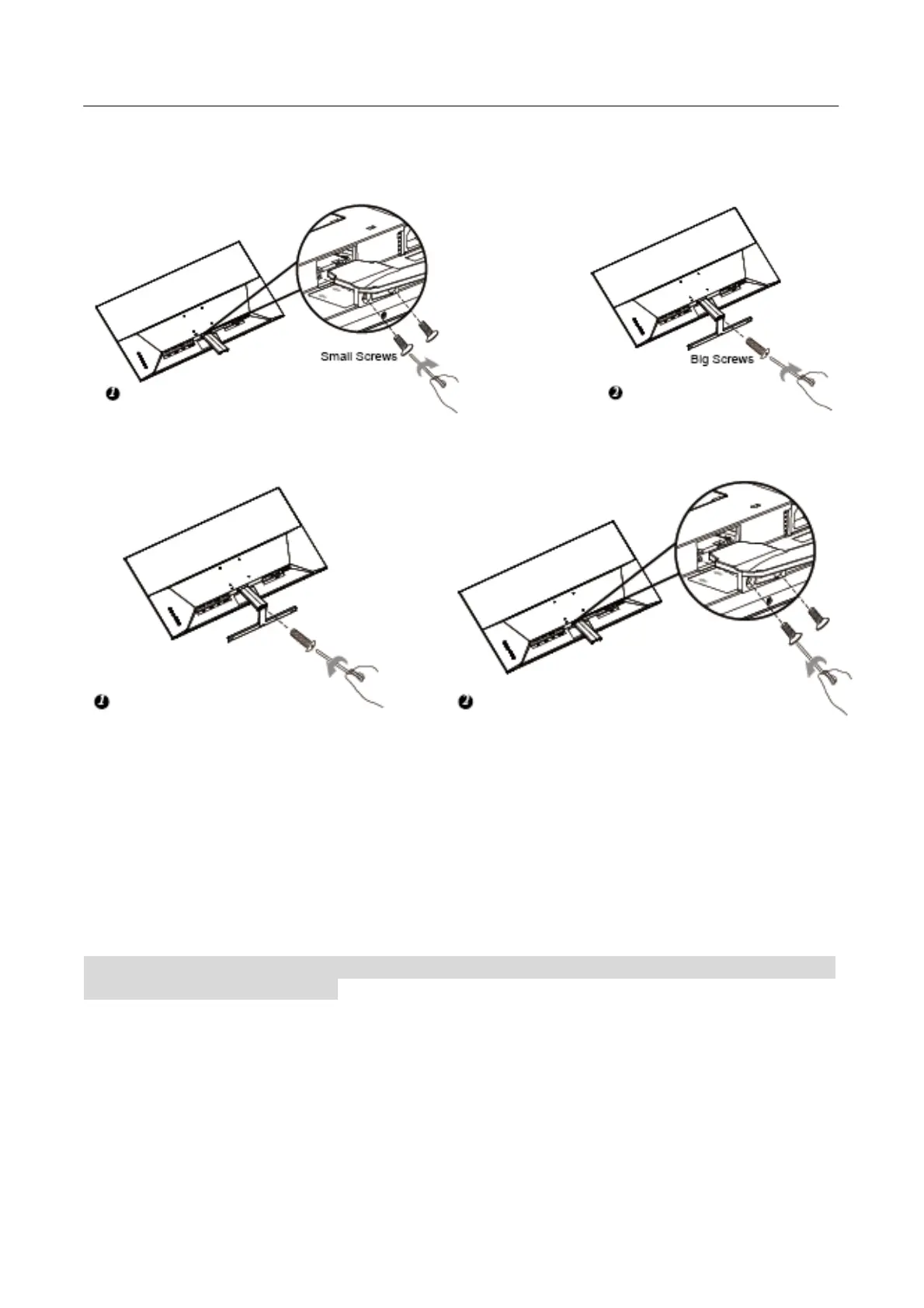
INSTALL
REMOVE
Figure.1. Installing and Removing the Base
INSTALLATION:
1. Align the Arm with the opening in the moniter,Install the Arm on the moniter with 2 screws.
2. Align the Arm with the opening in the base,Install the baseon the Arm with 1 screw.
REMOVAL:
1. Remove 1 screw so that bracket base can be removed.
2. Remove the 2 screws and gently pull the bracket base off the display until they disengage.
Warm prompt: Place the Monitor face down on a soft and flat surface (blanket, foam, cloth, etc) to
Monitor while install and remove.
POWER
POWER SOURCE:
1. Make sure that the power cord is the correct type required in your area.
2. This LCD monitor has an Internal universal power supply that allows operation in either
100/120V AC or 220/240V AC voltage area (No user adjustment is required.)
3. Connect the AC-power cord one end to your LCD monitor’s AC-input socket, the other end to
wall-outlet.
8






 To Next Page