The heating modes
Page EN-23
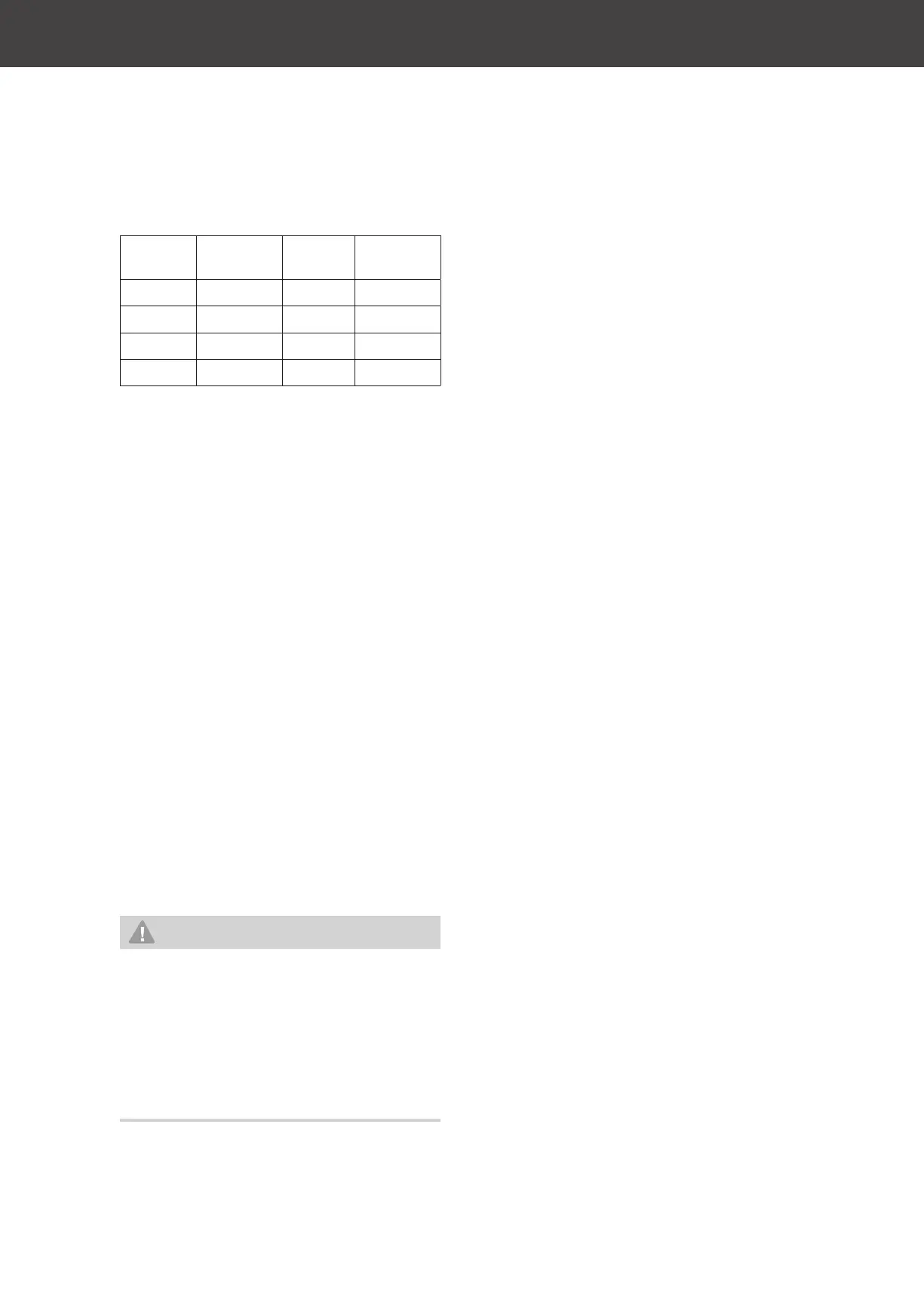
Display
indicator
Micro-
wave
Grill Con-
vection
C-1
■ ■
C-2
■ ■
C-3
■ ■
C-4
■ ■ ■
1. Select the “Combi” function using the
“+30s” control dial (11).
On the display (7), the
indicator will
illuminate and the
C-1
indicator will ap-
pear.
2. Set the desired combi function using the
“Confirm/Start” control dial (14).
3. Press the “Confirm/Start” control dial (14)
to confirm the setting.
The desired combi function as well as the
0
M and
00
S indicators are now shown on
the display (7).
4. Set the desired cooking time using the
“Confirm/Start” control dial (14).
5. Press the “Confirm/Start” control dial (14)
to confirm the setting.
The cooking process will start.
During operation, the
indicator will
flash and the countdown for the cooking
time will be shown.
Defrosting
WARNING
Health hazard!
Defrost water may contain hazardous
germs.
■ Avoid any physical contact.
■ Pour away the defrost water and do
not use it for anything else.
■ Clean used crockery thoroughly.
Before getting started
• Ideally, use food which has been frozen at
–18 °C in portions as thin as possible.
• Remove all packaging and weigh the dish.
The weight is required to ensure the cor-
rect settings.
• Remove the packaging.
• Place the food in an appropriately large
container, which can then collect the de-
frost water.
• Do not cover the food.
–
d1
: Defrosting by weight
–
d2
: Defrosting by time
Defrosting by weight
1. Select the “Defrost” function using the
“+30s” control dial (11).
On the display (7), the
indicator will
illuminate and the
d1
indicator will appear.
2. Press the “Confirm/Start” control dial (14)
to confirm the setting.
The
d1
indicator and the
000
g indicator
are now shown on the display (7).
3. Set the desired weight using the “Confirm/
Start” control dial (14).
You can select a weight between 100 g and
1800 g.
4. Press the “Confirm/Start” control dial (14)
to confirm the setting.
The defrosting process will start.
During operation, the
indicator will
flash and the countdown for the defrosting
time will be shown.
Defrosting by time
1. Select the “Defrost” function using the
“+30s” control dial (11).
On the display (7), the
indicator will
illuminate and the
d1
indicator will appear.
2. Select the
d2
function using the “Confirm/
Start” control dial (14).
3. Press the “Confirm/Start” control dial (14)
to confirm the setting.
The
d2
indicator and
0
M and
00
S indi-
cators are now shown on the display (7).


 To Next Page