Color Monitor
5
Controls
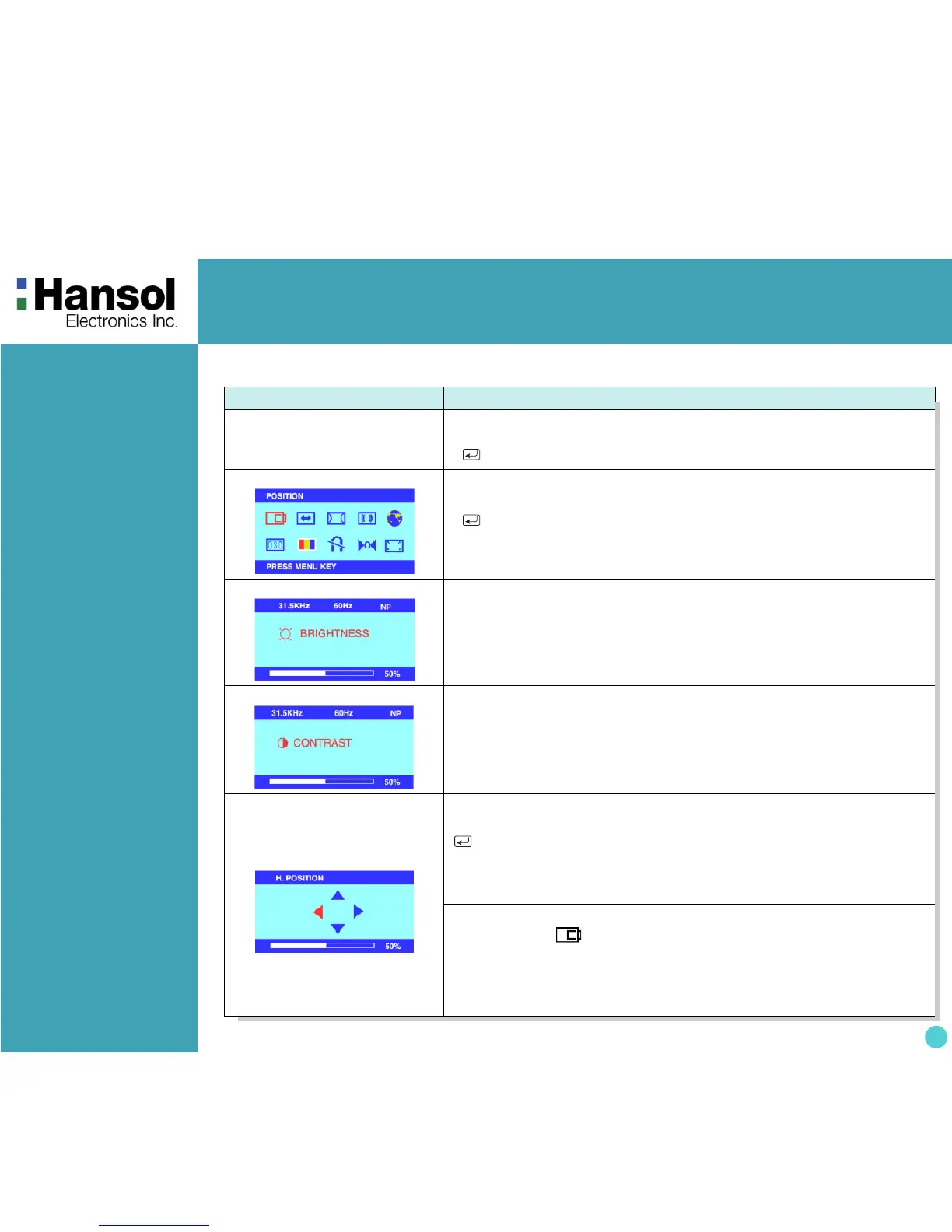
OSD MENU CONTROL
1. NO OSD
•
- Proceeds to NO.3
• + Proceeds to NO.4
•
No meaning
2. MAIN MENU
•
- + Moves to function to choose.
•
Exit the OSD controls.
• MENU : Proceed to the selected menu.
3. BRIGHTNESS
•
- Proceed to the Brightness menu.
•
- + Increases or decrease the Brightness.
4. CONTRAST
• + Proceed to the Contrast menu.
•
- + Increases or decrease the Contrast
5. H/V-POSITION
position and size Menu control guide
: exit to the main menu.
- / + : Refer to - / +
MENU :Toggle Horizontal and Vertical directly.
• After choosing , push MENU button.
• MENU : Push this button again & again to change the H/V-position.
•
- : Moves the image left or down.
• + : Moves the image right or up.
- OSD Menu



 To Next Page