6
12-CHANNEL
MIXER
L1202FX Owner's Manual
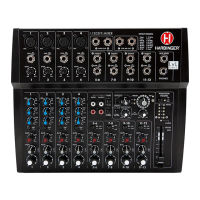
WHAT'S ON THE FRONT PANEL
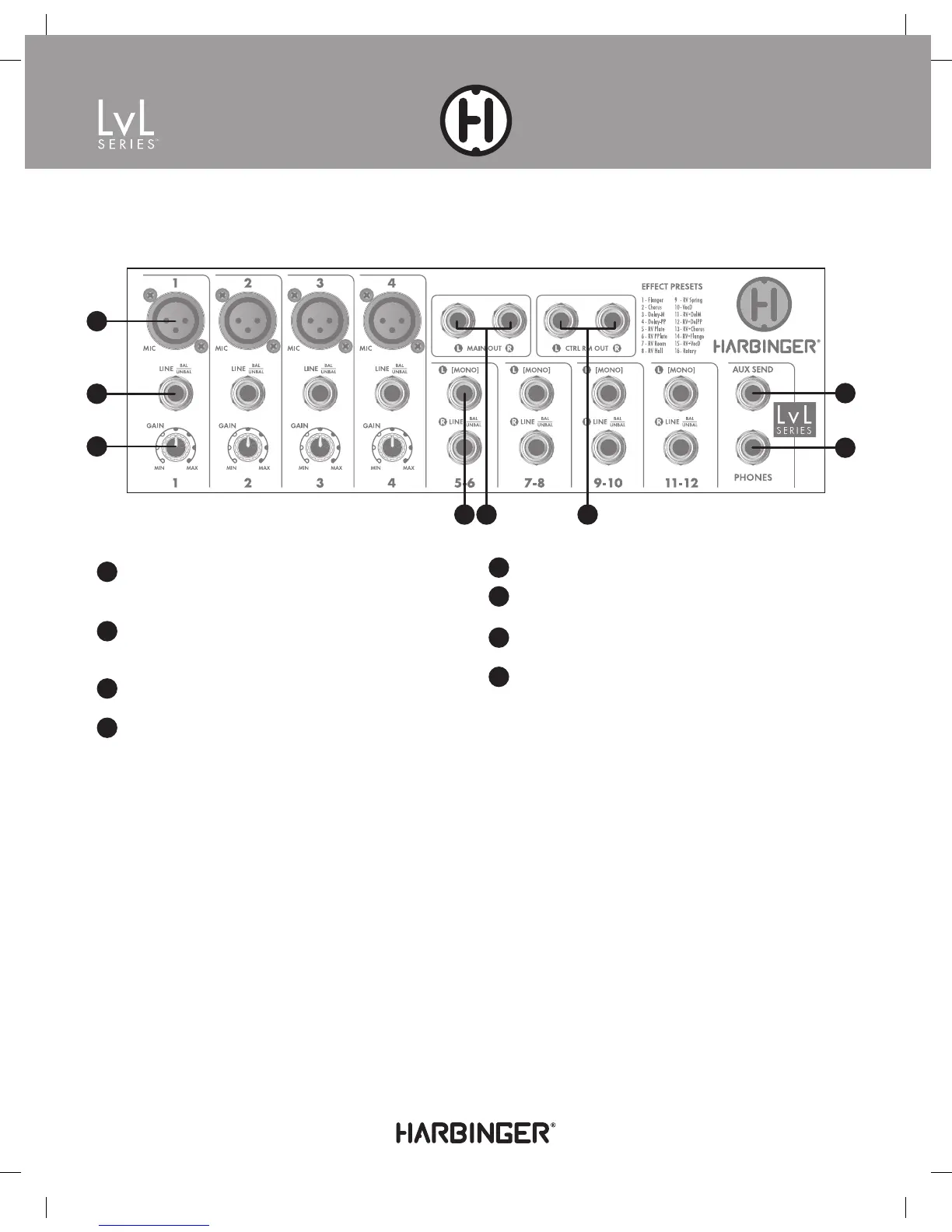
INPUT/OUTPUT JACKS:
1
Mic Input: XLR connector for a microphone-level signal. This
input also sends +48V phantom power to a microphone when
Phantom Power is switched on.
2
Line Input: A ¼" input that accepts a line-level signal.
Either a balanced (TRS) or unbalanced (TS) cable can be
plugged in here.
3
Gain Control: Controls the input gain for the selected channel,
from either the mic or line input.
4
Left/Mono Line Input: When this input is used and not the
input below, it is sent to both the left and right outputs of the
stereo channel. If L and R are both used, a stereo signal is sent
to the Main Out.
5
Main Out: Outputs controlled by the Main Mix fader.
6
Control Room Out: Outputs controlled by the Control Room/
Phones knob.
7
Aux Send: Output can be connected to a stage monitor or
effects processor
8
Phones Out: Stereo output for driving a pair of headphones.
The output level is controlled by the Control Room/
Phones knob.
1
2
3
4 5 6
7
8
10168 Harbinger Lvl L1202FX Manual.indd 6 7/8/14 3:10 PM


 To Next Page