V2300 SERIES OWNER’S MANUAL
6
V2318S QUICK START GUIDE
SETTING UP / HELPFUL TIPS
• Position the VARI speaker in the desired location, and ensure the speaker
is stable.
• Make sure the Power Switch is off.
• Make certain Level knob is turned down.
MAKING THE CONNECTIONS
• Plug connections to Input 1 and 2 from Outputs of signal source.
POWERING UP
• Turn on the power to any devices plugged into Input 1 or Input 2.
• Power ON the speaker.
• Slowly turn the Level knob to 12 o’clock.
• Slowly turn up the source volume to the desired level.
SIGNAL/LIMIT
• The SIGNAL/LIMIT LED will light up WHITE when the speaker is receiving
a signal. If the limiter is triggered, the LED will turn RED and the MASTER
VOLUME should be turned down.
LINKING MULTIPLE SUBWOOFERS
• If linking multiple subwoofers, plug the Line Output connection of the first
subwoofer to the INPUT connection of second subwoofer, and continue
the daisy chain to the next speaker.
• Switch Output Crossover Off.
• Turn the Power On in the order of the audio signal to prevent unwanted
“pops”. First On / Last Off.
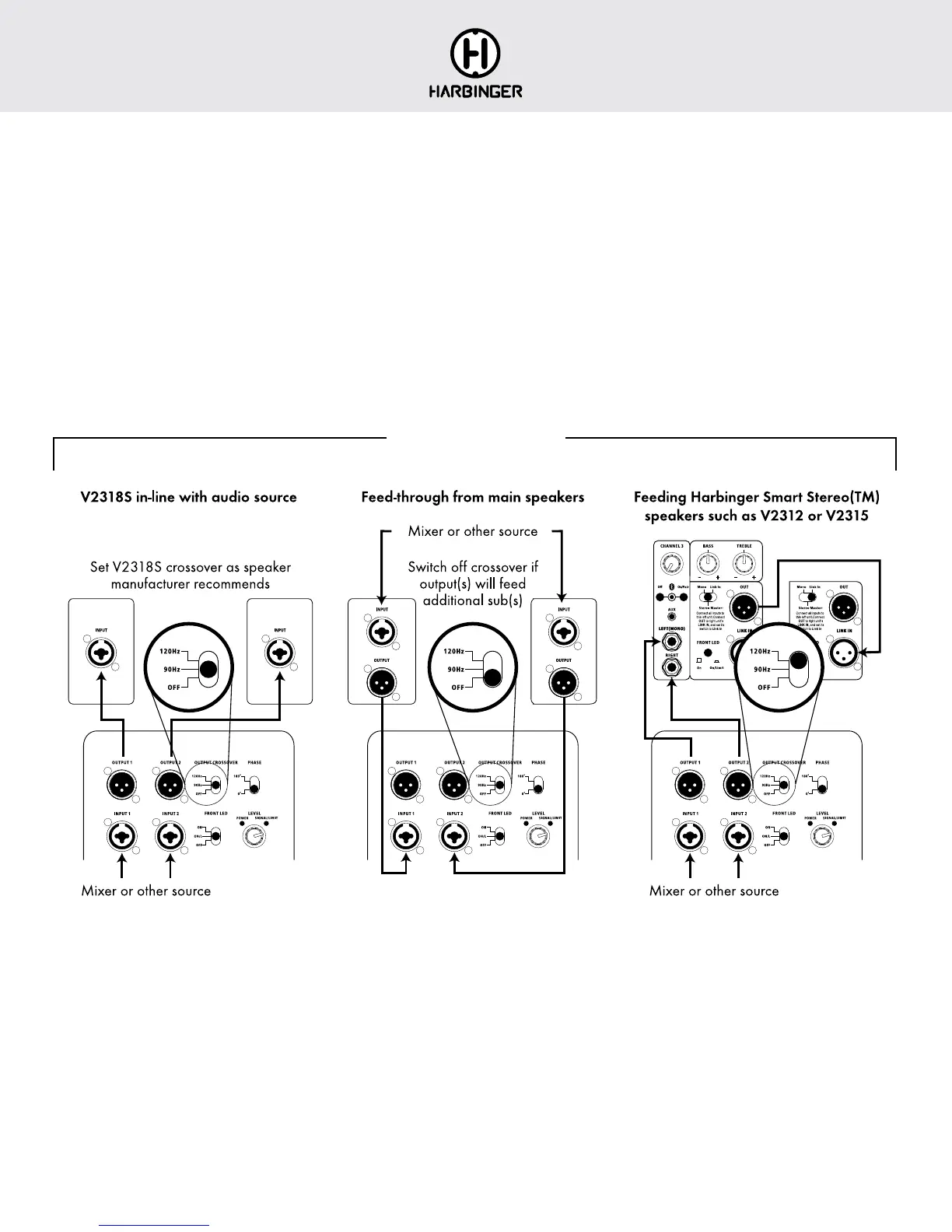
HOOK UP DIAGRAMS
SMART STEREO
™
WITH VARI V2318S
To operate a pair of VARI V2312 or V2315 speakers in Smart Stereo™
along with VARI V2318S sub(s):
• Connect your main stereo audio source directly to VARI V2318S inputs
• Set V2318S OUTPUT crossover to 120Hz
• Connect VARI V2318S OUTPUT 1 to Channel 3 LEFT(MONO) input on
first V2312 or V2315 (this is the speaker you have set up as the Stereo
Master unit)
• Connect VARI 2318S OUTPUT 2 to Channel 3 RIGHT input on that
same speaker
• Note that volume for the V2318S is set from its own knob, it is not affected
by the Stereo Master unit’s volume
• Note that you can use the other inputs on the Stereo Master unit, but they
will not be routed through the sub







 To Next Page