EasyManua.ls Logo

Harbor Freight Tools 63759 - User Manual

Harbor Freight Tools 63759
12 pages
Print Icon
To Next Page IconTo Next Page
Loading...
Visit our website at: http://www.harborfreight.com
Email our technical support at: productsupport@harborfreight.com
63759
7 FUNCTION
DIGITAL MULTIMETER
Owners Manual & Safety Instructions
Save This Manual Keep this manual for the safety warnings and precautions, assembly,
operating, inspection, maintenance and cleaning procedures. Write the product’s serial number in the
back of the manual near the assembly diagram (or month and year of purchase if product has no number).
Keep this manual and the receipt in a safe and dry place for future reference. 23d
When unpacking, make sure that the product is intact
and undamaged. If any parts are missing or broken,
please call 1-888-866-5797 as soon as possible.
Copyright
©
2020 by Harbor Freight Tools
®
. All rights reserved.
No portion of this manual or any artwork contained herein may be reproduced in
any shape or form without the express written consent of Harbor Freight Tools.
Diagrams within this manual may not be drawn proportionally. Due to continuing
improvements, actual product may differ slightly from the product described herein.
Tools required for assembly and service may not be included.
Read this material before using this product.
Failure to do so can result in serious injury.
SAVE THIS MANUAL.
Question and Answer IconNeed help?

Do you have a question about the Harbor Freight Tools 63759 and is the answer not in the manual?

Summary

Warning Symbols and Definitions

Hazard Definitions

Explains hazard symbols (DANGER, WARNING, CAUTION, NOTICE) and their meaning to prevent injury.

Important Safety Information

Safety Warnings and Precautions

Lists essential safety warnings and instructions for safe multimeter operation.

Specifications

Setup - Before Use

Functions Overview

Identifies and describes the various functions and controls of the multimeter.

Operating Instructions

AC Voltage Measurement

Details the procedure for measuring AC voltage using the multimeter.

DC Voltage Measurement

Details the procedure for measuring DC voltage using the multimeter.

DC Current Measurement

Explains how to measure DC current, including safety and connection steps.

Resistance Measurement

Provides instructions for measuring resistance, including safety precautions and probe placement.

Transistor (hFE) Measurement

Outlines the steps to test transistors using the multimeter's hFE function.

Diode Measurement

Details the process for testing diodes, including voltage drop measurement.

Battery Test

Describes how to test the charge level of small batteries using the multimeter.

Maintenance and Servicing

Cleaning, Maintenance, and Lubrication

Covers general cleaning and maintenance procedures for the multimeter.

Battery Replacement

Provides instructions on how to replace the multimeter's battery when needed.

Limited 90 Day Warranty

Summary

Warning Symbols and Definitions

Hazard Definitions

Explains hazard symbols (DANGER, WARNING, CAUTION, NOTICE) and their meaning to prevent injury.

Important Safety Information

Safety Warnings and Precautions

Lists essential safety warnings and instructions for safe multimeter operation.

Specifications

Setup - Before Use

Functions Overview

Identifies and describes the various functions and controls of the multimeter.

Operating Instructions

AC Voltage Measurement

Details the procedure for measuring AC voltage using the multimeter.

DC Voltage Measurement

Details the procedure for measuring DC voltage using the multimeter.

DC Current Measurement

Explains how to measure DC current, including safety and connection steps.

Resistance Measurement

Provides instructions for measuring resistance, including safety precautions and probe placement.

Transistor (hFE) Measurement

Outlines the steps to test transistors using the multimeter's hFE function.

Diode Measurement

Details the process for testing diodes, including voltage drop measurement.

Battery Test

Describes how to test the charge level of small batteries using the multimeter.

Maintenance and Servicing

Cleaning, Maintenance, and Lubrication

Covers general cleaning and maintenance procedures for the multimeter.

Battery Replacement

Provides instructions on how to replace the multimeter's battery when needed.

Limited 90 Day Warranty

Overview

This document provides an owner's manual and safety instructions for a 7-Function Digital Multimeter. The manual emphasizes the importance of reading all safety warnings and instructions before setup or use to prevent electric shock, fire, serious injury, or damage to the device. It advises users to save the manual and receipt for future reference.

Function Description

The 7-Function Digital Multimeter is a versatile tool designed for various electrical measurements. Its primary functions include:

  • DC Voltage Measurement: Allows users to measure direct current voltage in circuits.
  • AC Voltage Measurement: Enables the measurement of alternating current voltage.
  • DC Current Measurement: Facilitates the measurement of direct current amperage.
  • Resistance Measurement: Used to determine the resistance of a circuit in Ohms.
  • Transistor (hFE) Measurement: Tests transistors to ensure proper function by measuring their current gain (hFE value).
  • Diode Measurement: Measures the voltage drop across diodes.
  • Battery Test: Checks the charge level of small 9V or 1.5V batteries.

Usage Features

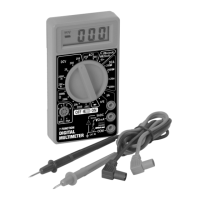
The multimeter features a Range Selector Switch that allows users to select the desired measurement function and range. It includes dedicated jacks for connecting test leads: a COM Jack for the black lead, a VΩMA Jack for the red lead (used for voltage, resistance, and low current measurements), and a 5ADC Jack for the red lead when measuring higher DC currents. The device also has a Transistor Testing Socket with specific holes for NPN and PNP transistors, arranged according to EBC (Emitter, Base, Collector) sequence. An On/Off Switch controls the power to the multimeter.

General Safety and Operation Guidelines:

  • Electrical Shock Prevention: Users are repeatedly warned about the risk of electrical shock and instructed to never touch exposed conductors of electricity. Caution is advised when working near voltages above 30 VAC rms, 42 VAC peak, or 60 VDC, and above 60 VDC for DC measurements.
  • Pre-Use Inspection: Before each use, the multimeter must be inspected for damage, including the insulation protecting connectors and the test leads for exposed metal, damaged insulation, and continuity. Damaged test leads must be replaced immediately.
  • Meter Condition: The multimeter should not be used if test leads are damaged, dirty, or have residue, if the battery is low, near explosive gases or fumes, or if any abnormal operation is detected. If in doubt, the meter should be serviced.
  • Proper Connection: When measuring current, the meter must be connected in series with the circuit, with the common (COM) test lead connected first and disconnected last. For resistance, diodes, or continuity tests, all power to the circuit must be disconnected, and high-voltage capacitors discharged.
  • Probe Handling: Users must hold the probes with fingers behind the guards to prevent accidental contact with live circuits.
  • Work Area Conditions: Testing voltages in damp or wet locations, or exposing the meter to rain, is prohibited. The work area should be clean and well lit.
  • Voltage and Current Limits: The manual specifies maximum voltage limits (250 volts AC, 20 volts DC) and current limits (5A) that should not be exceeded to prevent damage to the meter or personal injury.
  • Range Selection: When using manual range mode, users are advised to start with the highest range if the voltage or amperage is unknown. For resistance measurements, starting with the lowest range is recommended if the resistance is unknown.
  • Switching Modes: Do not switch between testing modes while the multimeter is connected to a circuit.
  • Battery Test Caution: The battery test setting is only for small 9V or 1.5V batteries. It should never be used to test automotive or lead-acid batteries due to the risk of high current causing damage to the meter and/or severe personal injury.
  • Measurement Duration: For DC current measurements, the device should be used for a maximum of 30 seconds, with a 15-minute cool-down period between measurements.

Maintenance Features

  • Cleaning: The unit should be wiped with a dry, lint-free cloth. Solvents or abrasives should not be used.
  • Storage: When not in use, the multimeter should be stored in a dry location to minimize moisture exposure. It should also be locked up and kept out of reach of children.
  • Battery Replacement: The manual provides instructions for replacing the 9V battery when the low battery indicator appears on the display. This involves removing the test leads, turning the unit over, removing screws, carefully removing the back cover, replacing the battery, and then reassembling the unit.
  • Repairs: Other than battery replacement, there are no user-replaceable parts. All repairs should be performed by a qualified technician.
  • Calibration: The multimeter should be calibrated by a qualified technician annually to maintain accurate results.

The manual also includes general warnings about personal alertness, avoiding operation under the influence of alcohol or drugs, and the potential for electromagnetic fields to interfere with pacemakers. It emphasizes that common sense and caution are crucial factors for safe operation.

Harbor Freight Tools 63759 Specifications

General IconGeneral
CategoryMultimeter
Model63759
BrandHarbor Freight Tools
Diode TestYes
Continuity TestYes
Battery Type9V
Display TypeLCD
DC Voltage200mV, 20V, 200V
AC Voltage200V
DC Current200µA, 2000µA, 20mA, 200mA
Resistance200Ω, 2000Ω, 20kΩ, 200kΩ
Battery Test1.5V, 9V
Safety RatingCAT III

Related product manuals