EasyManua.ls Logo

Harman Kardon HKTS 7 - User Manual

Harman Kardon HKTS 7
16 pages
Print Icon
To Next Page IconTo Next Page
Loading...
ENGLISH
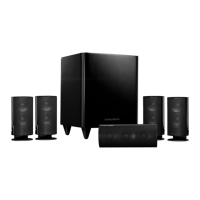
HKTS 7 Home Theater Speaker System
OWNER’S MANUAL

Other manuals for Harman Kardon HKTS 7

Questions and Answers

  • C
    Clarence WatkinsJul 27, 2025
    What to do if one Harman Kardon Subwoofer speaker has no sound?
    • K
      Kristopher NortonJul 27, 2025
      If there is no sound coming from one of your Harman Kardon Subwoofer speakers, you can try the following: * Check the “Balance” control on your receiver/amplifier. * Ensure all wires and connections between the receiver/amplifier and speakers are properly connected. * Make sure that none of the speaker wires are frayed, cut, or punctured, and that no wires are touching each other. * In Dolby Digital or DTS mode, ensure that the receiver/processor is configured so that the speaker in question is enabled. * Turn off all electronics and switch the problematic speaker with a working one. If the problem stays in the same place, the issue is likely with your receiver or amplifier. If the problem follows the speaker, further assistance may be needed.
  • C
    Courtney GonzalesAug 1, 2025
    How do I fix no sound from the center speaker on my Harman Kardon Subwoofer?
    • S
      samantha46Aug 1, 2025
      If you are not getting any sound from the center speaker of your Harman Kardon Subwoofer, here are some things to check: * Ensure all wires and connections between the receiver/amplifier and the speaker are properly connected. * Make sure none of the speaker wires are frayed, cut, punctured, or touching other wires. * If your receiver/processor is set in Dolby Pro Logic mode, ensure the center speaker is not in phantom mode. * If your receiver/processor is set in Dolby Digital or DTS mode, ensure the receiver/processor is configured so that the center speaker is enabled.
  • J
    John JamesAug 7, 2025
    How to troubleshoot no sound from Harman Kardon Subwoofer speakers?
    • C
      carmenwadeAug 7, 2025
      If you're not getting any sound from your Harman Kardon Subwoofer speakers, there are several things to check: * Ensure that your receiver/amplifier is turned on and a source is actively playing. * Verify that the powered subwoofer is properly plugged into a power outlet and that its Master Power Switch is in the “•” position. * Inspect all wires and connections between your receiver/amplifier and the speakers to confirm they are securely connected. * Check that none of the speaker wires are frayed, cut, punctured, or touching other wires. * Review the correct operation of your receiver/amplifier.
  • R
    Ronald HarmonNov 12, 2025
    Why is there low bass output from my Harman Kardon Subwoofer?
    • A
      andrew85Nov 12, 2025
      If you experience low or no bass output from your Harman Kardon Subwoofer, consider the following: * Ensure the SUB or Line-Level Inputs of the SUB-TS7 subwoofer and SUB or LFE output of your receiver or amplifier are correctly connected with an RCA-type interconnect cable. * If using the SUB-TS7’s Speaker-Level Inputs, verify all speaker cables are connected properly, none are frayed, cut, punctured, or touching, and that correct polarity is maintained (positive to positive, negative to negative). * Confirm the subwoofer is plugged into a working electrical outlet and its Master Power Switch is set to the “•” position. * Check the speaker setup (bass management) settings on your A/V receiver or processor to ensure front, center, and surround speakers are configured for 'Small,' a...
  • L
    Leslie WilsonNov 17, 2025
    Why are my Harman Kardon Subwoofer surround speakers not working?
    • E
      Elizabeth FrenchNov 18, 2025
      If there is no sound coming from the surround speakers of your Harman Kardon Subwoofer, try these troubleshooting steps: * Check all wires and connections between the receiver/amplifier and speakers to ensure they are properly connected. * Make sure none of the speaker wires are frayed, cut, punctured, or touching other wires. * Review the proper operation of your receiver/processor and its surround sound features. * Confirm that the movie or TV show you are watching is recorded in a surround sound mode. If not, check if your receiver/processor has other surround modes you can use. * In Dolby Digital or DTS mode, ensure your receiver/processor is configured so that the surround speakers are enabled. * Review the operation of your DVD player and the DVD jacket to ensure the DVD...

Summary

Introduction

Description and Features

Details the components and key features of the HKTS 7 home theater speaker system.

Rear Panel Connections

Subwoofer Controls

Explains the function of the Level, Filter, Trigger, and Phase controls on the subwoofer's rear panel.

Input;Output Terminals

Details the line-level and speaker-level input/output connections on the subwoofer's rear panel.

Power Connections

Covers the master power switch and AC power cord connection for the subwoofer.

Speaker Placement

Color-Coding System for Setup

Explains the color-coding system used for connecting satellite and surround speakers for easy setup.

Satellite and Surround Speaker Placement

Provides guidance on optimal placement of satellite and surround speakers for best audio performance.

Center Channel and Subwoofer Placement

Offers recommendations for positioning the center channel speaker and subwoofer for optimal sound.

Mounting Options

Wall-Mounting for Satellites

Instructions for securely mounting the satellite speakers to a wall using provided brackets.

Wall-Mounting for the Center Speaker

Guidance on wall-mounting the center channel speaker using its dedicated bracket.

Speaker Connections

Speaker-Level Connection Guide

Details how to connect speakers using speaker-level inputs and outputs, emphasizing polarity.

Dolby Digital;DTS Connection

Instructions for connecting the system to Dolby Digital or DTS sources via line-level inputs.

Dolby Pro Logic Line Level Connection

Connects system using line-level outputs for Dolby Pro Logic sources without a dedicated subwoofer output.

Dolby Pro Logic Speaker Level Connection

Connects system using speaker-level inputs for Dolby Pro Logic sources without line-level subwoofer output.

Operation

Volume Adjustment

How to adjust the subwoofer's volume level using the dedicated control knob.

Bass Adjustments (Phase & Filter)

Explains the use of Phase and High-Cut Filter switches for optimizing bass response.

Troubleshooting

Common Troubleshooting Scenarios

Troubleshooting guide covering no sound issues, low volume, and bass output problems.

Specifications

HKTS 7 System and SAT-TS7 Satellites

Technical specifications for the overall HKTS 7 system and its satellite speakers.

CEN-TS7 Center and SUB-TS7 Subwoofer

Technical specifications for the center channel speaker and the powered subwoofer.

Harman Kardon HKTS 7 Specifications

General IconGeneral
BrandHarman Kardon
ModelHKTS 7
CategoryHome Cinema speakers
LanguageEnglish

Related product manuals