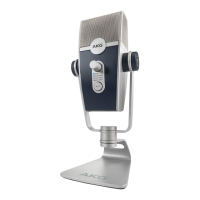
The AKG Ara is a professional dual-pattern USB condenser microphone designed for easy setup and operation. It comes with a Quick Start Guide, a USB C to USB A cable, a 3/8" to 5/8" microphone stand adapter, regulatory documents, and an Ableton Live 11 Lite registration card.
System Requirements:
- Windows: 8 and higher
- Mac OS: 10.7.X and higher
- Android: 9.X and higher (with an OTG compatible device)
- iOS: 10.X and higher (with a camera kit and external power source)
Connections and Setup:
Connecting the AKG Ara is straightforward:
- Connect the USB C end of the included cable to the microphone's USB C port.
- Connect the USB A end of the cable to a USB port on your computer, tablet, or phone.
- Note for Android: Android mobile devices may require an OTG adapter cable in conjunction with the included USB cable.
- Note for iOS: iOS mobile devices may require an Apple Camera kit to be used with the included USB cable.
- Stability Tip: For optimal stability, ensure your laptop is plugged into a stable power source when using the Ara microphone.
- Connect wired headphones to the 3.5mm stereo headphone jack on the microphone.
- Adjust the headphone volume to a comfortable listening level using the dedicated control on the microphone.
- Adjust the recording levels within your computer, tablet, or phone's audio settings.
Controls and Features:
The AKG Ara features several intuitive controls:
- Mic Capture Mode Knob (A): This knob allows you to select between the two distinct audio capture modes: Front and Front & Back.
- Mic Mute LED Indicator (B): This LED indicates the mute status of the microphone.
- Headphone Volume Control (C): This control adjusts the volume of the headphones connected to the microphone.
- USB Port (D): The USB C port for connecting the microphone to your device.
- 3.5mm Stereo Headphone Jack (E): For connecting wired headphones for monitoring.
Integrated Stand and Mounting Options:
The Ara comes with an integrated desktop stand. For more versatile mounting, this stand can be removed:
- Unscrew the base stand from the microphone.
- Screw the microphone assembly onto a common mic stand or boom arm.
Helpful Tips for Microphone Capture Modes:
The AKG Ara utilizes a Dual-Capsule array, offering two user-selectable audio capture modes to suit various applications.
-
A. FRONT Mode:
- Description: In Front mode, the microphone primarily captures audio sources directly from the front, while significantly reducing sound from the back and sides.
- Ideal Use Cases: This is the most common capture mode for recording and is highly effective for:
- Voiceovers
- Podcasters
- Vloggers
- Gamers
- Vocalists
- Acoustic instruments
- Web conferencing
-
B. FRONT & BACK Mode:
- Description: In Front & Back mode, the Ara captures sound evenly from all sides of the microphone.
- Ideal Use Cases: This capture mode is particularly well-suited for situations requiring omnidirectional sound pickup, such as:
- Recording group interviews
- Podcasts with multiple participants around the microphone
- Video production where ambient sound is desired
- Recording groups of musicians
Product Specifications:
- Maximum Operation Frequency: 12MHz
- Operating Temperature Range: -10° C to +40° C
- Input Voltage: USB 5volt, 40mA
- AKG ACOUSTICS, U.S.: 8500 BALBOA BOULEVARD, NORTHRIDGE, CA 91329, U.S.A.
- © 2021 HARMAN International Industries, Incorporated. All rights reserved.
- AKG is a trademark of AKG Acoustics GmbH, registered in the United States and/or other countries.
- Features, specifications, and appearance are subject to change without notice.
- Other trademarks and trade names are those of their respective owners.
- Website: www.akg.com
- Model: Ara C22
- Manufacturer and country of origin: Harman International, China
- Manufacture date: July 2021
- Revised: 7/27/2021

 Need help?
 General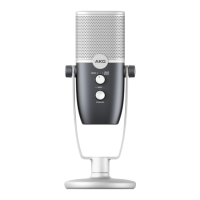

 To Next Page