EasyManua.ls Logo

Harman JBL AURA WALL MOUNT STEREO - User Manual

Harman JBL AURA  WALL MOUNT STEREO
24 pages
Print Icon
To Next Page IconTo Next Page
Loading...
AURA WALL MOUNT STEREO
OWNER’S MANUAL
Question and Answer IconNeed help?

Do you have a question about the Harman JBL AURA WALL MOUNT STEREO and is the answer not in the manual?

Summary

IMPORTANT SAFETY INSTRUCTIONS

Electric Shock & Cover Warning

Warns against removing the cover to prevent electric shock and hazards.

Cord Safety & Adult Supervision

Advises on managing the long cord to prevent injury and requires adult supervision.

FCC Notice & Interference

Details FCC compliance and steps to mitigate radio frequency interference.

General Operating Precautions

Lists essential safety and operating instructions to read before using the unit.

Cleaning, Ventilation, and Heat Safety

Guidelines for cleaning, proper ventilation, and avoiding heat sources for safe operation.

Plug, Cord, and Accessory Safety

Instructions regarding plugs, power cord protection, and use of specified accessories.

Lightning, Servicing, and Power Source

Procedures for lightning storms, periods of non-use, servicing, and power source identification.

Water Exposure and Moisture Warning

Warning against exposing the apparatus to rain, moisture, or liquids to prevent damage.

1 INTRODUCTION

Welcome and Product Overview

Welcomes the user and provides a brief description of the product's purpose.

2 WHATS IN THE BOX

Included Components List

Lists all the parts that should be included in the product packaging.

3 PRODUCT OVERVIEW

Controls and Features Identification

Identifies and labels the various controls and features on the unit's front panel.

Rear Panel Connectors

Details and labels the different input and output connectors on the rear panel.

4 SPEAKER;POWER WIRE SOCKET DIAGRAM

Wiring Color Code Guide

Provides a guide for correctly wiring speaker and power connections using color codes.

5 REMOTE CONTROL

Remote Control Button Functions

Identifies and describes the function of each button on the remote control.

Optional External Remote Sensor

Explains how to connect and use an optional external remote sensor.

REMOTE CONTROL BATTERY INSTALLATION

Battery Precautions and Handling

Provides important precautions for battery installation, type, and handling.

REMOTE CONTROL WORKING RANGE

Operating Range and Interference Factors

Details the working range and factors that can affect remote control operation.

6 MOUNTING

Wall Mounting Instructions

Provides step-by-step instructions for securely mounting the unit.

7 PLACEMENT

Ventilation and Heat Hazard Considerations

Advises on proper placement for ventilation to prevent potential heat hazards.

8 GENERAL OPERATION

Powering On;Off and Mode Selection

Instructions for powering the unit on/off and switching between input modes.

Playback Controls and Volume

Details playback operations, volume control, muting, and zone selection.

EQ Modes and AURA Ring Visualization

Explains how to select EQ modes and change AURA Ring visualization.

9 ADDING OPTIONAL EXTERNAL POWERED SUBWOOFER

Subwoofer Connection Diagram

Illustrates the connection of an external powered subwoofer to the unit.

Subwoofer Operation Notes

Provides notes on connecting and operating the subwoofer with ZONE "A".

10 FM OPERATION

FM Antenna Setup and Station Searching

Instructions for setting up the FM antenna and searching for radio stations.

FM Station Preset Storage and Recall

Guides on storing and recalling preset FM radio stations.

11 USB OPERATION

Connecting and Playing USB Devices

Instructions for connecting USB devices and playing audio content.

USB Port Charging Functionality

Notes that the USB port can also be utilized for charging external devices.

12 AUX 1 OPERATION

Connecting and Playing Audio via AUX 1

Details how to connect and play audio from external devices using the AUX 1 input.

13 AUX 2 OPERATION

Connecting and Playing Audio via AUX 2

Instructions for connecting and playing audio from external devices using the AUX 2 input.

14 OPTICAL IN OPERATION

Connecting and Playing Audio via Optical Input

Guides on connecting and playing audio using the optical input jack.

15 HDMI IN AND HDMI OUT

HDMI Connection for Video and Audio

Instructions for connecting HDMI devices for video and audio playback.

16 HDMI OUT (ARC) ONLY

ARC Connection for Audio Return Channel

Explains how to use the HDMI ARC feature for audio return functionality.

17 BLUETOOTH OPERATION

Pairing and Connecting Bluetooth Devices

Steps for pairing and connecting Bluetooth-compatible devices to the unit.

Bluetooth Playback Controls

Details playback controls and commands for Bluetooth audio streaming.

Pairing Additional Bluetooth Devices

Instructions on how to disconnect and pair new Bluetooth devices.

18 miZONE OPERATION

Wireless Audio to External Zones

How to play Bluetooth audio to external zones while watching TV.

19 LEARN OPERATION

Programming Remote Control Functions

Guides on controlling the AURA with another remote control.

20 RESTORE FACTORY SETTINGS

Resetting the Unit to Default Settings

Instructions for restoring the AURA to its factory default settings.

21 TROUBLESHOOTING

System and Sound Issues

Solutions for system power, response, and sound playback problems.

Bluetooth Connectivity and Quality

Troubleshooting for Bluetooth connection, audio quality, and intermittent issues.

FM and Remote Control Problems

Solutions for FM reception issues and remote control non-responsiveness.

22 PRODUCT SPECIFICATIONS

General, USB, Wireless, and FM Specs

Lists overall, USB, wireless, and FM specifications of the unit.

Unit Dimensions

Provides the physical dimensions of the AURA unit.

Summary

IMPORTANT SAFETY INSTRUCTIONS

Electric Shock & Cover Warning

Warns against removing the cover to prevent electric shock and hazards.

Cord Safety & Adult Supervision

Advises on managing the long cord to prevent injury and requires adult supervision.

FCC Notice & Interference

Details FCC compliance and steps to mitigate radio frequency interference.

General Operating Precautions

Lists essential safety and operating instructions to read before using the unit.

Cleaning, Ventilation, and Heat Safety

Guidelines for cleaning, proper ventilation, and avoiding heat sources for safe operation.

Plug, Cord, and Accessory Safety

Instructions regarding plugs, power cord protection, and use of specified accessories.

Lightning, Servicing, and Power Source

Procedures for lightning storms, periods of non-use, servicing, and power source identification.

Water Exposure and Moisture Warning

Warning against exposing the apparatus to rain, moisture, or liquids to prevent damage.

1 INTRODUCTION

Welcome and Product Overview

Welcomes the user and provides a brief description of the product's purpose.

2 WHATS IN THE BOX

Included Components List

Lists all the parts that should be included in the product packaging.

3 PRODUCT OVERVIEW

Controls and Features Identification

Identifies and labels the various controls and features on the unit's front panel.

Rear Panel Connectors

Details and labels the different input and output connectors on the rear panel.

4 SPEAKER;POWER WIRE SOCKET DIAGRAM

Wiring Color Code Guide

Provides a guide for correctly wiring speaker and power connections using color codes.

5 REMOTE CONTROL

Remote Control Button Functions

Identifies and describes the function of each button on the remote control.

Optional External Remote Sensor

Explains how to connect and use an optional external remote sensor.

REMOTE CONTROL BATTERY INSTALLATION

Battery Precautions and Handling

Provides important precautions for battery installation, type, and handling.

REMOTE CONTROL WORKING RANGE

Operating Range and Interference Factors

Details the working range and factors that can affect remote control operation.

6 MOUNTING

Wall Mounting Instructions

Provides step-by-step instructions for securely mounting the unit.

7 PLACEMENT

Ventilation and Heat Hazard Considerations

Advises on proper placement for ventilation to prevent potential heat hazards.

8 GENERAL OPERATION

Powering On;Off and Mode Selection

Instructions for powering the unit on/off and switching between input modes.

Playback Controls and Volume

Details playback operations, volume control, muting, and zone selection.

EQ Modes and AURA Ring Visualization

Explains how to select EQ modes and change AURA Ring visualization.

9 ADDING OPTIONAL EXTERNAL POWERED SUBWOOFER

Subwoofer Connection Diagram

Illustrates the connection of an external powered subwoofer to the unit.

Subwoofer Operation Notes

Provides notes on connecting and operating the subwoofer with ZONE "A".

10 FM OPERATION

FM Antenna Setup and Station Searching

Instructions for setting up the FM antenna and searching for radio stations.

FM Station Preset Storage and Recall

Guides on storing and recalling preset FM radio stations.

11 USB OPERATION

Connecting and Playing USB Devices

Instructions for connecting USB devices and playing audio content.

USB Port Charging Functionality

Notes that the USB port can also be utilized for charging external devices.

12 AUX 1 OPERATION

Connecting and Playing Audio via AUX 1

Details how to connect and play audio from external devices using the AUX 1 input.

13 AUX 2 OPERATION

Connecting and Playing Audio via AUX 2

Instructions for connecting and playing audio from external devices using the AUX 2 input.

14 OPTICAL IN OPERATION

Connecting and Playing Audio via Optical Input

Guides on connecting and playing audio using the optical input jack.

15 HDMI IN AND HDMI OUT

HDMI Connection for Video and Audio

Instructions for connecting HDMI devices for video and audio playback.

16 HDMI OUT (ARC) ONLY

ARC Connection for Audio Return Channel

Explains how to use the HDMI ARC feature for audio return functionality.

17 BLUETOOTH OPERATION

Pairing and Connecting Bluetooth Devices

Steps for pairing and connecting Bluetooth-compatible devices to the unit.

Bluetooth Playback Controls

Details playback controls and commands for Bluetooth audio streaming.

Pairing Additional Bluetooth Devices

Instructions on how to disconnect and pair new Bluetooth devices.

18 miZONE OPERATION

Wireless Audio to External Zones

How to play Bluetooth audio to external zones while watching TV.

19 LEARN OPERATION

Programming Remote Control Functions

Guides on controlling the AURA with another remote control.

20 RESTORE FACTORY SETTINGS

Resetting the Unit to Default Settings

Instructions for restoring the AURA to its factory default settings.

21 TROUBLESHOOTING

System and Sound Issues

Solutions for system power, response, and sound playback problems.

Bluetooth Connectivity and Quality

Troubleshooting for Bluetooth connection, audio quality, and intermittent issues.

FM and Remote Control Problems

Solutions for FM reception issues and remote control non-responsiveness.

22 PRODUCT SPECIFICATIONS

General, USB, Wireless, and FM Specs

Lists overall, USB, wireless, and FM specifications of the unit.

Unit Dimensions

Provides the physical dimensions of the AURA unit.

Overview

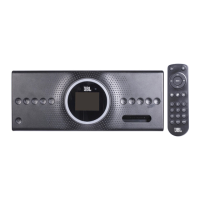
The JBL Aura Wall Mount Stereo is a comprehensive audio system designed to integrate into an entertainment setup, offering a variety of input options and multi-zone audio capabilities. It is designed for wall mounting and comes with a remote control for convenient operation.

Function Description:

The JBL Aura Wall Mount Stereo serves as a central hub for audio playback, supporting multiple sources including FM radio, USB, auxiliary inputs (AUX 1 and AUX 2), optical input, HDMI (both IN and ARC OUT), and Bluetooth connectivity. It features a built-in amplifier capable of driving multiple speaker zones (A, B, and C) independently. The device also includes an AURA Ring with customizable light effects (Mood, Neutral, Pulse) and an equalizer with preset modes (Rock, Jazz, Pop, Classic). A unique "miZONE™" operation allows for independent Bluetooth audio playback in a selected zone while other zones can play different sources. The unit can be controlled via its front panel buttons or an included remote control, and it also supports an optional external remote sensor. A "LEARN" function allows the unit to be controlled by another remote for basic functions like power, volume, and mute. The USB port can also be used for charging external devices.

Important Technical Specifications:

  • Power Supply: 10-14V, 15A
  • Total Speaker Power Output (Max. @THD 10%): 120W
  • Output Power (Max. @THD 10%): 6x20W (suggesting 6 channels)
  • USB Specification: DC5V/1A, supporting MP3 file format.
  • Bluetooth Version: 5.0
  • Bluetooth Working Range: Up to 10 meters
  • FM Coverage: 87.5-108.0MHz
  • Dimensions (LxHxD): 315x125x94mm (12 3/8" x 4 15/14" x 3 3/4")
  • Speaker Impedance: 6x4-ohms (as indicated in the wiring guide)

Usage Features:

  • Multi-Source Playback: Seamlessly switch between FM, USB, AUX 1, AUX 2, Optical, HDMI, ARC, and Bluetooth inputs using either the front panel or remote control.
  • Multi-Zone Audio: Control three independent audio zones (A, B, C) to turn speakers on or off in specific areas.
  • Bluetooth Connectivity: Easily pair and connect Bluetooth-enabled devices for wireless audio streaming. The unit automatically reconnects to the last paired device within range.
  • miZONE™ Operation: This advanced feature allows a Bluetooth device to play audio in a selected zone (B or C) independently, while other zones can play a different audio source, providing flexible audio distribution.
  • AURA Ring Light Effects: Customize the visual ambiance with Mood, Neutral, or Pulse light effects on the AURA Ring.
  • Equalizer Presets: Optimize sound quality with preset EQ modes including Rock, Jazz, Pop, and Classic.
  • FM Radio with Presets: Search for and store up to 10 FM radio stations for quick access.
  • USB Playback and Charging: Play MP3 files from a USB device and use the USB port to charge compatible devices.
  • HDMI ARC Support: Connect to a TV's HDMI ARC port to receive audio from the TV and connected video devices, ensuring audio plays through the Aura Wall Mount Stereo. The TV must have ARC capability.
  • External Subwoofer Output: Connect an optional external powered subwoofer to enhance bass, with the subwoofer playing exclusively with Zone A.
  • Remote Control Learning Function: Program the unit to respond to basic power, volume, and mute commands from another remote control, simplifying control in a multi-device setup.
  • External IR Sensor Support: For installations where the main unit's IR sensor might be obstructed, an optional external IR sensor can be connected.

Maintenance Features:

  • Troubleshooting Guide: The manual provides a comprehensive troubleshooting section to address common issues such as power problems, unresponsive buttons, no sound, distorted sound, Bluetooth connectivity issues, and remote control malfunctions.
  • Factory Reset: The unit can be restored to its default factory settings by inserting a straightened paper clip or toothpick into the Reset hole, removing all personalized settings. This is also recommended as a troubleshooting step for unresponsive buttons.
  • Battery Replacement: Instructions are provided for replacing the AAA batteries in the remote control, along with important battery precautions to ensure safe and proper use.
  • Cleaning: The unit should be cleaned only with a dry cloth, avoiding liquid or aerosol cleaners.
  • Safety Instructions: The manual includes important safety instructions regarding electrical shock, ventilation, heat sources, power cord protection, and servicing, emphasizing the importance of qualified personnel for repairs.

Harman JBL AURA WALL MOUNT STEREO Specifications

General IconGeneral
BrandHarman
ModelJBL AURA WALL MOUNT STEREO
CategoryStereo System
LanguageEnglish

Related product manuals