The JBL CINEMA SB180 is a soundbar and subwoofer system designed to enhance your home entertainment experience with immersive sound. This owner's manual provides essential information for safe operation, setup, and usage of the device.
Function Description:
The JBL CINEMA SB180 system consists of a soundbar and a wireless subwoofer, providing a comprehensive audio solution for your TV and other digital devices. It supports various audio input sources including HDMI ARC, Optical, Bluetooth, and USB for MP3 playback. The soundbar is designed to deliver clear dialogue and dynamic sound, while the wireless subwoofer adds powerful bass for a more engaging audio experience. The system offers multiple equalizer modes (SONG, CINEMA, TV) to optimize sound for different content types. It also features an auto standby and auto wakeup function for convenience, automatically turning off after a period of inactivity and turning on when an audio signal is detected.
Important Technical Specifications:
- Power Supply: 100 - 240 V~, 50/60 Hz
- Total Speaker Power Output (@THD 1% - 10%): 110 W RMS
- Soundbar Power Output (@THD 1%): 2 x 25 W RMS
- Subwoofer Power Output (@THD 10%): 60 W RMS
- Soundbar Transducer: 2x (45 x 100) mm racetrack driver
- Subwoofer Transducer: 6.5", wireless sub
- Standby Consumption: 0.5 W
- Operating Temperature: 0°C - 45°C
- HDMI Specification:
- HDMI Output (With Audio return channel): 1
- HDMI Version: 1.4
- Audio Specification:
- Frequency Response: 40 Hz - 20 kHz
- Max SPL: 82 dB
- Audio Inputs: 1 Optical, Bluetooth, USB (USB MP3 playback and for Service.)
- USB Specification:
- USB Port: Type A
- USB Rating: 5 V DC / 0.5 A
- Supporting File Format: mp3
- MP3 Codec: MPEG-1 Layer 1/2/3, MPEG-2/2.5 Layer 1/2/3
- Wireless Specification:
- Bluetooth Version: 5.3
- Bluetooth Profile: A2DP V1.3.2, AVRCP V1.5
- Bluetooth Frequency Range: 2402 - 2480 MHz
- Bluetooth Max. Transmitting Power: < 10 dBm (EIRP)
- Bluetooth Modulation: GFSK, π/4 DQPSK
- 2.4G Wireless Frequency Range: 2406 - 2474 MHz
- 2.4G Max. Transmitting Power: < 10 dBm
- 2.4G Wireless Modulation: GFSK
- Dimensions (W x H x D):
- Soundbar: 920 x 63 x 99 mm / 36.2" x 2.48" x 3.89"
- Subwoofer: 210 x 328 x 248 mm / 8.27" x 12.91" x 9.76"
- Weight:
- Soundbar: 2.1 kg
- Subwoofer: 3.5 kg
- Packaging Dimensions (W x H x D): 988 x 282 x 405 mm / 39.9" x 11.1" x 15.94"
- Packaging Weight (Gross weight): 7.5 kg
Usage Features:
- Controls and Indicators: The soundbar features power, source selection, and volume controls, along with LED status indicators for various modes (POWER ON/OFF, ARC, OPT, USB, NO BT, VOLUME LEVEL, MUTE, STOP, PLAY TIME, SONG, CINEMA, TV, CONNECTING SUB, DISCONNECT SUB).
- Remote Control: A full-function remote control is included, allowing users to manage power, volume, source selection, playback (play/pause, previous/next track), mute, and equalizer modes (SONG, CINEMA, TV).
- Placement Options: The soundbar can be placed on a desktop or wall-mounted. For desktop placement, it should be on a flat, stable surface, with the subwoofer at least 3 ft (1 m) away from the soundbar and 4" (10 cm) from a wall. Wall-mounting instructions are provided, emphasizing secure fastening and proper cable management.
- TV Connection: Connect to your TV via HDMI ARC for digital audio and video with a single connection, or via an optical cable for digital audio. HDMI ARC is recommended for optimal connectivity.
- Bluetooth Connection: Easily stream audio from Bluetooth-enabled devices like smartphones, tablets, and laptops. The soundbar can be paired by selecting the Bluetooth source and searching for "CINEMA SB180" on your device. A password (0000) may be required.
- Auto Standby/Auto Wakeup: The system automatically enters standby mode after 10 minutes of inactivity and wakes up when an audio signal is detected from the TV (HDMI ARC or Optical) or Bluetooth source.
- TV Remote Control Setup: If your TV supports HDMI-CEC, you can control the soundbar's volume, source, and power functions using your TV remote. For TVs without HDMI-CEC, the manual suggests steps for TV remote control learning.
- Subwoofer Pairing: The soundbar and subwoofer are pre-paired at the factory. In case of disconnection, they can be manually re-paired by pressing and holding the PAIR button on the soundbar or remote control until the subwoofer's indicator light turns solid blue.
- Software Update: The device supports software updates via a USB storage device (FAT32 format, max 64 GB). Instructions are provided for downloading update files from www.jbl.com and performing the update.
Maintenance Features:
- Safety Instructions: The manual emphasizes important safety precautions, including verifying line voltage before use (100-240V, 50/60Hz AC), avoiding extension cords, handling the AC power cord gently, and never opening the cabinet due to shock hazards and warranty voidance.
- Troubleshooting: A dedicated section addresses common issues such as the unit not turning on, no sound, distorted sound, Bluetooth connection problems, and remote control malfunctions. Solutions include checking power connections, selecting correct input sources, resetting to factory settings, and ensuring proper Bluetooth pairing.
- Factory Reset: Users can restore the soundbar to its default factory settings, removing all personalized settings, by pressing and holding the [] button on the unit or remote control for more than 5 seconds in USB mode.

 Need help?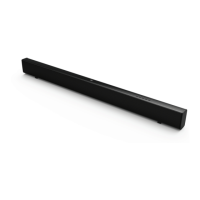







 To Next Page
 General