
 Need help?
Do you have a question about the Harman JBL LIVE 460NC and is the answer not in the manual?
Activate Google Assistant, Alexa, or Siri for voice commands.
Use buttons for playback, volume, ANC, Ambient Aware, and TalkThru functions.
Manage noise cancellation, Ambient Aware, and TalkThru modes via the app.
Configure your preferred voice assistant (Google Assistant or Amazon Alexa).
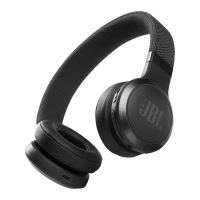
This document serves as a quick start guide for the JBL LIVE460NC headphones, providing instructions on setup, usage, and features.
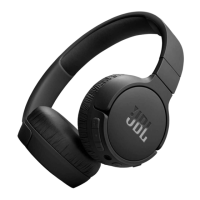
The JBL LIVE460NC are wireless headphones designed for a personalized and immersive listening experience. They offer Bluetooth connectivity for wireless audio streaming and can also be used in a wired mode. A key feature is Active Noise Cancellation (ANC), which helps to reduce ambient noise for a more focused listening experience. The headphones also incorporate voice assistant integration, allowing for hands-free control and access to various smart features.
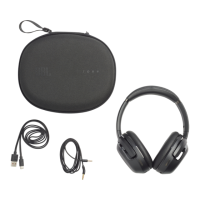
The package includes the JBL LIVE460NC headphones, a charging cable (USB-A to USB-C), an audio cable (3.5mm), and documentation (quick start guide, safety sheet, warranty card).
To enhance the user experience, the JBL Headphones app is available for download on both Google Play and the App Store. This app provides additional control and personalization options for the headphones.
To power on the headphones, slide the power switch. For initial pairing, the headphones will enter Bluetooth pairing mode.
The JBL LIVE460NC headphones support multi-point connection, allowing them to be connected to up to two devices simultaneously. To use this feature:
The headphones feature several buttons for controlling various functions:
The headphones are equipped with an auto-play/pause feature. When you remove the headphones from your ears, audio playback will automatically pause. When you put them back on, playback will resume. This feature can be managed within the JBL Headphones app under "Play & Pause automation." The app also allows you to set an auto-off timer (e.g., 15 minutes).
The JBL Headphones app provides extensive customization and control:
For Android users, the headphones offer hands-free voice control with Google Assistant. Simply say "Ok Google" to get started and issue commands such as:
The headphones also support Alexa built-in. Activate Alexa by saying "Alexa" and then give commands like:
The headphones can be used in a wired mode by connecting the included 3.5mm audio cable to the headphone jack and your audio source (e.g., smartphone, laptop, tablet).
To charge the headphones, connect the USB-C charging cable to the charging port on the headphones and a power source. A full charge takes approximately 2 hours. A quick 10-minute charge provides up to 4 hours of music playtime.
To perform a factory reset, press and hold the Volume Up (+) and Volume Down (-) buttons simultaneously for 5 seconds. This will restore the headphones to their original factory settings.
The LED indicator on the headphones provides visual feedback on their status:
 General
| Type | Over-ear |
|---|---|
| Active Noise Cancellation | Yes |
| Battery Life (without ANC) | 50 hours |
| Battery Life (with ANC) | 40 hours |
| Charging Time | 2 hours |
| Bluetooth Version | 5.0 |
| Driver Size | 40 mm |
| Frequency Response | 20 Hz - 20 kHz |
| Impedance | 32 ohm |
| Bluetooth Profiles | A2DP, AVRCP, HFP, HSP |
| Bluetooth Transmitter Modulation | GFSK, π/4 DQPSK, 8DPSK |
| Foldable | Yes |
| Colors | Black, Blue, White |
| Water Resistance | No |
| Voice Assistant Integration | Amazon Alexa, Google Assistant |
| Bluetooth Transmitter Frequency Range | 2.402 - 2.480 GHz |
| Battery Type | Lithium-ion polymer |



 To Next Page