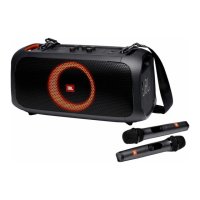
The JBL PartyBox On-The-Go is a portable active acoustic system designed for entertainment, featuring a built-in battery and a wireless microphone. It offers a range of connectivity options and sound mixing capabilities for a versatile audio experience.
Function Description:
The PartyBox On-The-Go serves as a portable speaker system capable of playing audio from various sources, including Bluetooth-enabled devices, USB storage, and external audio devices via an AUX connection. It features a built-in battery for portability and can also be powered by AC. A key feature is its ability to mix sound from a microphone and/or guitar with the main audio source, making it suitable for karaoke or small performances. The speaker also includes light effects that can be customized. For enhanced sound, two PartyBox On-The-Go speakers can be connected wirelessly in True Wireless Stereo (TWS) mode.
Important Technical Specifications:
- Product Name: PARTYBOX ON-THE-GO
- AC Power Input: 100-240 V ~ 50/60 Hz
- Built-in Battery: 18 Wh
- Power Consumption: 60 W
- Total Output Power: 100 W RMS (AC powered), 50 W RMS (battery powered)
- Standby Power Consumption: < 2 W with Bluetooth connection; < 0.5 W without Bluetooth connection
- USB Output: 5 V 2.1 A
- Speaker Drivers: 1 x 5.25 in (133 mm) woofers + 2 x 1.75 in (44 mm) tweeters
- Signal-to-Noise (S/N) Ratio: > 80 dBA
- Frequency Response: 50 Hz - 20 kHz
- Battery Charge Time: < 3.5 hrs
- Battery Play Time: > 6 hrs
- Bluetooth Version: 4.2
- Bluetooth Profile: A2DP v1.3, AVRCP v1.6
- Bluetooth Transmitter Frequency Range: 2.4 - 2.48 GHz
- Bluetooth Maximum Transmitter Power: 10 dBm (EIRP)
- Bluetooth Transmitter Modulation: GFSK, π/4 DQPSK, 8DPSK
- Bluetooth Range: Approx. 10 m (33 ft)
- USB Format: FAT 16, FAT 32
- USB File Format: .mp3, .wma, .wav
- Digital Input: Bluetooth / USB -9 dBFS
- Input Sensitivity: AUX in: 370 mV rms, Microphone: 20 mV, Guitar: 100 mV
- Product Dimension (W x H x D): 490 x 245 x 228 mm / 19.3 x 9.6 x 9.0 in
- Net Weight: 7.5 kg / 16.5 lbs
- Wireless Microphone Spec:
- Frequency Response: 65 Hz - 15 kHz
- Signal-to-Noise (S/N) Ratio: > 60 dBA
- UHF Frequency Band: 470 ~ 960 MHz (depends on SKU) (EU 657 ~ 662 MHz)
- Transmitter Transmitting Power: < 10 mW
- Microphone Battery Play Time: < 10 hrs
- Distance between Transmitter and Receiver: < 10 m
- IPX4 Splash Resistance: The speaker is splash resistant, provided the charging port is dry and protective covers are securely closed.
Usage Features:
- Power On/Off: The speaker can be powered on or off using the dedicated button. It automatically switches to standby mode after 20 minutes of inactivity.
- Battery Level Indicator: Five LED indicators show the battery level.
- Bluetooth Connection: Easily pair with Bluetooth-enabled smartphones or tablets. The speaker can memorize up to 8 paired devices.
- USB Connection: Play audio files directly from a USB storage device. Supports MP3, WMA, and WAV formats, with up to 8 levels of subfolders.
- AUX Connection: Connect external audio devices via a 3.5 mm audio cable.
- Music Control: Play, pause, skip tracks, and adjust main volume. Mute/unmute sound output. Note that skip operation is unavailable in AUX mode.
- Sound Mixing:
- Microphone Input: Connect a wired microphone or use the supplied wireless microphone. Adjust microphone volume, gain, echo, treble, and bass levels.
- Guitar Input: Connect an electric guitar. Adjust guitar volume, gain, treble, and bass levels.
- BASS BOOST: Enhances bass levels with two selectable levels or can be turned off.
- Light Effects: Select from various light patterns (rock, neon, club) or turn off the light effect.
- Mobile Device Charging: The USB port can be used to charge mobile devices.
- True Wireless Stereo (TWS) Mode: Connect two PartyBox On-The-Go speakers for a stereo sound experience. Hold the Bluetooth button on both speakers simultaneously for more than 5 seconds to enter TWS pairing mode.
- Carrying: The speaker includes shoulder strap hooks and a supplied shoulder strap for easy transport.
Maintenance Features:
- Battery Lifespan: Fully charge the speaker before first-time use. For optimal battery lifespan, fully charge at least once every 3 months. Battery life varies with usage patterns and conditions.
- Wireless Microphone Battery Replacement: The wireless microphone uses two Alkaline AA batteries. Check battery level and replace when low. Do not mix old and new batteries or different types. Dispose of batteries properly.
- Cleaning: Do not block ventilation openings.
- Safety: Do not expose batteries to excessive heat. Ensure power cords are protected from being walked on or pinched. Use only manufacturer-specified attachments/accessories. Unplug during lightning storms or when unused for long periods.
- IPX4 Rating: Keep the charging port dry and protective covers closed to maintain splash resistance.
- Factory Reset: To restore factory settings, hold the "+" and "Play/Pause" buttons simultaneously for more than 10 seconds.

 Need help?
 General

 To Next Page


