1010
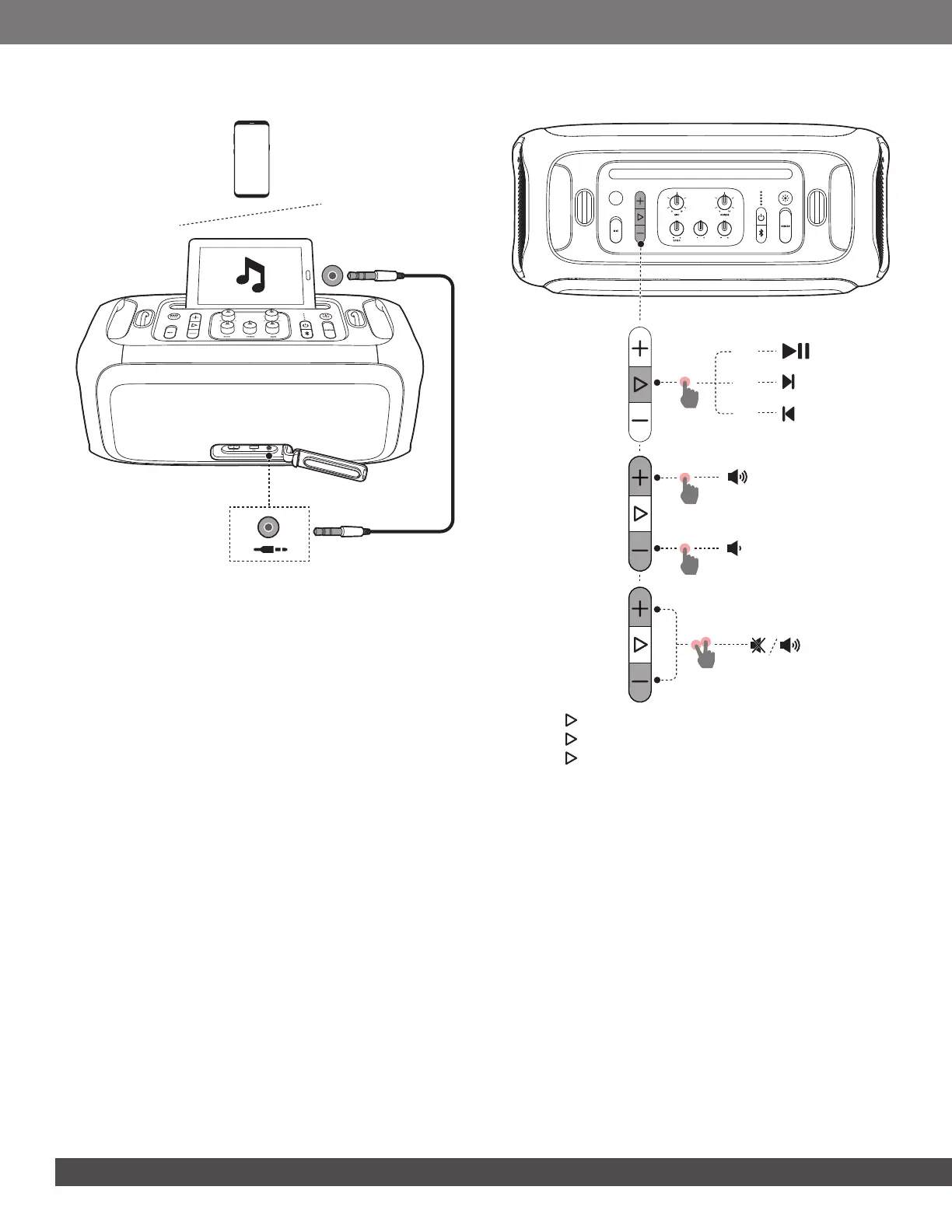
6.3 AUX Connection
1. Connect an external audio device to the speaker through a
3.5 mm audio cable (not supplied).
2. Start audio playback on the external device.
6.4 Music Control
BASS
TREBLE
BASS
BOOST
x 1
x 1
x 1
x 2
x 3
x 1
• Press once to pause or resume playback.
• Press twice to skip to the next track.
• Press three times to skip to the previous track.
• Press +/- to increase or decrease main volume.
• Hold the + and - buttons simultaneously to mute or unmute sound
output.
Note:
– The skip operation is unavailable in AUX mode.
6.5 Mixing Sound with a Microphone and /
or Guitar
By using a microphone or electric guitar (not supplied), you can
mix sound with an audio source.
Notes:
– Always set the guitar or microphone volume to the minimum level
before guitar or microphone connection / disconnection.
– Always disconnect the guitar or microphone when you are not
using them.


 To Next Page
 Loading...
