EasyManua.ls Logo

Harman JBL Quantum400 - User Manual

Harman JBL Quantum400
19 pages
Print Icon
To Next Page IconTo Next Page
Loading...
QUICK START GUIDE
400
Question and Answer IconNeed help?

Do you have a question about the Harman JBL Quantum400 and is the answer not in the manual?

Summary

Whats in the Box

Package Contents

Lists all items included in the product packaging, such as headset, cables, and accessories.

System Requirements

Software Requirements

Details platform compatibility and disk space requirements for the JBL QuantumENGINE software.

Device Compatibility

Specifies which platforms and devices the JBL Quantum400 headset can be used with.

Product Overview

Headset Features and Controls

Identifies and describes the key components, controls, and indicators on the JBL Quantum400 headset.

Setup and Connectivity

Connecting to Devices

Illustrates the cable connections required for PC, console, and mobile device usage.

Initial Configuration

Setting Default Audio Devices

Guides users on configuring the headset as the default playback and recording device in Windows.

Microphone Operation

Microphone Mute and Lighting

Explains how to mute the microphone, the function of the notification LED, and how to control headset lighting.

Technical Specifications

JBL Quantum400 Specs

Provides detailed technical data including driver size, frequency response, sensitivity, impedance, and weight.

Warranty and Support

Product Registration and Warranty Terms

Instructions for product registration and the scope of the limited warranty for the JBL Quantum400.

Requesting Warranty Service

Steps for obtaining warranty service, including required documentation and authorization.

Australian Warranty Information

Specific warranty terms and claim procedures for products distributed and sold within Australia.

Safety and Environmental

Important Safety Precautions

Critical safety advice on pacemaker interference, electrical safety, child supervision, and hearing protection.

Waste Electrical Disposal

Information and guidelines for the responsible disposal of electronic waste in accordance with regulations.

Summary

Whats in the Box

Package Contents

Lists all items included in the product packaging, such as headset, cables, and accessories.

System Requirements

Software Requirements

Details platform compatibility and disk space requirements for the JBL QuantumENGINE software.

Device Compatibility

Specifies which platforms and devices the JBL Quantum400 headset can be used with.

Product Overview

Headset Features and Controls

Identifies and describes the key components, controls, and indicators on the JBL Quantum400 headset.

Setup and Connectivity

Connecting to Devices

Illustrates the cable connections required for PC, console, and mobile device usage.

Initial Configuration

Setting Default Audio Devices

Guides users on configuring the headset as the default playback and recording device in Windows.

Microphone Operation

Microphone Mute and Lighting

Explains how to mute the microphone, the function of the notification LED, and how to control headset lighting.

Technical Specifications

JBL Quantum400 Specs

Provides detailed technical data including driver size, frequency response, sensitivity, impedance, and weight.

Warranty and Support

Product Registration and Warranty Terms

Instructions for product registration and the scope of the limited warranty for the JBL Quantum400.

Requesting Warranty Service

Steps for obtaining warranty service, including required documentation and authorization.

Australian Warranty Information

Specific warranty terms and claim procedures for products distributed and sold within Australia.

Safety and Environmental

Important Safety Precautions

Critical safety advice on pacemaker interference, electrical safety, child supervision, and hearing protection.

Waste Electrical Disposal

Information and guidelines for the responsible disposal of electronic waste in accordance with regulations.

Overview

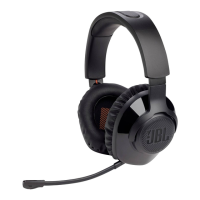
The JBL Quantum 400 is a USB over-ear gaming headset designed to provide an immersive audio experience with game-chat balance. It aims to give gamers a competitive edge through its surround sound capabilities and clear communication features.

Function Description:

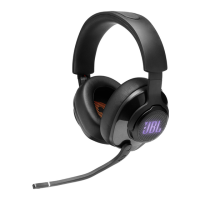
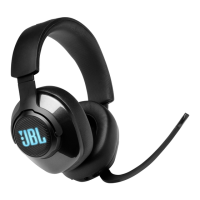
The JBL Quantum 400 headset is engineered to deliver a comprehensive gaming audio experience. It features JBL QuantumSURROUND and DTS headphone:X v2.0 for personalized surround sound, placing the user at the center of the action. The JBL QuantumSOUND Signature is designed to provide realistic soundscapes, from subtle footsteps to loud explosions, enhancing competitive gameplay. For communication, the headset includes a voice focus directional flip-up boom microphone, which offers clear multiplayer interactions and features auto on/off and mute functionalities. A Game-chat Balance Dial, certified by DISCORD and compatible with TeamSpeak and more, allows for seamless adjustment between game audio and chat volume. The headset is compatible with a wide range of platforms, including PC, Xbox™, PlayStation™, Nintendo Switch™, Mobile, Mac, and VR. The JBL QuantumENGINE PC software provides an intuitive dashboard for customizing surround sound settings, creating profiles, adjusting RGB lighting effects on the JBL logo, and modifying microphone settings, including an equalizer with six presets.

Important Technical Specifications:

  • Driver size: 50mm Dynamic drivers
  • Frequency response: 20 Hz – 20 kHz
  • Microphone frequency response: 100 Hz – 10 kHz
  • Max input power: 30 mW
  • Sensitivity: 98 dB SPL @1 kHz / 1 mW
  • Microphone sensitivity: -40 dBV @1 kHz / Pa
  • Impedance: 32 ohm
  • Cable length: 3.5mm audio cable (1.2m) + Type-C to Type-A cable (3m)
  • Microphone pickup pattern: Directional
  • Microphone size: 4mm x 1.5mm
  • Weight: 274g

Usage Features:

The JBL Quantum 400 offers several features to enhance the user experience:

  • Game Audio-Chat Balance Dial: Allows users to adjust the balance between game audio and chat volume on the fly.
  • Volume Control: A dedicated dial for easy volume adjustment.
  • Detachable Windshield Foam: Can be attached to the boom microphone to reduce plosives and improve voice clarity.
  • Notification LED for Mic Mute / Unmute: Provides a visual indicator of the microphone's status.
  • RGB-Lit JBL Logo: Customizable RGB lighting effects on the earcups via the JBL QuantumENGINE software.
  • 3.5mm Audio Jack: For connecting to various devices using the included 3.5mm audio cable.
  • Voice Focus Boom Microphone: A directional microphone designed for clear voice pickup, with a flip-up mechanism that automatically mutes the mic when flipped up and unmutes when flipped down.
  • Flat-Fold Ear Cup: Earcups can be folded flat for easier storage and portability.
  • Microphone Mute/Unmute Button: A physical button on the headset for quick microphone control. Holding this button for more than 5 seconds toggles the JBL Quantum Lighting ON/OFF.
  • USB-C Port: For digital audio connection and power, using the included Type-C to Type-A cable. Note that a USB-C to USB-C cable is not included, and USB-C connectivity may not work with all devices.

Maintenance Features:

While the manual does not explicitly detail maintenance features, it provides general guidelines for product care and warranty information.

  • Warranty: The product comes with a limited warranty covering defects in workmanship and materials for one year from the date of retail purchase. This warranty does not cover damage from accidents, unreasonable use, neglect, shipping, deterioration of accessories/decorative surfaces, failure to follow instructions, unauthorized repairs, or normal wear and tear of components like batteries and ear pads.
  • Software Updates: Users are encouraged to register their product on the relevant country-specific website to receive information about updates for products and firmware.
  • Disposal: The product should not be mixed with general household waste. Users are advised to take it to designated collection points for proper treatment, recovery, and recycling.

The headset is designed for comfort during long gaming sessions, featuring a lightweight headband and memory foam ear cushions. The JBL QuantumENGINE software is a key component for unlocking the full potential of the headset, allowing for extensive customization and optimization of the audio experience.
Harman JBL Quantum400 Specifications

General IconGeneral
BrandHarman
ModelJBL Quantum400
CategoryHeadsets
LanguageEnglish

Related product manuals