
 Need help?
Do you have a question about the Harman JBL TUNE 115BT and is the answer not in the manual?
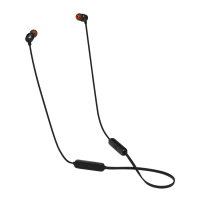
Lists all included accessories and the headset components.
Instructions on selecting the right ear tips and wearing the headset for optimal fit and performance.
Step-by-step guide to powering on the JBL TUNE 115BT and establishing a Bluetooth connection.
Details the functions of the headset's control buttons for playback, volume, and calls.
Instructions on how to connect the headset to two devices simultaneously.
Information on how to charge the headset, charging time, and quick charge benefits.
Explanation of the different LED indicator light signals and their meanings.
Detailed technical specifications including driver size, frequency response, and battery life.
This document serves as a quick start guide for the JBL Tune 115 BT, a pair of wireless in-ear headphones designed for on-the-go audio enjoyment and communication. These headphones offer a blend of comfort, sound quality, and practical features for everyday use.
The JBL Tune 115 BT headphones are primarily designed for wireless audio playback and hands-free calling. They connect to your devices via Bluetooth, allowing you to listen to music, podcasts, and other audio content without the need for a physical cable connection to your audio source. The integrated microphone enables clear voice communication, making them suitable for phone calls and interacting with voice assistants. The headphones feature an in-line remote with buttons for controlling playback, volume, and calls, providing convenient access to essential functions without needing to interact directly with your connected device.
The JBL Tune 115 BT comes with multiple sizes of ear tips (Small, Medium, Large) to ensure a comfortable and secure fit for various users. The guide emphasizes the importance of selecting the right ear tips to optimize both comfort and audio performance. Users are instructed to mix and match the ear tips to find their perfect fit. The design encourages wearing the headphones behind the neck, which helps keep the earbuds in place and the cable managed, reducing tangling and discomfort during movement.
A practical feature of these headphones is the inclusion of magnets in the earbuds. When not in use, the earbuds can be magnetically clasped together, preventing them from dangling freely and reducing the risk of loss or tangling. This also makes them easy to store around your neck when you need to take a break from listening.
To power on the headphones and initiate the pairing process, users need to press and hold the multi-function button (the center button on the in-line remote) for more than 2 seconds. This action automatically puts the headphones into pairing mode, indicated by specific LED behaviors. Once in pairing mode, users can select "JBL TUNE115BT" from the Bluetooth settings on their desired device (e.g., smartphone, tablet, laptop) to establish a connection. The guide clearly illustrates the steps for connecting to a Bluetooth device.
The in-line remote provides comprehensive control over various functions:
A significant feature of the JBL Tune 115 BT is its multi-point connection capability, allowing the headphones to be simultaneously connected to two Bluetooth devices (e.g., a smartphone and a laptop). This feature enhances convenience for users who frequently switch between devices.
The JBL Tune 115 BT headphones are charged via a micro-USB cable. The charging port is located on the in-line remote. A full charge takes approximately 2 hours. The headphones also support a quick charge feature: a 15-minute charge provides 1 hour of music playtime, which is convenient for users who are short on time. The guide clearly illustrates the charging process.
The LED indicator on the in-line remote provides visual feedback on the headphones' status, aiding in maintenance and understanding their current state:
These LED indicators are crucial for users to monitor the battery status and connection state of their headphones, ensuring they are always ready for use.
 General
| Type | In-ear |
|---|---|
| Connectivity | Wireless |
| Battery Life | 8 hours |
| Charging Time | 2 hours |
| Frequency Response | 20 Hz - 20 kHz |
| Impedance | 16 ohm |
| Sensitivity | 96 dB |
| Microphone | Yes |
| Bluetooth Version | 5.0 |
| Bluetooth Modulation | GFSK, π/4 DQPSK, 8DPSK |
| Wireless Range | 10 m |
| Water Resistance | No |
| Bluetooth Profiles | A2DP, AVRCP, HFP |
| Bluetooth Frequency | 2.402 GHz – 2.480 GHz |
| Battery Type | Lithium-ion |





 To Next Page