
 Need help?
Do you have a question about the HASHIMA HN-2880C and is the answer not in the manual?
Explains DANGER, WARNING, and CAUTION symbols indicating levels of risk and required actions.
Covers essential safety rules including child safety, no remodeling, proper power connection, and disconnection for maintenance.
Details safety measures for machine installation, needle inspection, avoiding flammable materials, and general cautions.
Covers cautions on humidity, cord handling, and petitions regarding magnetic interference and operation understanding.
Explains the purpose of "alarm labels" and warns against removing or altering them, emphasizing their importance for safety.
Highlights LCD panel, position lamp, Key Switch, and automatic return of defective products for efficiency.
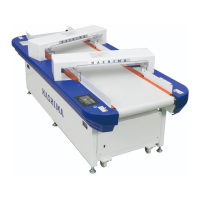
Details the device's application in inspecting sewn products for needles and Fe pieces.
Lists model names, detection methods, capacity, dimensions, weight, and other technical details.
Provides essential guidelines for initial setup, material detection limits, accessory compliance, and operator metal objects.
Details requirements for horizontal installation, avoiding magnetic interference, and environmental conditions for optimal performance.
Details the process of setting the machine's date and time for accurate operation.
Explains the layout and functions of the main HOME screen interface.
Provides a detailed explanation of each numbered element on the HOME screen, including buttons and displays.
Lists and briefly describes the main functions accessible from the menu, such as settings, history, and printing.
Explains the difference and usage of Production mode and Test Card mode for various inspection scenarios.
Details the straight-reading (6-step) and decimal (100-step) methods for adjusting machine sensitivity.
Provides instructions on how to adjust the conveyor belt speed to a desired setting.
Explains how to interpret the history log, including event details, operator, and time, and options for backup and printing.
Details the different counter values (pass, detect, total, loop) and their significance in tracking production.
Presents a table showing the relationship between sensitivity settings (ms) and detection distance (mm).
Illustrates how to adjust sensitivity using either the straight-reading or decimal method via the interface.
Details how to set, change, and use passwords for administrator and operators to secure machine functions.
Describes how to print various types of data, including counter readings, history, and self-checking results.
Covers setting check time, belt return adjustment, and performing pre-checks for sensor verification.
Guides on inspecting the machine's installation location for optimal performance.
Explains the consecutive detection process, response to foreign objects, and the use of Production and Test Card modes.
Highlights critical points like passing items within guides, cleaning sensors, avoiding disassembly, and careful machine movement.
Provides step-by-step instructions on how to adjust the belt roller position using a hex wrench.
 General
| Brand | HASHIMA |
|---|---|
| Model | HN-2880C |
| Category | Security Sensors |
| Language | English |

 To Next Page
