75
1
3 4
5 6
2
Navigating the
CAMERA settings
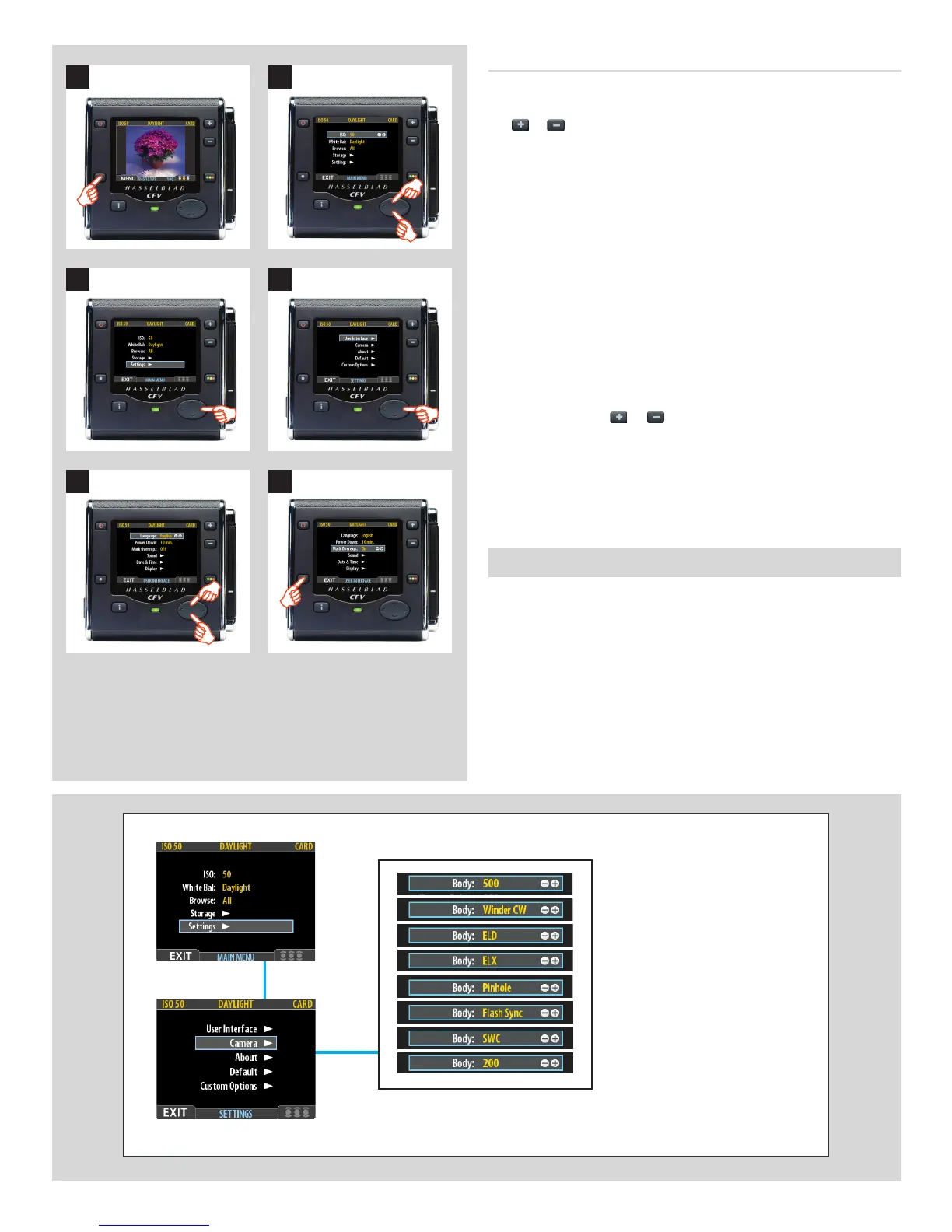
MENU > SETTINGS > Camera
All Hasselblad V-system cameras can communicate with the CFV
without the need for extra cable connections except:
• Unmodied200seriesmodelsusingCFlensesinC-modeand
the FlexBody accessory.
View cameras (with the appropriate adapter and cables) can also
be used.
Proceed as follows:
1. Press the menu (MENU) button to open the menu.
2. Use and to select the SETTINGS sub-menu.
3. Press to open the SETTINGS menu.
4. Press to select the USER INTERFACE sub-menu.
5. Use and to select the required item.
Press either the
or button to make the new settings in
the case of Language, Power Down and Mark Overex or
press again to access Sound, Date & Time and Display.
6. Press the EXIT button again to save the new settings and
close the menu.
Setting the options under the User Interface menu
Each of the above items can be set by similar menu navigation.
Language, Power Down and Mark Overex can be set immediately by
the or buttons while Sound, Date & Time and Display require
another move to sub menu for final choice.













 To Next Page