The HELMSMAN NAVIGATION SYSTEM is a sophisticated control system designed to enhance the operation of a boat's motor through a combination of a dedicated remote control (HM-connector) and a smartphone application. This system offers both manual and advanced navigation functions, aiming for efficient and precise boat control.
Function Description:
The core function of the HELMSMAN NAVIGATION SYSTEM is to provide comprehensive control over a boat's motor, integrating GPS-based navigation capabilities. It allows users to:
- Manual Control: Directly steer and adjust the speed of the motor using a joystick interface on the smartphone app. A double tap on the motor icon starts/stops the motor, and a long drag upward on the joystick activates full speed.
- GPS Connection: The system relies on a GPS signal for accurate navigation. The boat control automatically searches for a GPS signal, indicated by a GPS light. Proper GPS connection is crucial for the accuracy of all advanced navigation features.
- HM-connector (Remote Control) Pairing: The HM-connector acts as a bridge between the smartphone and the boat control. It pairs with the boat control via Wi-Fi and with the smartphone via Bluetooth. Signal lights on the HM-connector indicate its status (searching for connections, connected, sending commands, low battery).
- Bluetooth Connection with Smartphone: The smartphone connects to the HM-connector via Bluetooth. Once connected, the HELMSMAN App can be used to control the motor.
- Wi-Fi Password Setup: Users can set up a custom Wi-Fi password for the system to avoid interference from other HM-connectors. This requires reconnecting power to both the motor and the HM-connector after changing the password.
- Heading Calibration: Essential for accurate navigation, the compass inside the boat control needs calibration before first use or if the angle deviation between heading and arrow direction exceeds 10 degrees. This involves pointing the smartphone north, steering the motor to align with the phone's heading, and keeping the phone at least 0.5 meters away from magnetic interference. The motor rotates automatically during calibration.
- Route Management (My Routes): Users can create, save, upload, reverse, and delete routes. New routes can be created by tapping on the map and adding waypoints. Existing waypoints can be edited by dragging them. Uploading a route to the boat control initiates automatic navigation.
- Advanced Functions: The system offers four advanced functions:
- Record Route: Allows users to record manually driven routes for future reuse. When activated, the motor automatically records the path. If interrupted, the route can be downloaded from the motor.
- Cruise Control: Enables efficient sailing in a straight line at a set GPS speed. Users can manually steer to avoid obstacles and adjust the cruise direction, but the motor speed remains fixed.
- Navigation: Guides the boat along a pre-uploaded route. If navigation is paused, the motor switches to manual mode, but the route remains on the map. Tapping the navigation icon again will direct the motor to the nearest waypoint and resume navigation. Users can still change speed and steer manually to avoid obstacles during navigation. Upon reaching the final waypoint, the motor automatically enters Anchor mode.
- Anchor: Keeps the boat in its current location. In this mode, the boat control automatically adjusts speed based on water flow, and manual speed/motor control is disabled.
- Helmsman Network: A platform for users to share routes, anchor spots, and discoveries with friends. It allows downloading functional routes and anchor spots from the network.
- Diagnostics: The operation log is updated to the Helmsman Data Center to improve product quality and after-sales service.
- My Devices: Lists information about devices connected to the cell phone.
Important Technical Specifications (Inferred from Usage Features):
- Connectivity: Bluetooth (for smartphone to HM-connector), Wi-Fi (for HM-connector to boat control).
- GPS: Integrated GPS module for navigation, cruise control, and anchor functions. Requires a strong GPS signal for accuracy.
- Compass: Internal compass in the boat control for heading determination, requiring calibration.
- Power: The HM-connector has a battery, indicated by a signal light for low battery status.
- Smartphone Compatibility: Available on iPhone (App Store) and Android (Google Play). Requires cellular data network for internet access and Bluetooth enabled.
Usage Features:
- Quick Start Guide: Provides initial setup instructions.
- Preparation: Connect battery to motor, wait 10 seconds for system initialization before deployment. Early deployment may affect navigation accuracy.
- User Interface: Simple UI on the smartphone app for easy operation of both manual and advanced functions.
- Online Instructions: Detailed online instructions within the APP describe the latest navigation system functions and troubleshooting.
- China Optimization: A setting to fix coordinate deviation, recommended for use in mainland China.
- Vibration Mode: Smartphone vibrates when operating the APP in vibration mode.
- Navi Mode: Allows selection of a suitable navigation mode for different environments.
- Emergency Stop: Pushing the home button on the cell phone will quit the Helmsman APP and immediately stop the motor.
- HM-connector as Bridge: The HM-connector must remain powered on and close to the cell phone while using the HELMSMAN App.
Maintenance Features (Inferred):
- Battery Management: The HM-connector has a low battery indicator, suggesting the need for charging or replacement when indicated.
- Software Updates: The diagnostics feature, which updates operation logs to the Helmsman Data Center, implies ongoing software development and potential updates to improve product quality and service.
- Troubleshooting: The online instructions provide guidance for troubleshooting common issues.
- Calibration: Regular heading calibration is a user-performed maintenance step to ensure navigation accuracy.
- Motor Manual: Users are advised to read the motor manual in addition to this guide, indicating that some maintenance or operational aspects might be covered there.
The HELMSMAN NAVIGATION SYSTEM aims to provide a safe and enhanced control experience, but users are reminded of their responsibility for safe operation and to be prepared to switch to manual control in case of hazards. Practicing with the system in a safe, open area free from obstacles is highly recommended.

 Need help?
 General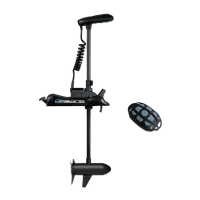

 To Next Page