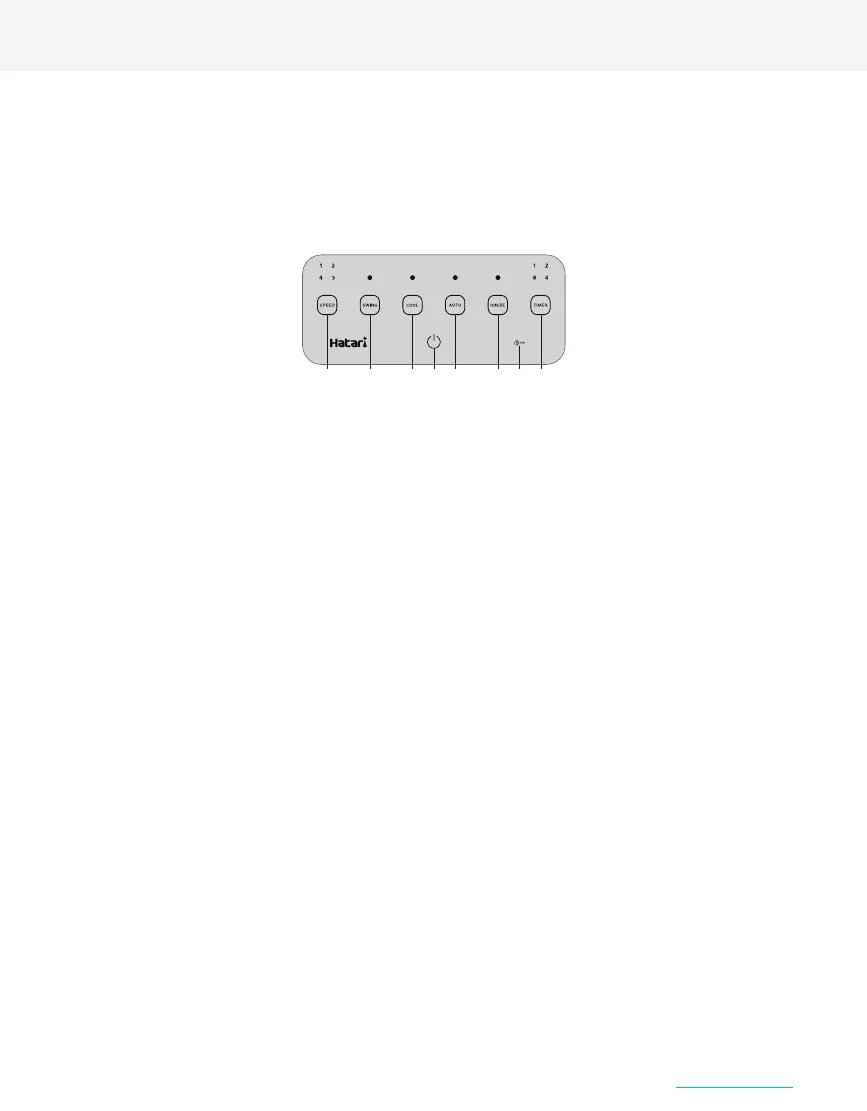
Touch the switch on the control and display panel to turn on the fan. The light will show the resumed settings of
the fan’s latest operation before having been switched off. To turn the fan off, touch the switch again for about
1.5 seconds ( When the air cooler is switched off while the COOL function is activated, the fan will continue to
operate for 1 minute to remove moisture. The fan will stop working immediately afterwards )
4 adjustable fan speed settings 0: off, 1: lowest speed, 2: medium speed, 3: high speed, 4: highest speed.
Switch for timing the fan’s operation: 1, 2, 4, 8 hours or to cancel timing altogether, respective to the number of
time the sensor is touched. Once set, the timer will indicate the remaining time left of the duration.
Set the timer while the fan is switched on to set the time when the fan is to automatically turn off.
Set the timer while the fan is turned off (but it must be plugged in) to set the time when the fan is to automatically turn on.
After adjusting the settings, the operating lights will dim. When the time comes, the fan will resume settings of
the latest operation before having been switched off.
Switch for activating the water cooling system. Touch the switch to activate the function. Touch the switch again
to deactivate the function.
Switch for adjusting left to right swinging motions. Touch the switch to activate the function. Touch the switch
again to deactivate the function.
Switch for activating the Ionize system. Touch the switch to activate the function, the light will illuminate indicating
the operation of the Ionize system. Touch the switch again to deactivate the function.
Switch for activating the automatic control system. Touch the switch to activate the function, which will work
simultaneously with the water cooling system (COOL) to control the air cooler’s operation, resulting in appropriate
water usage. This is so that the water cooling system can operate for longer without having to frequently refill
the water. Touch the switch again to deactivate the function.
A warning with a warning sound will appear when there is electricity leakage. The circuit breaker system will immediately
be activated.
ON/OFF
SPEED
TIMER
TIMER OFF
TIMER ON
COOL
SWING
IONIZER
AUTO
ELCB
DIRECTION OF USE
Plug the power supply cord into a 220V, 50Hz power socket.
This fan is operated by touch screen system and remote control. Touch screen system can be activated using fingers to touch the
control and display panel. When the machine is left idle for 1 minute, the operating lights will dim but the fan will still be operating
as normal. By simply touching the control and display panel, the lights will illuminate and the fan will be ready to be adjusted again.
Remote control, point the remote signal transmitter in the direction of the signal receiver on the control and display panel. Avoid
having obstructions between the remote signal transmitter and the receiver.
12 5 4 7 6 3
8


 To Next Page
 Loading...