11
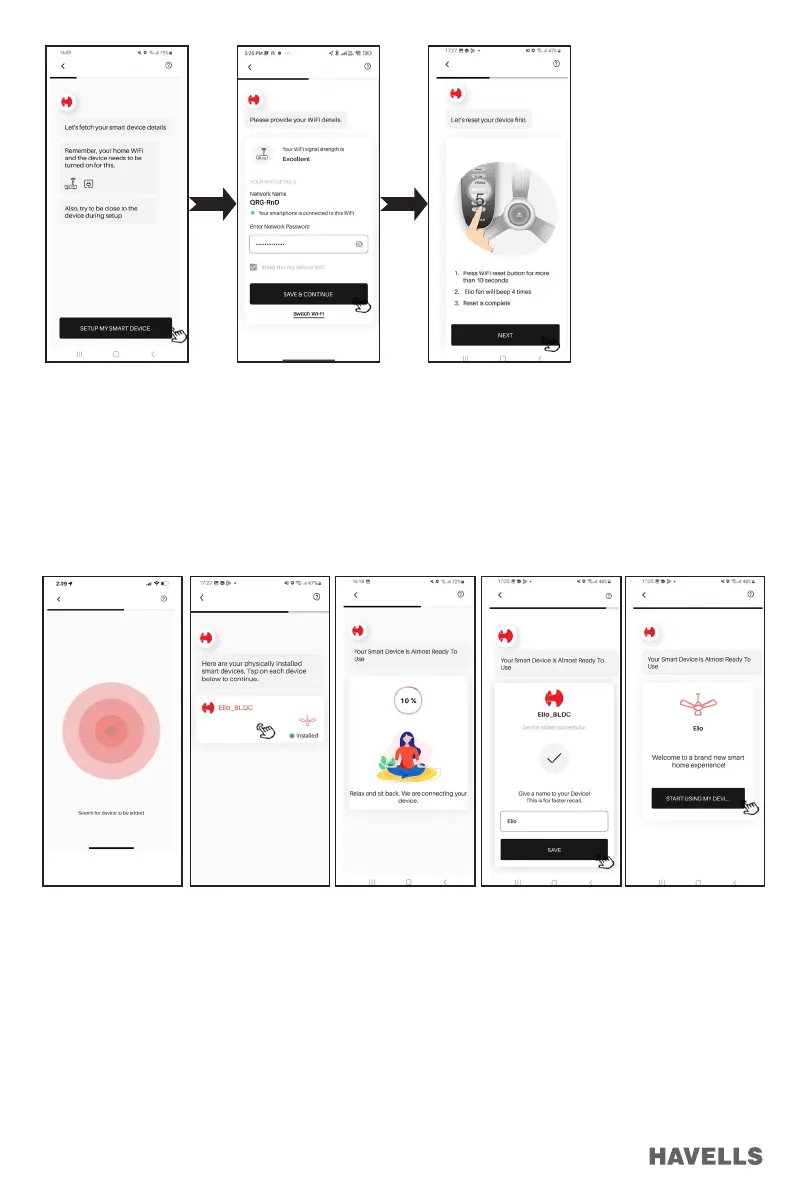
8. Wait till the signal nds the active nearby devices on an APP screen (Figure 44)
9. After successful completion, Tap on “Elio Fan” to continue (Figure 45) wait till completion of circular
bar (Figure 46)
10. Give name to Fan (only alphabets are allowed). Tap on SAVE (Figure 47)
11. Now tap on “START USING MY DEVICE” (Figure 48)
In case of Unsuccessful Pairing:
1. If device registration is unsuccessful, below message will be displayed on an App. (Figure 49) Please recheck
the reasons listed on mobile screen, carefully check and rectify if any problem exists.
2. Press the “SEARCH DEVICE AGAIN” button to search the network again,
3. If Device addition is still unsuccessful Press “RESET DEVICE” button & hold it up to 10 seconds to reset the
device (Figure 50) and follow instructions App. it will continue as in previous section (point no. 8 onwards).
(Figure 51)
4. Even after above procedure if device addition is unsuccessful than contact Customer care (Figure 53).
Figure 41
Figure 44
Figure 42
Figure 45
Figure 43
Figure 46 Figure 47 Figure 48


 To Next Page
 Loading...