This document provides operating instructions for the Havells Elio Prime Underlight BLDC Inverter Technology fan, which is IoT-enabled and works with Alexa and Google Home. It covers installation, remote operation, app setup for Android and iOS, and troubleshooting.
Function Description
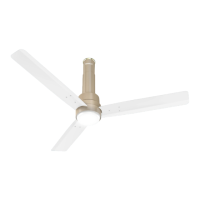
The Havells Elio fan is a ceiling fan designed to provide air circulation and ambient lighting. It features BLDC (Brushless DC) inverter technology, which typically offers energy efficiency and quiet operation. The integrated underlight provides illumination, making it a dual-purpose appliance. As an IoT-enabled device, it can be controlled remotely via a smartphone app (Havells Sync) and integrated with smart home ecosystems like Amazon Alexa and Google Assistant for voice control.
Usage Features
Remote Control Operation:
The fan comes with a remote control for direct operation.
- Power ON/OFF: A dedicated button switches the fan on and off.
- Fan Speed Control: Buttons 1 through 5 allow selection of desired fan speeds.
- Modes: The remote offers various operating modes:
- Breeze Mode: Fan speed varies progressively, increasing to maximum and then decreasing to minimum in a loop, simulating a natural breeze.
- Mop Mode: The fan runs at speed 5 for 3 minutes, then turns off. It can be reactivated from the remote or main supply.
- Sleep Mode: The fan's speed reduces at fixed intervals. For example, if running at speed 5, it reduces one level every 90 minutes until it reaches speed 1, where it continues to run. Similar progressive reductions occur for speeds 4, 3, and 2 over longer intervals (120, 180, and 360 minutes respectively).
- Boost Mode: Increases fan speed beyond the standard 5 levels for enhanced comfort.
- Timer Function: Allows setting the fan to run for specific durations (2, 4, 6, or 8 hours). The timer is disabled if the main power is turned off.
- Light Colour Control: A "Colour" button cycles through Warm White, Neutral White, and Cool White light options.
- Light Intensity Control: Buttons are available to decrease or increase the light intensity across 5 levels, from dimming to smooth glowing.
- Wi-Fi Reset: A "Reset" button, when pressed for 5 seconds, enables or disables Wi-Fi broadcasting in the fan's PCB, useful for app pairing.
Smartphone App Control (Havells Sync App):
The Havells Sync app (available for Android and iOS) provides comprehensive control and smart features.
- Device Registration: Users can register as "New Users" or "Existing Users" by providing mobile number, email ID, and creating a PIN.
- Device Addition: The app guides users through connecting the fan to their home Wi-Fi network (2.4 GHz band, password-secured). This involves turning on the fan, pressing and holding the Wi-Fi reset button on the remote for 10 seconds (indicated by 4 beeps from the fan's PCBA), and then following on-screen prompts in the app to search for and connect to the device.
- Fan Control:
- Speed Selection: Users can select speeds 1-5 by tapping or sliding on a speed bar within the app.
- Timer Setting: A timer icon allows setting durations (1-8 hours) by tapping or dragging on a timer bar.
- Modes: Access to Breeze, Mop, Sleep, and Boost modes is available through the app.
- Light Control: Users can select Warm, Neutral, or Cool light colours and adjust light intensity by tapping or sliding a bar.
- Device Sharing: The app allows sharing control of the fan with other registered Havells Sync app users by inviting them from a contact list.
- Automation/Scheduling: Users can create custom automation rules to schedule fan operations based on specific conditions or times.
Voice Control Integration:
The fan can be controlled using voice commands through Amazon Alexa and Google Assistant after linking the Havells Sync account.
- Alexa Integration:
- Users download the Alexa app, log in, and enable the "Havells Sync" skill.
- After linking the Havells Sync account, Alexa discovers the fan as a connected device.
- Voice commands include: "Alexa, turn on/off ", "Alexa, is the Main Light on?", "Alexa, set Speed to low/medium/high", "Alexa, set to speed one/two/three/four/five", "Alexa, set Light colour to Warm/Natural/Cool", and "Alexa, set Light Brightness to Level One/Two/Three/Four/Five".
- Google Assistant Integration:
- Users connect their Havells device in the Google Home app by tapping their profile photo, selecting "Assistant Setting", searching for "Home Control", and then "Havells Sync" action.
- After linking the Havells Sync account, Google Home discovers the fan.
- Voice commands include: "Hey Google, Is turned on?", "Hey Google, Set on speed one/two/three/four/five", "Hey Google, Set on breeze/night mode", "Hey Google, Set Light colour to Warm/Natural/Cool", and "Hey Google, Set Light Brightness to level1/2/3/4/5".
Installation Features:
- Blade Installation: Blades are fastened to the motor using screws, ensuring tight fit and matching numerical codes for balance.
- Down-rod Installation: The down-rod is assembled with canopies, and power/earthing wires are passed through it. The down-rod is then secured to the motor shaft using a bolt assembly (including split pin, hex nut, lock nut, spring washer, and aluminium spacers) and an earthing screw.
- Ceiling Hook Mounting: The fan, with its shackle assembly, is mounted onto a ceiling hook.
Maintenance Features
Troubleshooting:
The manual provides solutions for common issues:
- Fan not starting: Check circuit fuses/breakers, line wire connections, and ensure main power is OFF before checking.
- Noisy fan: Ensure all motor housing screws and blade screws are snug, and check for a gap between the top canopy and ceiling.
- Fan wobbles: Do not connect with a wall-mounted external regulator, and ensure all blades have the same numerical code.
- Poor remote sensing: Change old batteries and ensure the remote is directed towards the fan.
- App-related issues (OTP not received, unsuccessful pairing, fan offline): Check network stability, Wi-Fi details (SSID, password), firewall settings, router functionality, fan power, and app connection timing. Instructions are provided for resetting the device via the app or remote.
- Fan speed changing randomly/on its own: Check if Sleep Mode or Breeze Mode is activated.
- Automation not deleting: Wait for automation to complete or delete the device from the app and re-add/configure.
- Edited automation not deploying correctly: Re-select speed and mode in the automation settings.
General Maintenance Advice:
- Battery Replacement: Use AAA batteries (2 N) of a preferred brand when the remote battery is drained.
- Wall Mount Regulator: Disconnect any wall mount regulator for fan safety and better performance.
- Blade Care: Do not damage blades during installation or cleaning. Avoid inserting foreign objects between rotating blades.
- Secure Fasteners: Ensure the safety screw, down-rod bolt, lock nut, and split pin are properly tightened. Tighten the ceiling plate separately.
- E-Waste Disposal: The product complies with E-WASTE (MANAGEMENT) RULES, 2022. Users are advised to drop used electrical/electronic products at authorized collection points, ensure recycling by authorized dismantlers, segregate packaging materials, and protect glass surfaces. Do not dismantle the product yourself, sell to informal sectors, or dump in garbage bins.


 To Next Page
 General