7
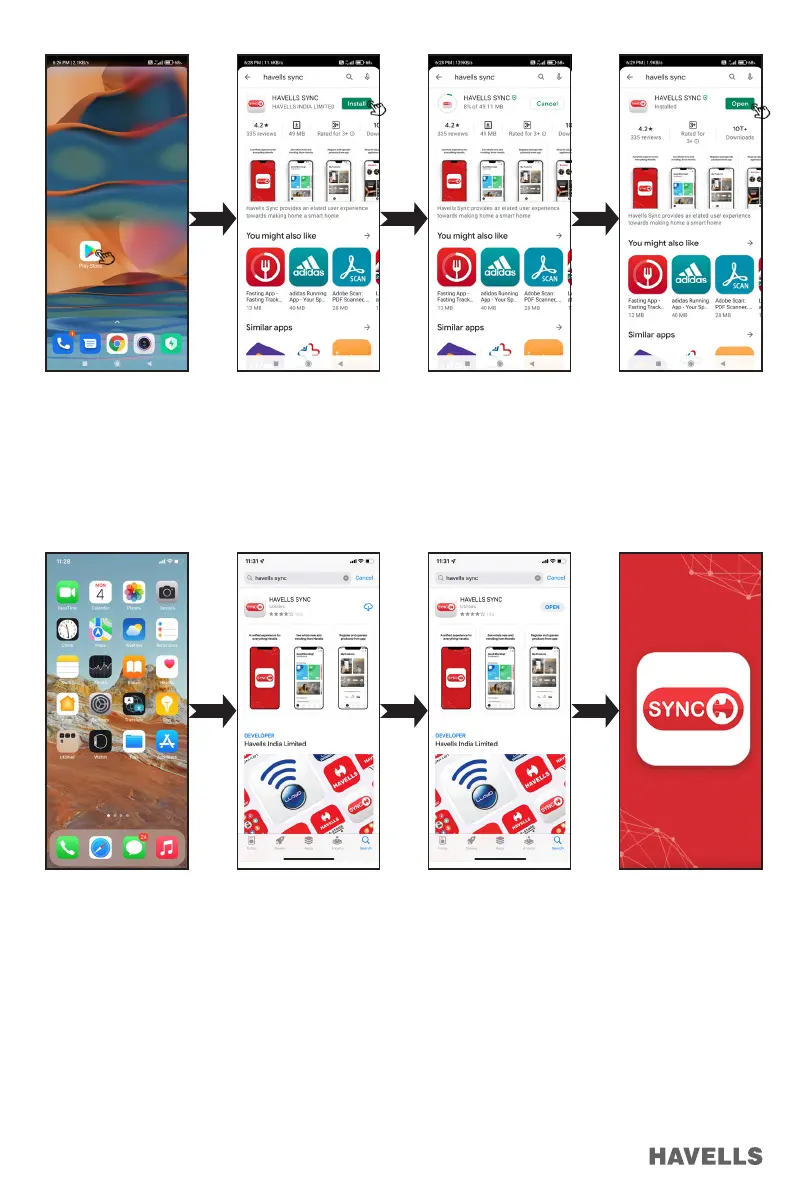
Download the APP for iOS Smart Phone from Apple “App Store”
Go to App Store (Or Scan QR code and follow link)
Download and install Havells SYNC app (Figure 15-18)
Setup and Installation of “Havells Sync” Application
Before using Havells Sync, please complete the following conguration in order to exchange the credential between ELIO
Fan and smart phone.
1. Connect your smart phone with the Wi-Fi Network by selecting the Wi-Fi Network with which the ELIO Fan has to be
connected.
2. Wi-Fi Network must be at 2.4 GHz band and secured with a Password. Read the router user manual or contact your ISP
(Internet Service Provider) for router setting.
3. If rewall is enabled in the network (like in ofce network), the IP and the device must be allowed.
4. Follow the below steps to congure ELIO Fan.
Figure 11 Figure 12 Figure 13 Figure 14
Figure 15 Figure 16 Figure 17 Figure 18


 To Next Page