8
User Registration
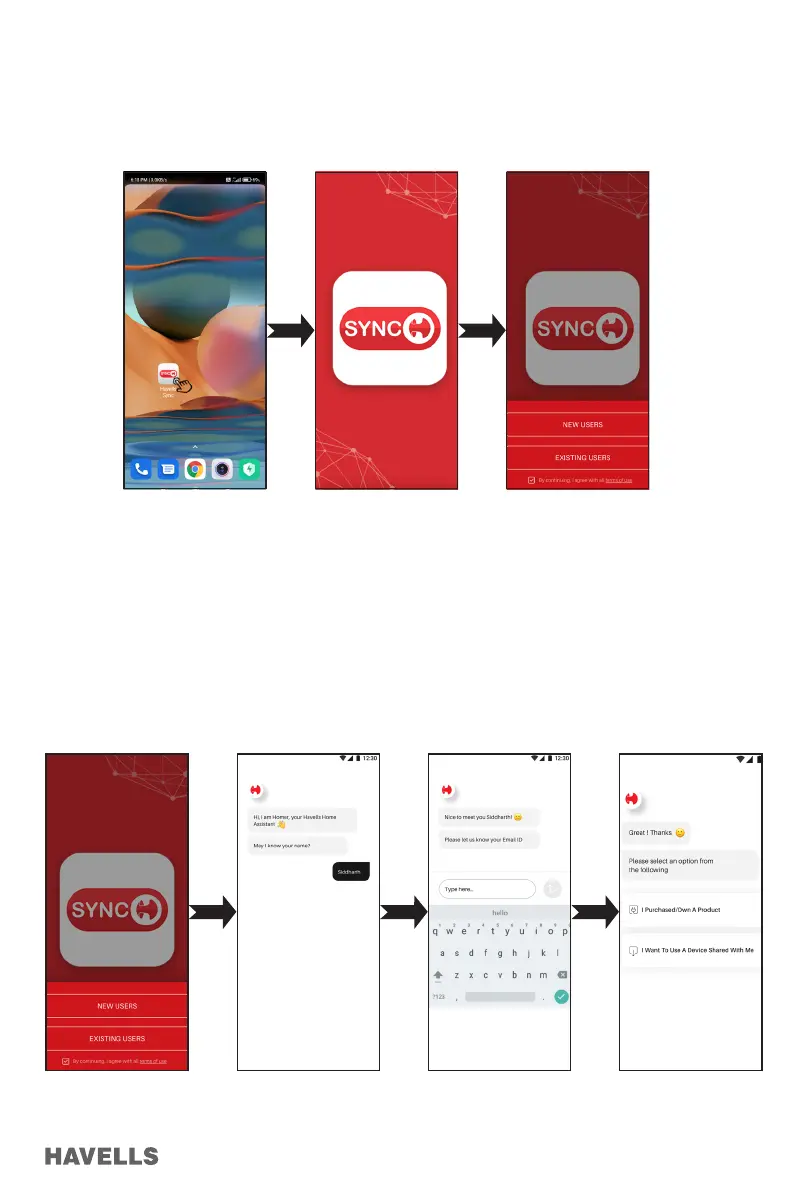
1. Open the APP by taping the “Havells SYNC” icon in your smart phone (Figure 19).
2. On the App, user has to choose Registration type before starting to use the App.
3. The user can be of two types: (gure 21)
“New User” Registration
1. Tap on the “NEW USER” and by continuing with the terms & conditions, process further
2. Enter the desired details on the screen displayed (ex. “User name”) (Figure 23)
3. Enter your Email ID in the provided space below (Figure 24)
4. Select whether the product is your own purchased or want to share the device with other user.
(Figure 25)
5. In case of new product purchase, choose rst option and then you arrive on home screen. (gure 38)
Figure 19 Figure 20 Figure 21
Figure 22 Figure 23 Figure 24 Figure 25


 To Next Page