4
Installation Guideline for Better Performance:
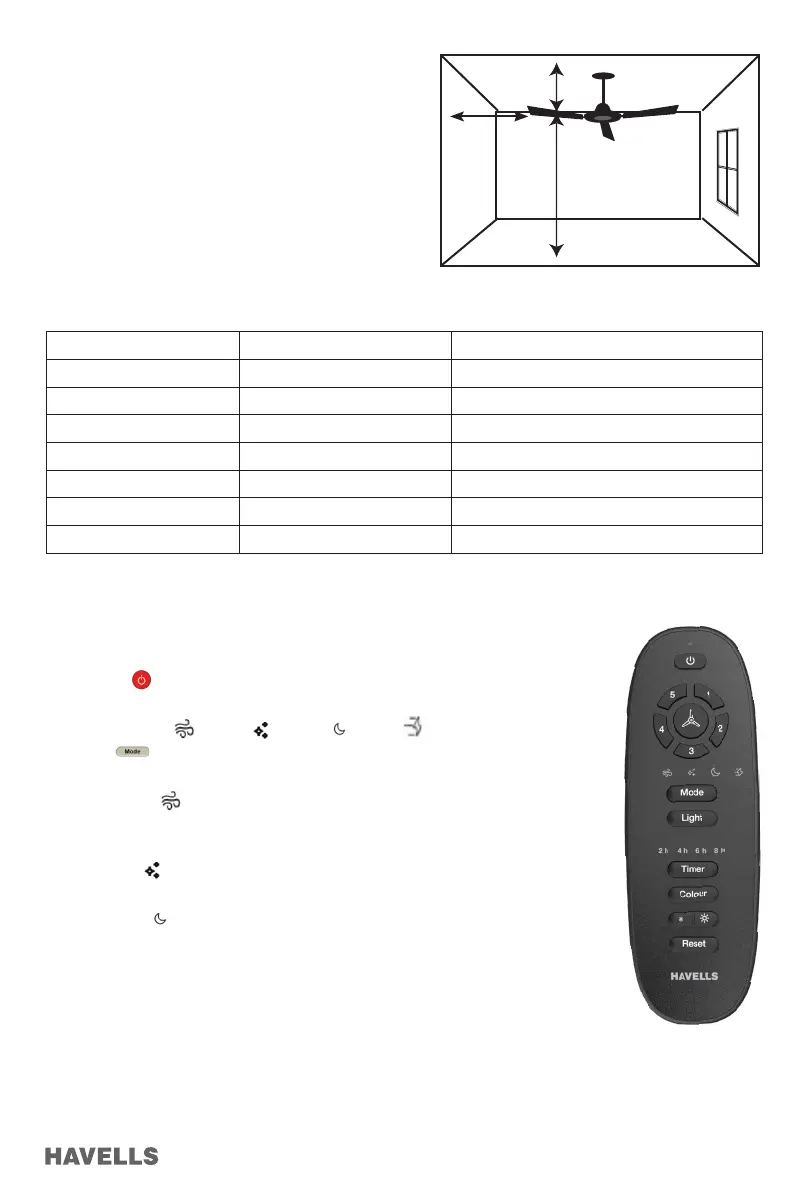
• To optimize the Air delivery, ceiling fan should be approx.
3 m from the Ground level and 30.5 cm below the ceiling.
• Remote Maximum Range in all direction is 3 m (with good
battery condition)
This range may vary if there are obstructions between
remote and fan.
• Keep Minimum (80 cm ~ 1.2 m) distance b/w blade tip and
side walls.
Selection Guide:
• Ceiling Fan recommended sweep for different room sizes:
Model Size Sweep / Size (mm) Suitable for room size
Ceiling fan 600 mm For Small Shops, Cabins & Toilets
Ceiling fan 750 mm 1.8 m x 3.0 m
Ceiling fan 900 mm 2.1 m x 3.0 m
Ceiling fan 1050 mm 3.0 m x 3.0 m
Ceiling fan 1200 mm 3.6 m x 3.9 m
Ceiling fan 1250 mm 3.8 m x 4.2 m
Ceiling fan 1400 mm 4.2 m x 4.8 m
3 m
30.5 cm
80 cm ~ 1.2 m)
Remote Operating Function:
1. Power ON/OFF:
• Press Button to switch ON and switch OFF the fan.
2. 1, 2, 3, 4 & 5: Press the desired button for their respective Fan speed.
3. Mode : Breeze / Mop / Sleep / Boost
• Press button to select/deselect respective Mode, selected LED icon will illuminate
for 5 seconds
• Breeze mode Fan speed varies from set speed after every 30 seconds.
i.e. fan speed increases progressively upto max speed, then decreases progressively
upto minimum speed in loop
• Mop mode Fan will run at 5th speed for 3 minutes then Fan OFF, Turn ON Fan again
from either Remote or Mains Supply
• Sleep mode


 To Next Page
 Loading...