15
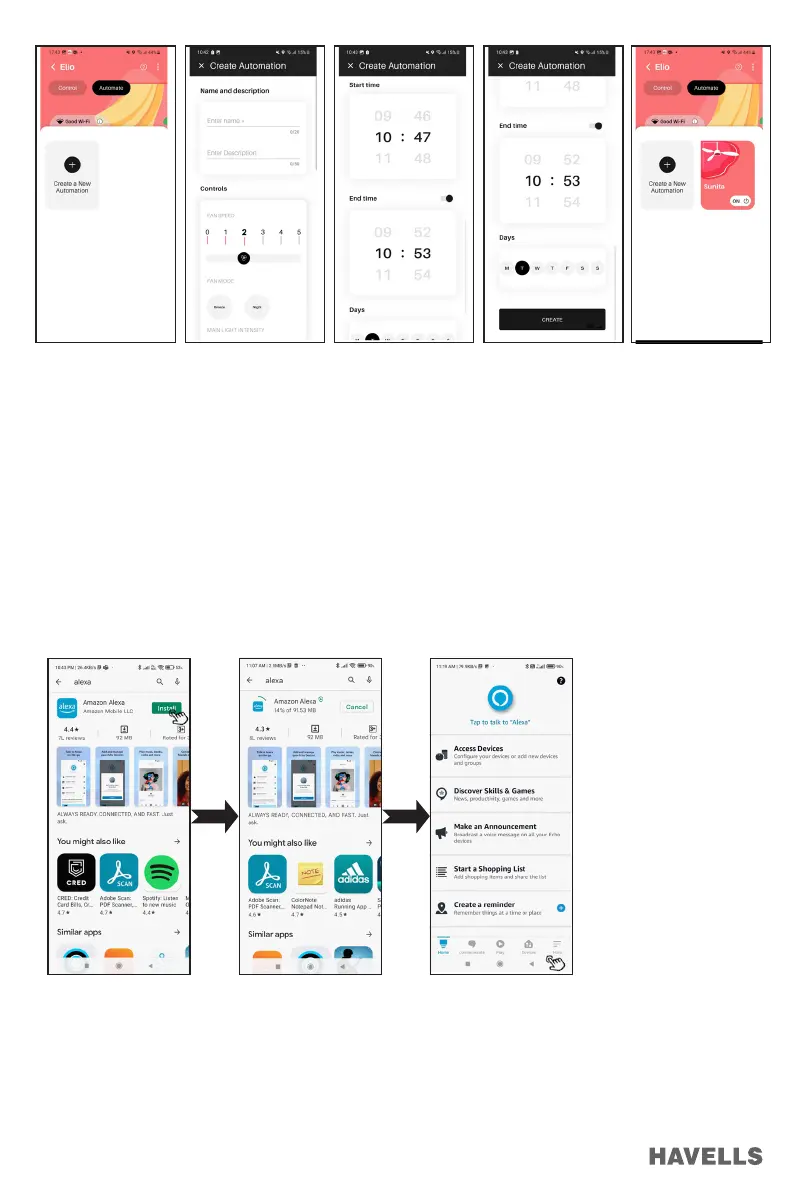
Figure 63 Figure 64 Figure 65 Figure 66 Figure 67
ALEXA SKILL ENABLING AND FAN OPERATION
Pre-requisite.
1. Stable Wi-Fi Network.
2. Alexa Device should be ready, signed in with amazon account.
3. Alexa smart phone App signed in with same Amazon Account.
4. ELIO Fan connected to a stable Wi-Fi Network.
5. “Havells Sync” signed in and connected to ELIO Fan.
6. “Havells Sync” account details. Note: Refer Section, APP User manual (Page 8 to 16) for setup using ‘Havells
Sync’ APP Account”.
Set up Alexa enabled ELIO Fan
1. Download/Install Alexa from Play store. (Figure 68, 69)
2. Login to Amazon Account, Alexa Home screen will Appear (Figure 70)
3. Run the App with voice recognition.
Figure 68 Figure 69 Figure 70
Link “Havells Sync” Skill to Alexa
1. Tap on “More” from the bottom menu options. (Figure 70).
2. Go to “Skills & Games” (Figure 71).
3. Search Havells Sync and select it (Figure 72).
4. Tap on “ENABLE TO USE” (Figure 73).
5. Enter Havells Sync account details to authorize Amazon Alexa to Link
6. Select “Sign In” (Figure 74).


 To Next Page
 Loading...