04 05
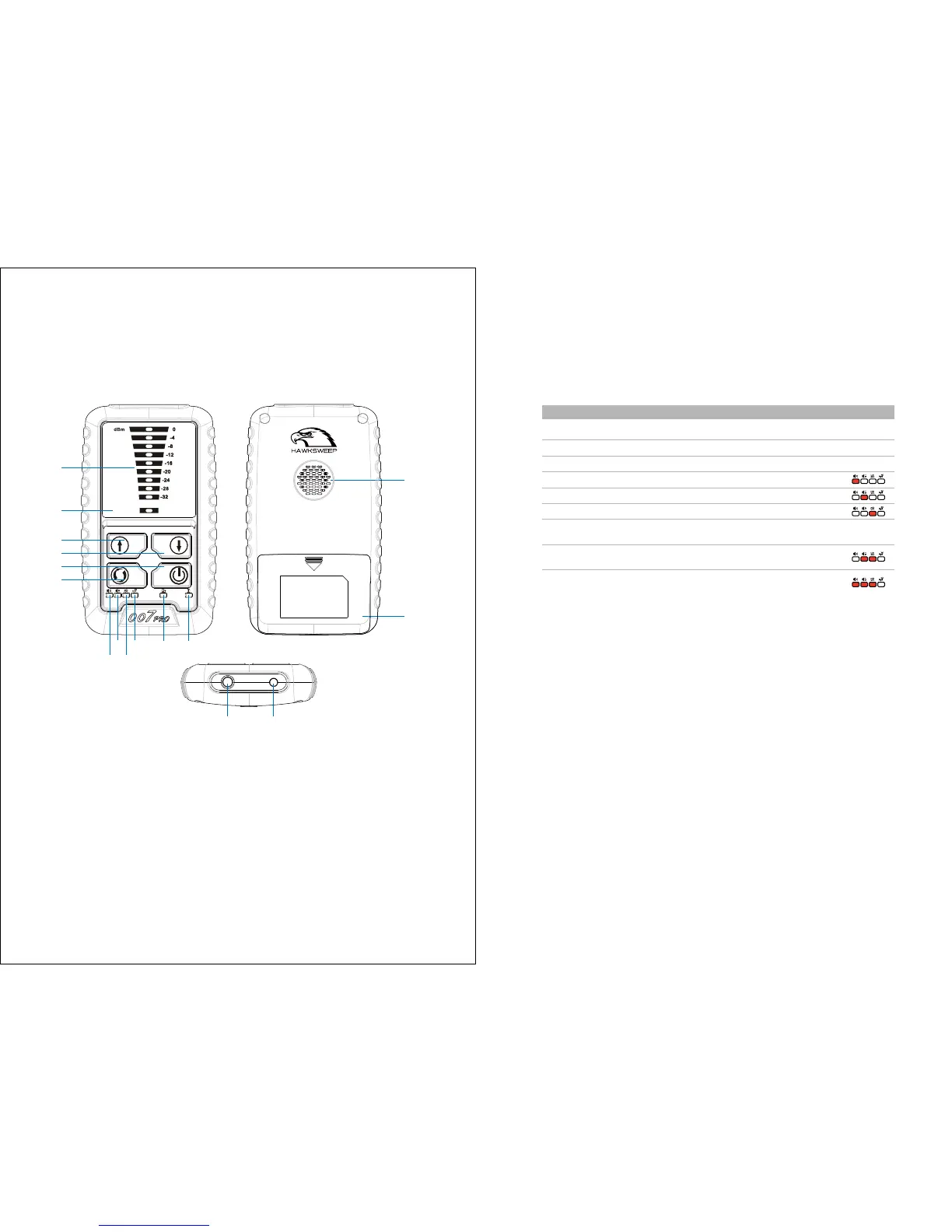
HS-007 Pro at a glance
1. Signal Strength Indication
2. Minimum Indication Lights
3. Increase sensitivity
4. Decrease sensitivity
5. Power ON/OFF
6. Selectable Mode Button
7. Power LED Lights
8. Charging LED lights.
9. Cellphone Locking LED Lights
10. Acoustic Mode Light
11. Sound Mode Light
12. Silent Mode Light
13. Headphone Jack
14. Recharging Connector
15. Speaker
16. Battery Cover
MINIMUM
UP
DOWN
POWE R
MODE
1
2
3
4
5
6
12
11
13 14
15
16
10
9
87
Using HS-007 Pro controls
Operate the device buttons and enter the desirable modes.
ON/OFF
Increase sensitivity
Decrease sensitivity
Silent Mode
Sound Mode
Acoustic Mode
Guard Mode
Vibrate Mode
Keep pressing Power Buttons for 2 seconds
Press UP
Press DOWN
Press Mode ,the corresponding lights will be on.
Press Mode ,the corresponding lights will be on.
Press Mode ,the corresponding lights will be on.
Press Mode to make the lights on shown as
picture.
Press Mode to make the lights on shown as
picture.
To Do
this Model light


 To Next Page