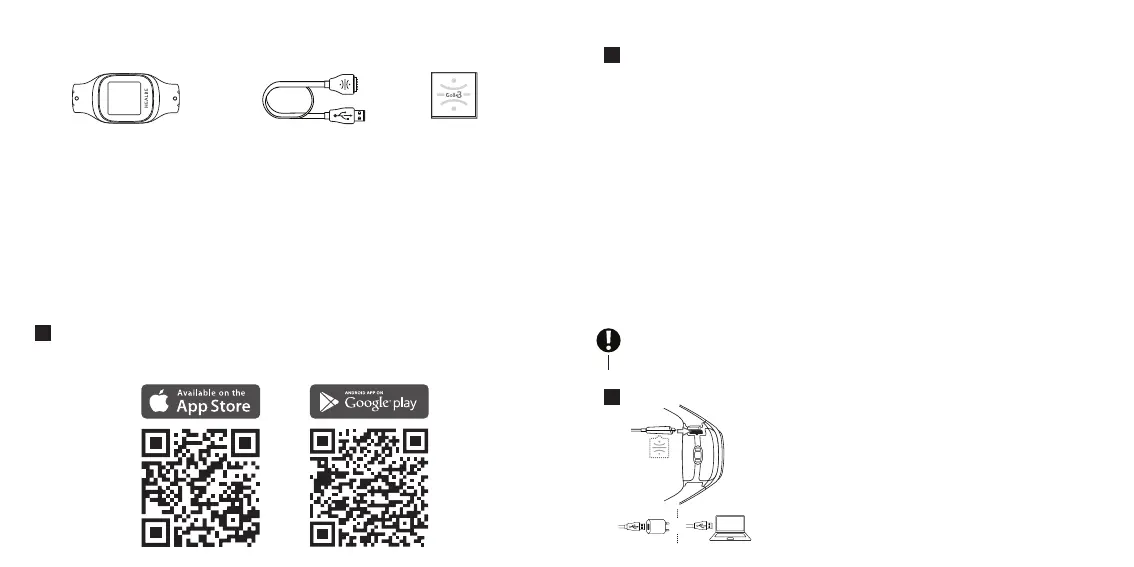
PACKAGE CONTENTS
2. USB charging cable1. HEALBE GoBe3 smart band
with strap
3. User guide
SETUP
GoBe3 can only be activated and made fully functional by using iOS 10 (or higher) or Android
5.0 (or higher). Your mobile device must also support Bluetooth® Low Energy (Bluetooth LE)
technology.
BEFORE YOU START USING THE HEALBE GoBe3 BAND
To start using GoBe3, you should install the latest updates for the HEALBE application on your
device. If you already have the HEALBE app installed on your phone, just update it to the
latest version and go to the “Getting started with HEALBE GoBe3” section of the current
manual.
DOWNLOAD AND INSTALL ON YOUR SMARTPHONE THE HEALBE APP FOR
IOS/ANDROID. Type “HEALBE” into the search bar of your preferred app store or open your
phone’s camera application and focus it on the QR-code of the chosen application store
below:
1
CREATE A HEALBE ACCOUNT IN THE APP.
Once you have specied your data during registration, the HEALBE app calculates other
important parameters automatically: average step length, glass volume of the drink
notication, and comfortable sleep duration.
However, we recommend changing the default values in these elds to your own ones in the
User prole and GoBe menu to ne-tune the band and achieve the best results.
GoBe uses this data to adapt to the individual parameters of the current user, thus making all
the inner algorithms personal and more accurate.
GETTING STARTED WITH HEALBE GoBe3
Before activating GoBe3 for the rst time:
1. Peel o all the protective lms from the display and optical sensor on the back of the
band;
2. Without touching the display with spirit, wipe all external surfaces with an alcohol pad or
alcohol tissue;
3. The band’s display can be cleaned with a dry cotton pad or a soft natural cloth.
Attention! The band is supplied uncharged. Connect the band to a power source using the
charging cable, and it will turn on and start working automatically upon reaching a sucient
battery level.
2
CONNECT GoBe3 TO A POWER SOURCE TO TURN IT ON AND ACTIVATE IT:
1. Connect the charging cable to GoBe3: carefully pull out
the charging socket plug located on the band’s rear side and
push the cable until it stops. While plugging in the cable, make
sure that the logo is directed towards the sensors;
2. Connect the charging cable to the USB interface of your PC
or mains adapter and turn on the power source;
3. Wait until the GoBe3’s display shows the welcome screen with
a message that the device is ready to connect to the app.
3
or
4 5


 To Next Page
 Loading...