EasyManua.ls Logo

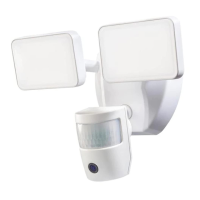
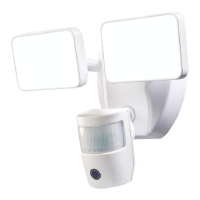
Health Zenith SECUR360 9300 - User Manual

Health Zenith SECUR360 9300
28 pages
Print Icon
To Next Page IconTo Next Page
Loading...
To see operational and troubleshooting information and videos,
go to www.hzsupport.com
Dated receipt required for warranty replacement.
FEATURES
1080p HD Video
180° Motion Sensor
Audible Alarm
Energy Saving LED
UNPACKING
Be sure to remove all contents from packaging and verify
all items are present before assembling this light xture.
is package includes the following items:
Security Light
Owners Manual
SECUR360 App Quick Start Guide
Mounting Hardware
© 2019 HeathCo LLC 210064-03A
Connected LED Video
Security Motion Light
Model: 9300
HARDWARE INCLUDED
Note: Six mounting bracket screws are included. e installation will only require two. Discard the unused mounting
bracket screws after installation.
Plastic plug #6 Mounting Bracket #8 Mounting Bracket
Screw (x2) Screw (x2)
Mounting Bolt Mounting Bolt (Pre-Installed in Light Fixture)
FRONT
Mounting Bracket Mini Screwdriver

Questions and Answers

  • J
    jwilliamsAug 2, 2025
    Why won't my Health Zenith Lighting Equipment turn on?
    • N
      Nicole PattersonAug 2, 2025
      There are several potential reasons why your Health Zenith lighting might not be turning on. Try the following: * Ensure the light switch is in the on position. * Check the fuse and replace if necessary, or turn the circuit breaker on. * Recheck the light after dark. * Verify that the wiring is correct. * Re-aim the motion sensor to cover the desired area. * Increase the sensitivity setting. * Use the app to set the light to “AUTO” mode.
  • C
    Charles HullAug 6, 2025
    Why does my Health Zenith SECUR360 9300 stay on continuously?
    • J
      John ClarkAug 6, 2025
      If your Health Zenith lights are staying on continuously, here are some possible solutions: * Decrease the sensitivity setting or reposition the motion sensor. * Use the app to set the light to “AUTO” or “OFF” mode. * Do not use a dimmer or timer to control the light fixture. Replace the dimmer or timer with a standard on/off wall switch. * Install the light fixture on a circuit without motors, transformers, or fluorescent bulbs.
  • C
    Connie McneilAug 11, 2025
    What to do if my Health Zenith SECUR360 9300 Lighting Equipment comes on for no apparent reason?
    • J
      jsanchezAug 11, 2025
      If your Health Zenith Lighting comes on for no apparent reason, try these steps: * Decrease the sensitivity setting or reposition the motion sensor. * The light fixture may be operating normally under these circumstances. * Do not use a dimmer or timer to control the light fixture; instead, use a standard on/off wall switch.
  • J
    Jasmine HarrisAug 15, 2025
    Why is my Health Zenith SECUR360 9300 Lighting Equipment flashing on and off?
    • V
      Victoria RobbinsAug 15, 2025
      If your Health Zenith Lighting Equipment is flashing, consider the following: * Reposition the lamp heads away from the motion sensor. * Decrease the sensitivity setting or reposition the motion sensor. * While in TEST mode, the light only stays on for 5 seconds. Set the “Full Brite Setting” in the app to the 1, 5, or 20 minute setting. * Relocate the light fixture away from this type of meter.
  • S
    sjonesAug 19, 2025
    Why does my Health Zenith SECUR360 9300 Lighting Equipment come on during the day?
    • P
      Paul MckeeAug 19, 2025
      If your Health Zenith lighting comes on during the day: * The light fixture is operating normally under these circumstances. * Set the “Full Brite Setting” in the app to the 1, 5, or 20 minute setting.
  • L
    Lynn HillAug 23, 2025
    Why do the lights turn off too late in Dusk-to-Dawn setting on my Health Zenith SECUR360 9300 Lighting Equipment?
    • C
      Colleen WatsonAug 23, 2025
      If the lights turn off too late in Dusk-to-Dawn setting, it may be because the light fixture is installed in a relatively dark location. Try relocating the light fixture or use the 3 hour or 6 hour setting.
  • A
    Andrew RojasAug 28, 2025
    What to do if my Health Zenith SECUR360 9300 flashes once then stays off in manual mode?
    • R
      Robyn PatelAug 28, 2025
      If your Health Zenith Lighting Equipment flashes once then stays off in manual mode, it may be because the motion sensor is detecting light from the lamp heads. Reposition the lamp heads to keep the area below the motion sensor relatively dark.

Summary

Product Features and Hardware

Product Features

Lists key features of the Connected LED Video Security Motion Light.

Unpacking Instructions

Details the contents of the package and verification steps before assembly.

Hardware Included

Identifies all mounting hardware components provided with the light fixture.

Safety and Installation Guidance

Important Safety Warnings

Provides critical safety precautions for preventing electric shock, fire, and other hazards.

Motion Sensor Detection Zones

Explains motion detection sensitivity and camera viewing angles for optimal placement.

Installation and Wiring Procedures

Fixture Installation Steps

Step-by-step instructions for mounting the light fixture and mounting plate.

Electrical Wiring Guide

Details the correct connections for the light fixture's terminal block and ground screw.

Final Assembly

Instructions for connecting the light fixture to the mounting plate and tightening securely.

Testing and Adjustments

Mounting Position Guidelines

Ensures correct fixture and sensor orientation for wall or eave mounting.

App-Based Testing and Setup

Guide for using the SECUR360 app to test motion and camera detection zones.

Sensor and Lamp Head Adjustment

How to adjust the motion sensor and lamp heads for optimal coverage.

Advanced Features and Reset

LED Indicator Status

Explains the meaning of different LED light patterns during operation.

DualBrite Duration Setting

Details the feature that adjusts light brightness based on time or motion.

Reset Button Functionality

Instructions on how to reset the light fixture to its original factory settings.

Specifications and Troubleshooting

Product Specifications

Lists technical details including sensing range, angle, power, and LED characteristics.

Troubleshooting Common Issues

Provides solutions for problems like light not turning on or false triggers.

Technical Support and Warranty

Technical Service Contact

Information on how to contact HeathCo LLC for assistance and required details.

One Year Limited Warranty

Details the warranty coverage, limitations, and exclusions for the product.

Health Zenith SECUR360 9300 Specifications

General IconGeneral
BrandHealth Zenith
ModelSECUR360 9300
CategoryLighting Equipment
LanguageEnglish

Related product manuals