The device described in this manual is the HealthyLine InfraMat Pro TAJ Series, a far-infrared heating pad filled with natural gemstones, designed to enhance wellness through heat therapy.
Function Description:
The HealthyLine InfraMat Pro is a nature-inspired medical device that utilizes natural gemstones to generate far-infrared (FIR) rays and negative ions when heated. It also incorporates Pulsed Electromagnetic Field (PEMF) therapy and Photon LED lights. The primary function of the mat is to provide muscular relaxation, temporary relief of stiffness, minor muscle and joint pain, temporary relief of joint pain associated with arthritis, temporary relief of muscle spasms, minor sprains and strains, and to increase circulation where applied. The device aims to improve overall health and wellness by delivering these therapeutic elements deep into the body. The mat's design allows for various temperature settings, enabling users to customize their experience from prolonged, low-heat sessions to shorter, high-heat sauna-like treatments.
Important Technical Specifications:
The mat's heating system uses state-of-the-art silicon heating wire with EMF filtration and smart heat sensors. It is constructed with 21 layers of materials, including:
- External casing: Flexible membrane, synthetic leather exterior, durable and easy to clean, keeps gemstones in place.
- Gemstones: Natural tourmaline, amethyst, and jade gemstones that produce far-infrared rays and negative ions.
- Thermal distribution layer: Ensures even heat distribution.
- Non-woven functional fabric: For increased negative ion output.
- Oxford waterproof fabric: Reduces damage from perspiration.
- Bamboo carbon fiber cotton: Adds an additional layer of protection.
- Copper fabric net: Shields from EMFs.
- Electric discharge patented layer.
- Yellow mud: Maximizes ion output.
- Charcoal layer: Magnetically charged layer to boost energy.
- Heat absorption release layer: Redistributes heat to avoid discrepancies.
- Thermal insulation: Prevents heat from being conducted downwards.
- Ecological compression cotton: For comfort.
- Photon LED lights: Visible red light at a wavelength of 660 nm.
- Pulsed Electromagnetic Field (PEMF) system: Simulates Earth's electromagnetic field, delivered at a default frequency of 7.83 Hz (displayed as 8 Hz) in a pulsed sinusoidal waveform.
- Waterproof eleusine cloth: Prevents wear.
The mat operates on 110V power for USA and Canada, with 220V models available for overseas use. The negative ion output varies from 300 to 3000 per cubic centimeter, depending on gemstone type and temperature.
Usage Features:
The InfraMat Pro is designed for ease of use with a dedicated controller.
- Quick Start: Involves content review (controller and warranty card), plugging one end of the controller into the mat and the other into a surge protector, and powering on the device.
- Temperature Control: Adjustable from 95°F (35°C) to 160°F (70°C).
- 95°F - 105°F (35-40°C) | OVERNIGHT: Good for prolonged and overnight use, promoting better sleep and relaxation. Safe for heat-sensitive individuals.
- 105°F - 130°F (45-55°C) | UNDER 2 HR: Temporary relief of joint pain, stiffness, and minor muscle pain; provides muscular relaxation and temporary increase in local circulation. Not too warm for the average person.
- 130°F - 150°F (55-65°C) | 30-90 MIN: Warmer setting for temporary relief of joint pain, stiffness, and minor muscle pain; provides muscular relaxation and temporary increase in local circulation. Recommended for use up to twice a day.
- 150°F - 160°F (65-70°C) | 30-60 MIN: Provides a far-infrared sauna experience when heat is trapped. Recommended for use once a day, with a mylar blanket or towel to trap heat.
- Controller Instructions:
- Power Button: Turns the controller ON, illuminating TEMP, TIMER, PEMF, and PHOTON indicators.
- Temperature Setting: Press TEMP to turn on heat, press again to enter adjustment mode (flashing indicator), use +/- buttons to set, press TEMP again to save.
- °F or °C Units Set: Press and hold TIME for 6 seconds to switch between Fahrenheit and Celsius.
- Timer Setting: Press TIME to enter adjustment mode (flashing indicator), use +/- buttons to set, press TIME again to save.
- PEMF Setting: Press PEMF to turn ON, press again to enter frequency adjustment mode (flashing indicator), use +/- buttons to set frequency (1-30 Hz), press PEMF again to save. Press and hold PEMF for 6 seconds to turn OFF.
- Photon Light: Press PHOTON button to turn lights ON or OFF.
- Factory Reset: Press and hold PEMF for 10 seconds while the controller is ON; the controller will shut down and turn back ON automatically.
- Preheating: Preheat the mat for 15-20 minutes before use. Allow up to 40 minutes for the surface to reach the highest temperature.
- Hydration: Stay hydrated, especially when using higher temperatures.
- Covering the Mat: Always cover the mat with a blanket, towel, or waterproof cover to protect from moisture, stains, direct contact with hot gemstones, and to alleviate excessive heat. Covering also helps gemstones heat faster. Partial coverage is not recommended as it can cause heat sensors to malfunction.
- Sleeping on Mat: Only with low heat settings to prevent dehydration.
- Folding: Only fold the mat inward at predetermined positions. Frequent folding may reduce the system's resource life.
- Placement: Use on flat surfaces like a bed, floor, or massage table. When using in a bed or chair, place a foil blanket or bath towel between the mat's backside and the surface to prevent slight heat transfer.
- Calorie Burning: High settings (122°F-140°F) can increase heart rate, boost metabolism, and improve circulation, similar to cardiovascular exercise. Sauna effect (158°F) with a blanket can induce sweating and detoxification.
- EMF Protection: Features double insulated wiring and an EMF-filtering copper mesh layer, along with grounding.
Maintenance Features:
- Protection from Moisture: Always protect the mat from moisture, including spills and perspiration, by using a cover.
- Cleaning:
- After use, set the mat to a high temperature for 15-20 minutes to evaporate any moisture, then unplug and power down.
- Clean the surface of the mat and controller with a dry cloth or a slightly damp sanitizing wipe as needed.
- Do not use chemicals or solvents for cleaning.
- For spills, unplug, absorb excess moisture with paper towels, wipe with multi-surface cleaning wipes, spray odor remover, and air dry. For stubborn dirt, carefully rinse the affected area of the unconnected mat under a shower stream, minimizing water ingress, then blow-dry.
- Storage: Use the provided dustproof bag. Keep the mat in a dry and ventilated place. Avoid excessive folding or bending to prolong its lifespan.
- Ventilation: Keep the controller ventilated; do not place it on soft surfaces that may cover vents. If the controller overheats, turn off the heat and place it on a firm surface.
Warranty and Policies:
- 5-Year Limited Warranty: For all TAJ models, requiring purchase confirmation (model, serial number, date, price).
- 45-Day Trial Period: Allows users to test the product and return it if not satisfied.
- Lifetime Trade-In: After the warranty period, users can trade in their mat for half its original value towards a new purchase.
- Lifetime Upgrade: Users can upgrade their current mat to a larger or more advanced model, receiving full original value credit if the mat is in good condition and the new purchase is at least twice the value of the old mat.

 Need help?
 General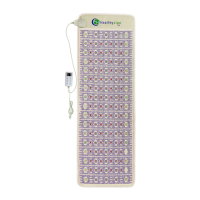

 To Next Page
