Heat Controller, Inc. Room Air Conditioner with R-410A Owner’s Manual
8
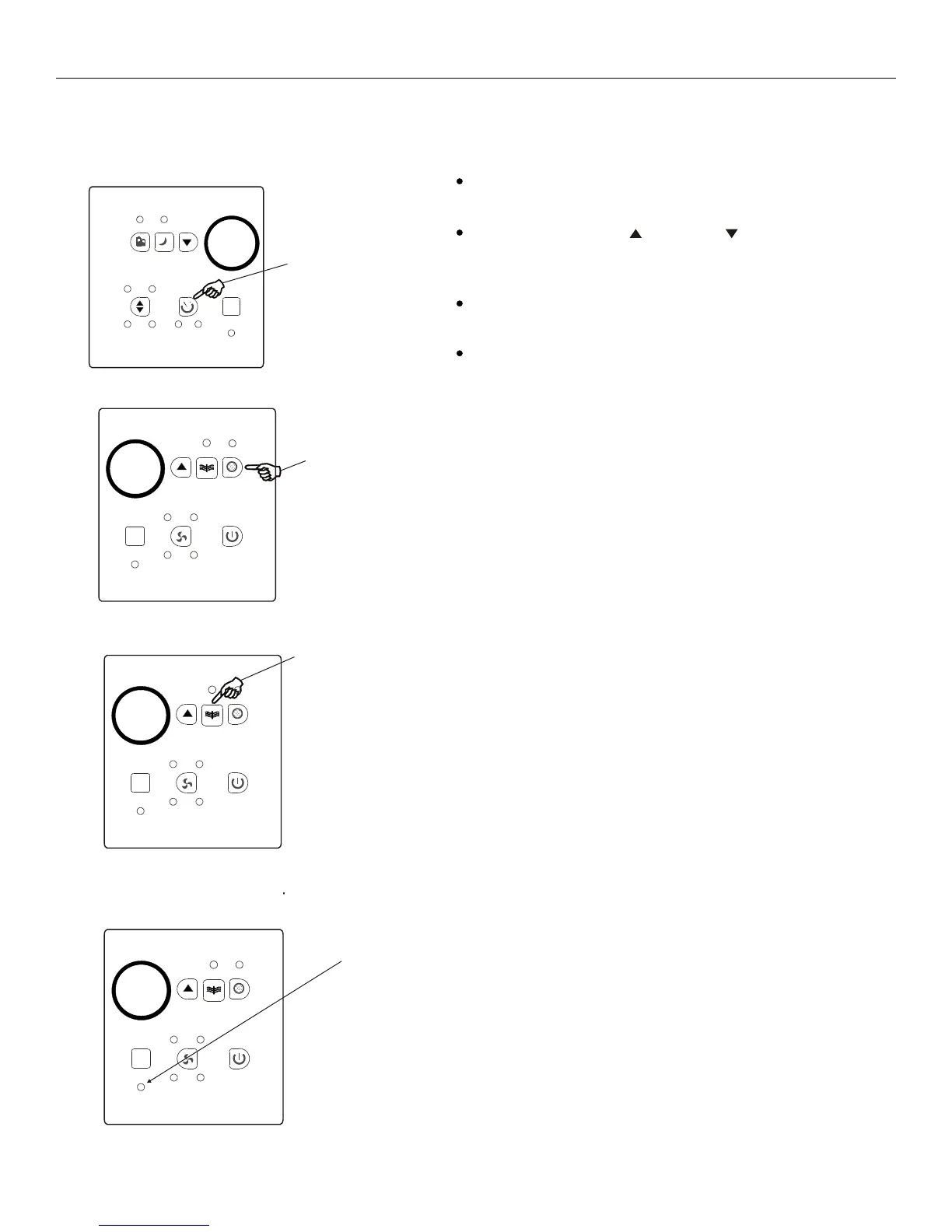
TIMER: AUTO START/
STOP FEATURE:
Press Timer
button
DO THIS:
AIR CONDITIONER FEATURES(CONTINUED)
First press the Timer button, the indicator light
besides word On illuminates. It indicates the Auto
Start program is initiated.
Press or hold the Up( ) or Down( ) to change
the Auto time by 0.5 hour increments, up to 10 hours,
then at 1 hour increments up to 24 hours. The control
will count down the time remaining until start.
The selected time will register in 5 second and the
system will automatically revert back to display the
previous temperature setting.
Turning the unit ON or OFF at any time will cancel
the Auto Start/Stop function.
NOTE:
CHECK FILTER FEATURE:
Press Check
Filter button
DO THIS:
This feature is a reminder to clean the Air Filter for
more efficient operation. The LED(light) will illumi-
nate after 250 hours of operation. To reset after
cleaning the filter, press the Check Filter button and
the light will go off.
NOTE:
FOLLOW ME FEATURE:
(on some models)
Light flashing
NOTE:
To activate the Follow Me feature, point the remote
control towards the unit and press the Follow Me
button. T
If the unit
does not receive the Follow Me signal during any 7
minute interval, the unit will beep to indicate the
Follow Me mode has ended.
The actual temperature can be displayed at the unit
by pressing the Fan Only mode. When in the Cool
mode, the unit display indicates the set temperature.
he remote display is actual temperature
at its location. The remote control will send this
signal to the air conditioner every 3 minutes interval
until press the Follow Me button again.
This feature can be activated from the remote
control ONLY. The remote control serves as a
remote thermostat allowing for the precise
temperature control at its location.
Energy
Saver
Sleep Timer
Temp
Fan Dry
Mode
Timer
Auto Cool On Off
Follow
Me
Temp
Timer Check
Filter
High Med
Follow
Me
Auto Low
Fan
On/Off
Temp
Timer Check
Filter
High Med
Follow
Me
Auto Low
Fan
On/Off
Clean
Air
Clean
Air
CLEAN AIR FEATURE:
(on some models)
Press Clean
Air button
DO THIS:
Temp
Timer Check
Filter
High Med
Follow
Me
Auto Low
Fan
On/Off
Clean
Air
Press the Clean Air button, the ion generator is
ener gized and will help to remove pollen and
impurities from the air, and trap them in the filter.
NOTE:
This feature can be activated from the remote
control ONLY. The remote control serves as a remote
thermostat allowing for the precise temperature
control at its location rather than from the unit’s
temperature sensor.
To activate the Follow Me feature, point the remote con-
trol towards the unit and press the Follow Me button. The
remote display is actual temperature at its location. The
remote control will send this signal to the air conditioner
every 3 minutes until the Follow Me button is pressed
again. If the unit does not receive the Follow Me signal
during any 7 minute interval, the unit will beep to indicate
the Follow Me mode has ended.
The actual temperature can be displayed at the unit by
pressing the Fan Only mode. When in the Cool mode,
the unit display indicates the set temperature.
Press the Clean Air button, the ion generator is
energized and will help to remove pollen and
impurities from the air, and trap them in the lter.
First press the Timer button, the indicator light besides
word On illuminates and indicates the Auto Start
program is initiated.


 To Next Page