icon and its SET temperature.
For the sake of its use simplicity, Heatermate comes with Automatic Mode disabled. To enable it, please refer to Section 6
(Factory Settings): at No. 9 in the Table change 01 to 00 by pressing Down button, then press SET to save. The Automatic Mode
is now enabled. Use short press of SET button to switch between Manual and Automatic Modes.
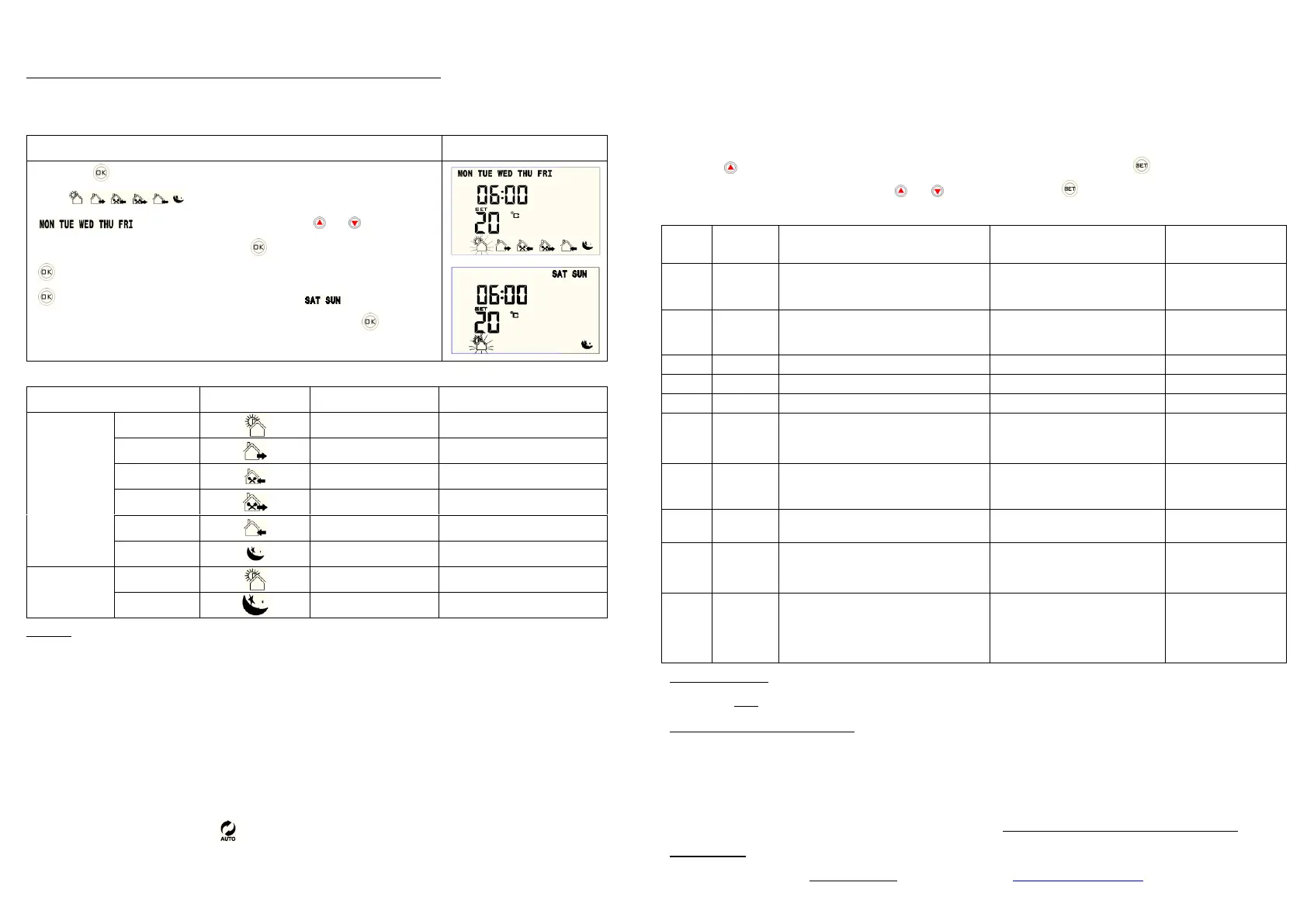
Press/hold “ ” for 3 seconds then release - screen will
display (6 periods for every week day) and week days:
“ ”. First period will be flashing - press “ ” or “ ”to adjust
temperature setting temperature then press “ ” to adjust time setting. Press
“ ”to go to the next period and so on for all 6 periods for week days. Now press
“ ” to go to weekend programming with 2 periods for “ ” and set
temperatures and times in the same way as for week days. . Press “ ” when
finished. Please refer to the table below for default values for different periods.
5) Factory Programmed Periods and Settings
Example: Set the heater to come ON at 7pm, maintain room temperature at 20 degrees until 7am, then turn OFF until 1pm,
then at 1 pm to come ON and maintain 22 degrees temperature until 2.30pm, then turn OFF and come ON at 7pm (as above)
and so on, during weekdays:
(i) Set up Period 1 temperature to well below the typical room temperature e.g. to 10 degrees and Period 1 start time to 07:00;
(ii) Move to period 2 and set its temperature also to 10 degrees and leave its start time as default at 08:00 (iii) Repeat the same
for period 3 (iv) Move on to period 4 and set its temperature to 22 degrees and its start time to 13.00; (v) Move on to Period 5
and set its temperature to 10 degrees and its start time as 14.30 (vi) Move on to Period 6 and set its temperature to 20 degrees
and its start time to 19.00; (vii) Make sure the Timer function is disabled – 00.00 is set for both ON and OFF times (viii) Make
sure Heatermate is in Automatic mode - symbol is showing next to SET temperature. If not, press SET button once to switch
to Automatic mode. You can now leave your Heatermate plugged in and it will do the job.
6) Factory Settings
This section shows how to change the factory settings according to your requirements, such as: enable Automatic
Mode, adjust the temperature sensor reading, change the temperature differential to activate your heater (see Section 1
- Operation), change from Heating to Cooling Mode etc.
Press/hold “ ” for 3 seconds then release to enter into factory settings mode, then press“ ”to choose the required
option (A1-A9, AA) as per table below. Press“ ” or “ ”to adjust value. Press“ ” to save and move to the next option.
Press Power to exit or wait 12 seconds for Factory Setting programming to time out.
Room Ventilation Function
(Heater is off when window is open)
Temperature Differential to Activate
Heater
Temperature Setting - Highest Limit
Temperature Setting - Lowest Limit
Temperature Sensor Calibration
Anti-freezing Function – turns heater ON
when temperature is below 5ºC
00:Anti-freezing function OFF
01:Anti-freezing function ON
00:Anti-freezing
function OFF
Resume operation after power
disconnection or stay OFF
01:Resume operation
00:Stay OFF
00:Cooling Mode
01:Heating Mode
Automatic Mode (AM) – weekly
programming
00: AM is enabled
01: AM is disabled
Return to Factory Settings
88:Do not return to Factory
Settings
00:Return to Factory Settings
Troubleshooting: Problem: Can’t turn the unit ON - display remains blank. Solution: with Heatermate plugged into power
do a firm but short press (pressing and holding even a little will not work) on the Power button – the display will come up.
TECHNICAL SPECIFICATIONS:
Operating Voltage: 240V , 50HZ
Max Load: 10A, 2400W (resistive)
Temperature Measurement Precision:±1ºC
Temperature Setting Range:1ºC - 70ºC
Self-consumption Power:<0.3W
Temperature Sensor: NTC
NB: Suitable for use with heaters and air conditioners which can automatically restart after power reconnection
WARRANTY: This product comes with 2 years manufacturer warranty – please contact your place of purchase for
warranty replacement. For technical support please contact us via info@heatermate.com.au or call us 1800 229 325.


 To Previous Page
 Loading...