o
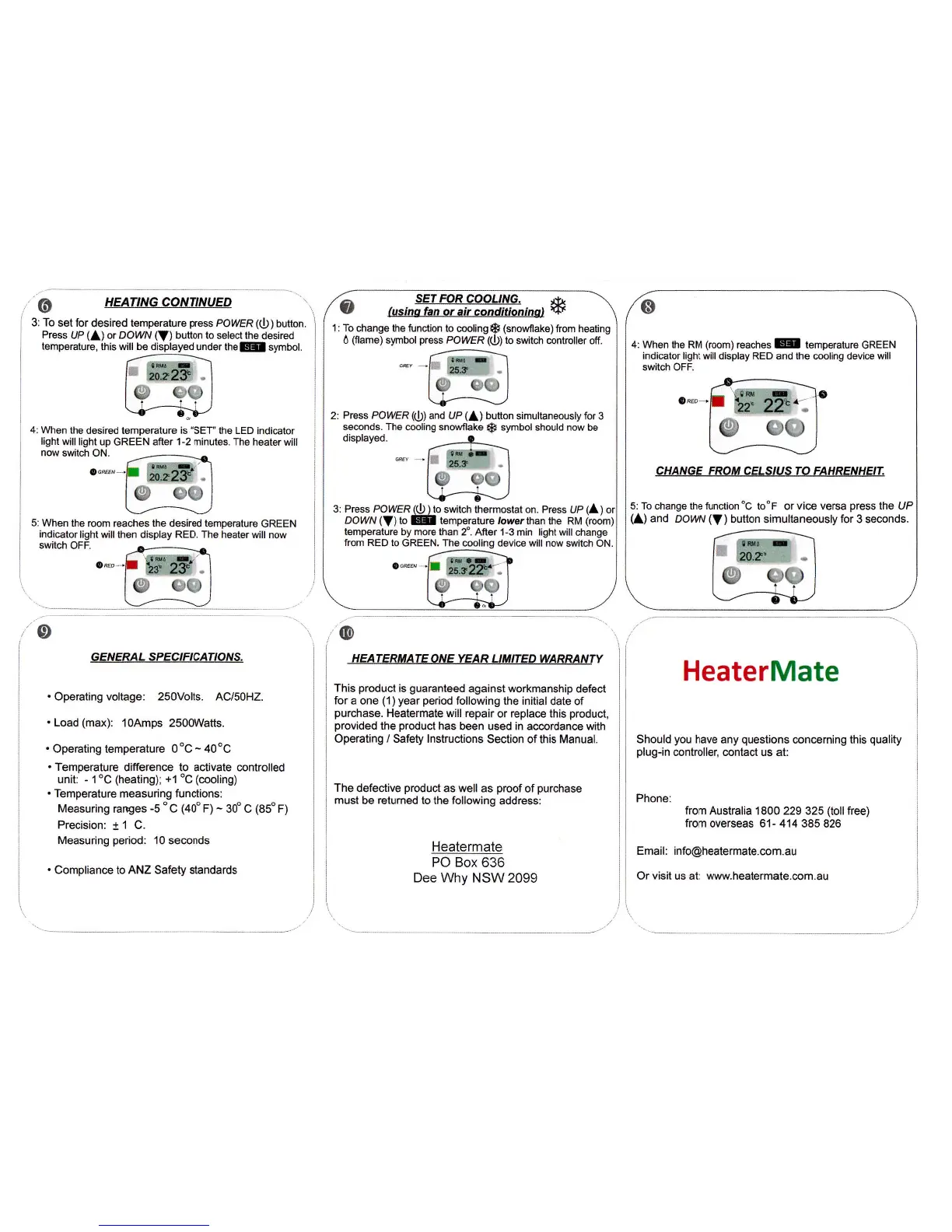
HEAT'NG CONTINUED
3: To
set for
desired
temperature
press
POIVER
(())
button.
Press
UP
(A)
or
DOW?V
(V)
bution to
seloct ths
desired
When
the desired tsmperature is
"SET'lhe
LED
indicator
light
will light
up GREEN
alter 1-2 minules. The
heater will
now
switch ON.
5: When
the room reaches the desired temperature
GREEN
indicator
light will then display
RED. The
heater will
now
switch
OFF.
/o
GENERAL S
P
ECIF
ICATIONS,
.
Operating voltage: 250volts. AC/50H2.
.
Load
(max):
1oAmps 2500Watts.
.
Operating temperature 0oC
-
40oC
.
Temperature
difference to activate controlled
unit:
-
1"C
(heating);
+1
oC
(moling)
.
Temperature
measuring
functions:
Measuring
rar€es
-5
o
c
(40'
F)
-
30' c
(85"
F)
Precision:
t
1 C.
Measuring
period:
10 seconds
.
Compliance to ANZ
Safety
standards
,@
HEATERFIATE ONE YEAR
LIIIITED WARRANTY
This
product
is
guaranteed
against workmanship
defect
for
a one
(1) year period
following
the
initial
date of
purchase.
Heatermate
will repair or replace this
product,
provided
the
product
has
been used in
accordance
with
Operating / Safety lnstructions
Section
of
this Manual.
The
defective
product
as well
as
proof
of
purchase
must
be
returned
to the following
address:
Heatermate
PO
Box 636
Dee Why NSW 2099
HeaterMate
Should
you
have any
questions
concerning this
quality
plug-in
controller, contact
us at:
Phone:
from Australia 1800 229 325
(toll
free)
from
overseas 61- 414 385 826
Emai!:
info@heate.maie.com.au
Or visit us at www.heatermate-com.au
1,
fusino hn or
ai, anditioninat
ff
'l:
To
change the function to
cooling{S
(snowflake)
from
heating
d
(flame)
symbol
press
POIVER (O)
to
switch controller off.
Press PO!'tlER
(O)
and UP
(A)
button
simultaneously for 3
seconds. The
cooling snowflake
{p
symbol should now be
t€mperature
by more than 2". AAer 1-3
min
light
will change
from
RED to GREEN. The
cooling device will now
switch
ON.
3: Press POWER@I1o
switch thermostat on. Press
UP
(A)or
DOWN
(V)to
E
temp"ratu.e ,owerthan
the nu
(ro6m)
0
4: When
the RM
(room)
reaches E temperature
GREEN
indicator light will display RED
and
the
cooling device
will
switch OFF.
CHANGE FROM CELSIUS TO
FAHRENHEIT.
5: To
change
the function "C
to'F or vice versa
press
the UP
(
)
and
DOrv?V
(V
)
button simultaneously for 3 seconds.
908



 To Previous Page
 Loading...