1
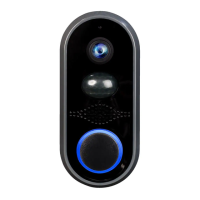
Thank You for Purchasing Notifi ™ Video Doorbell System
Welcome to Notifi by HeathZenith, the fi rst video doorbell system that doesn’t require batteries for the camera and allows you
to position the camera to best suit your needs. This manual will help setup the Notifi system. Please read and understand this
entire manual before attempting to assemble, install, or operate the Notifi system. For additional support and videos, go to
www.heath-zenith.com/notifi .
IMPORTANT INFORMATION
• Minimum system requirement for the Notifi app is iOS 7 or higher and Android 2.2 or higher.
• The Notifi camera requires constant power to operate. Whenever the power is turned on to the camera (either for the fi rst
time or after a power outage), the bulb requires a short 60-second boot-up period before the camera will be fully operational.
NOT COMPATIBLE WITH LIGHT FIXTURES CONTROLLED BY A:
• Photocell (dusk-to-dawn operation)
• Motion Sensor
• Dimmer
• Timer
Many states regulate the use of security cameras and other recording devices. It is the purchaser’s sole
responsibility to ensure compliance with all applicable laws and to provide any legally required notices.
Check local laws regarding the use of any recording devices and cameras prior to installation.
Introduction
Table of Contents
INTRODUCTION . . . . . . . . . . . . . . . . . . . . . . . . . . . 1-3
SETUP . . . . . . . . . . . . . . . . . . . . . . . . . . . . . . . . . . . 4-6
HOW TO USE . . . . . . . . . . . . . . . . . . . . . . . . . . . . . 7-9
CARE AND CLEANING . . . . . . . . . . . . . . . . . . . . . . . 9
FAQS . . . . . . . . . . . . . . . . . . . . . . . . . . . . . . . . . . 10-11



 To Next Page