EasyManua.ls Logo

Heathkit HM-2102 - Page 19

Heathkit HM-2102
26 pages
Print Icon
To Next Page IconTo Next Page
To Previous Page IconTo Previous Page
Loading...
Ge
guearHnKit®
Page
15
FINAL
ASSEMBLY
#6
x
1/4"
SHEET
METAL
SCREW
REMOTE
CHASSIS
FOIL
SIDE
a
sale
CIRCUIT
BOARD
we
REMOTE
~~,
CHASSIS
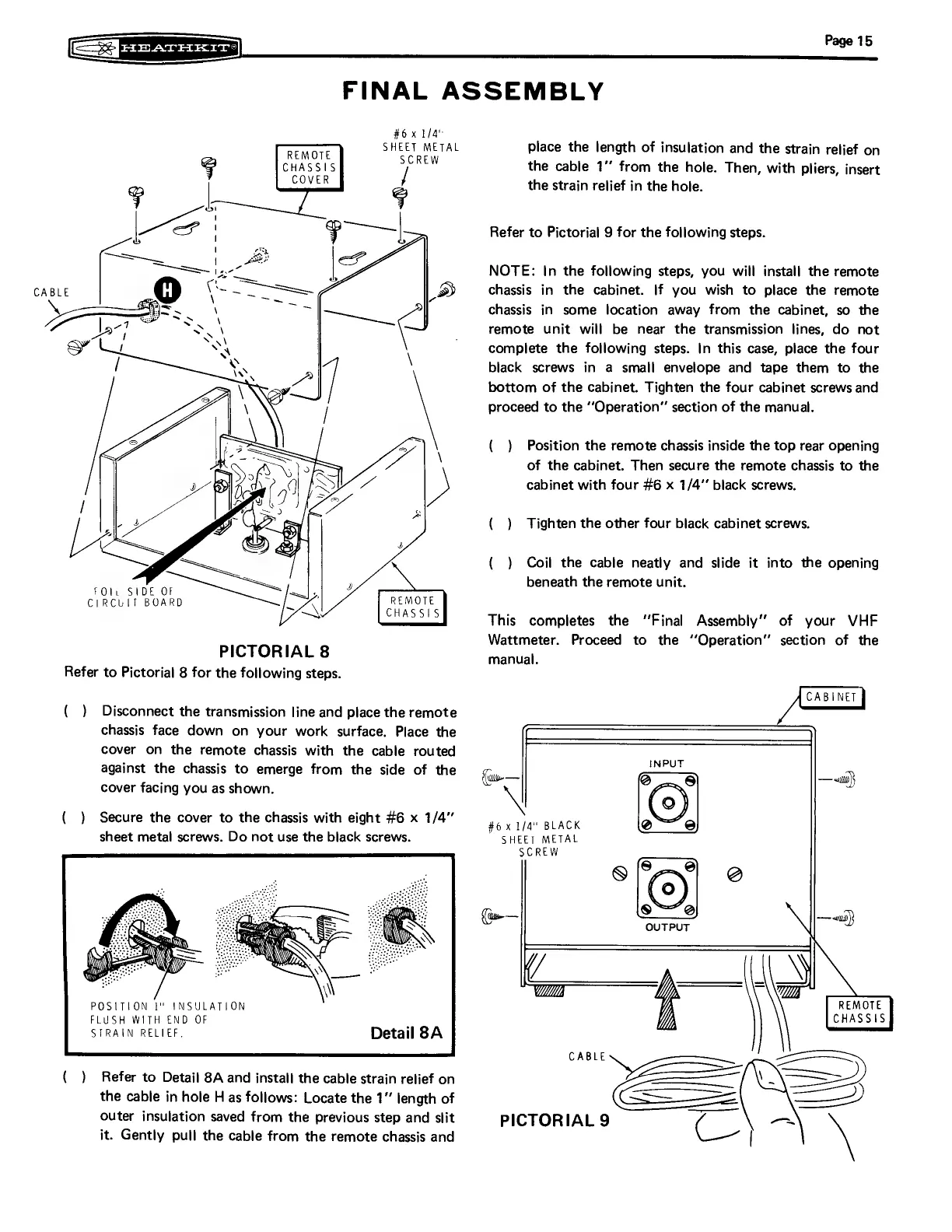
PICTORIAL
8
Refer
to
Pictorial
8
for
the
following
steps.
(
)
Disconnect
the
transmission
line
and
place
the
remote
chassis
face
down
on
your
work
surface.
Place
the
cover
on
the
remote
chassis
with
the
cable
routed
against
the
chassis
to
emerge
from
the
side
of
the
cover
facing
you
as
shown.
(_
)
Secure
the
cover
to
the
chassis
with
eight
#6
x
1/4”
sheet
metal
screws.
Do
not
use
the
black
screws.
POSITION
I"
INSULATION
FLUSH
WITH
END
OF
STRAIN
RELIEF.
Detail
8A
(
)
Refer
to
Detail
8A
and
install
the
cable
strain
relief
on
the
cable
in
hole
H
as
follows:
Locate
the
1”
length
of
outer
insulation
saved
from
the
previous
step
and
slit
it.
Gently
pull
the
cable
from
the
remote
chassis
and
place
the
length
of
insulation
and
the
strain
relief
on
the
cable
1’°
from
the
hole.
Then,
with
pliers,
insert
the
strain
relief
in
the
hole.
Refer
to
Pictorial
9
for
the
following
steps.
NOTE:
In
the
following
steps,
you
will
install
the
remote
chassis
in
the
cabinet.
If
you
wish
to
place
the
remote
chassis
in
some
location
away
from
the
cabinet,
so
the
remote
unit
will
be
near
the
transmission
lines,
do
not
complete
the
following
steps.
In
this
case,
place
the
four
black
screws
in
a
small
envelope
and
tape
them
to
the
bottom
of
the
cabinet.
Tighten
the
four
cabinet
screws
and
proceed
to
the
‘‘Operation”
section
of
the
manual.
(
)
Position
the
remote
chassis
inside
the
top
rear
opening
of
the
cabinet.
Then
secure
the
remote
chassis
to
the
cabinet
with
four
#6
x
1/4’’
black
screws.
(
)
Tighten
the
other
four
black
cabinet
screws.
(
)
Coil
the
cable
neatly
and
slide
it
into
the
opening
beneath
the
remote
unit.
This
completes
the
‘Final
Assembly"
of
your
VHF
Wattmeter.
Proceed
to
the
“‘Operation”
section
of
the
manual.
|
CABINET
}
“|
—an}
#6
x
1/4"
BLACK
SHEET
METAL
(—
OUTPUT
sad}
CABLE
—_
=
——)
PICTORIAL
9
=~
(_)
\

Related product manuals