EasyManua.ls Logo

Heathkit IM-4180 - Page 8

Heathkit IM-4180
42 pages
Print Icon
To Next Page IconTo Next Page
To Previous Page IconTo Previous Page
Loading...
Pes
ed
FIED
ATELECITITS
rr
{
)
7.
Return
to
“Alignment
Using
Frequency
Counter”
or
to
‘Alignment
Using
FM
Re-
and
rarcharck
all
of
tha
alhanmant
44th
PK
OE
OU
LAL
UL
Sst
steps
cainider
those
headings;
you
should
need
to
make
only
slight
adjustments
to
either
coil
L202
or
trimmer
C211.
cei
ver,
ea
a
Proceed
to
“Main
Circuit
Board
Calibration.”
Refer
to
Pictorials
5-2
and
6-2
(Illustration
Booklet,
Page
9)
as
you
perform
the
following
calibration
steps.
(
JA
On
the
front
panel
of
the
Meter,
set
all
the
pushbutton
switches
to
their
“out”
positions
{press
lightly
on
adjacent
buttons).
(t)
On
the
main
circuit
board,
make
sure
the
green
jumper
wire
is
connected
to
the
15V
circuit
haard.
ie
et
at
ia,
iy
Bes
|
yoOara,
all
other
jyuiiper
wires
should
be
on
their
adjacent
NORM
circuit
board
pins.
(,
)
Push
the
ON-OFF
switch
to
ON.
(A
Push
in
the
2
kHz
DEVIATION
switch.
When
the
pointer
swings
upscale,
stop.
Caretully
turn
the
OFFSET
control
counterclockwise
until
the
meter
pointer
just
stops
at
“‘0.”,
NOTE:
You
may
wish
to
repeat
this
b
step
a
few
times
to
be
sure.
Vv
«J
Move
the
red
jumper
wire
to
the
CAL
pin.
(
(!
})
Move
the
orange
jumper
wire
to
the
TUNE
pin.
(,
)
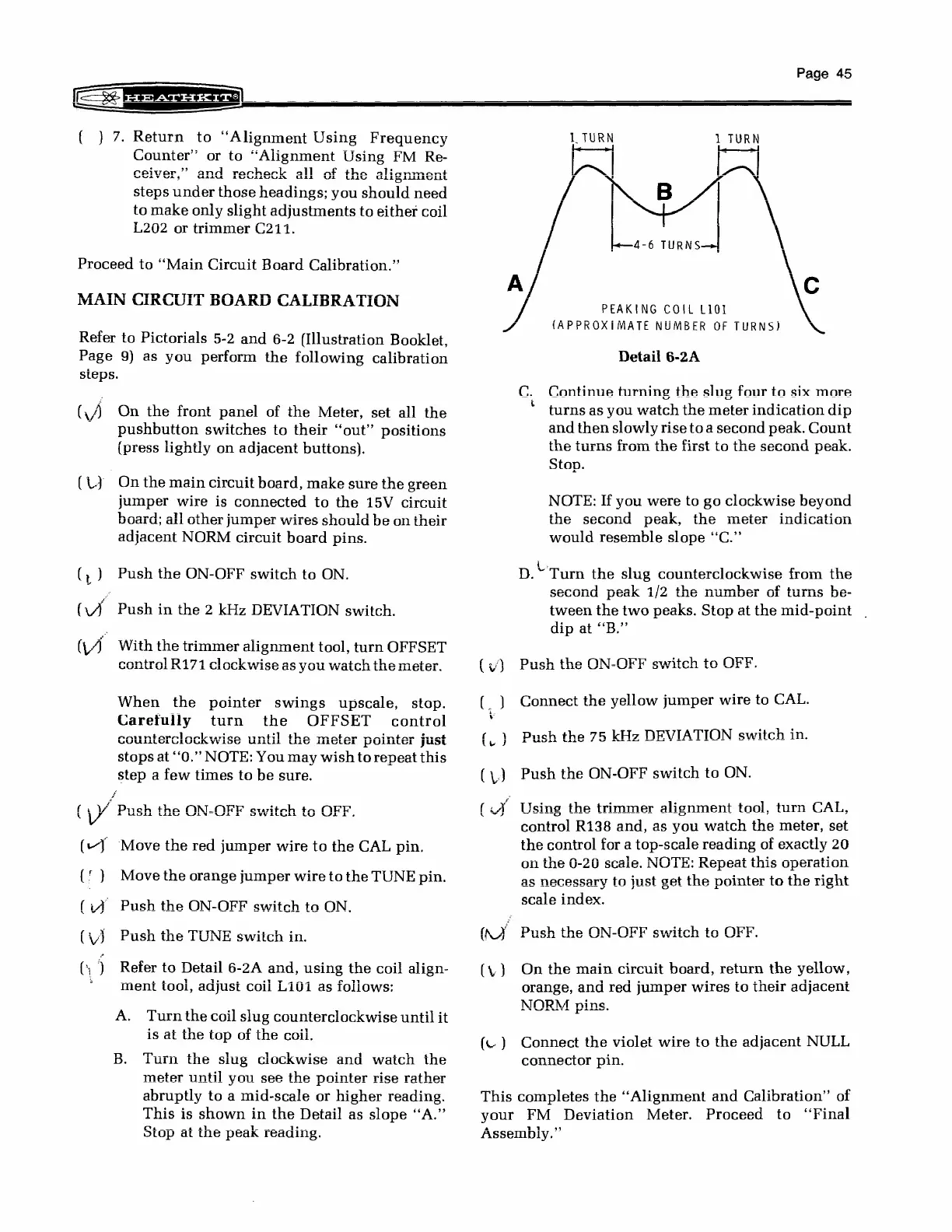
Refer
to
Detail
6-2A
and,
using
the
coil
align-
a
ane
ment
tool,
adjust
coil
L101
as
follows:
meter
until
you
see
the
pointer
rise
rather
abruptly
to
a
mid-scale
or
higher
reading.
This
is
shown
in
the
Detail
as
slope
“A.”
PEAKING
COIL
L101
a
{APPROXIMATE
NUMBER
OF
Detail
6-2A
C.
Continue
turning
the
slug
four
to
six
mare
turns
as
you
watch
the
meter
indication
dip
and
then
slowly
rise
to
a
second
pea
Count
Ba
Oe
ge
OS
a
ee
a
a
ae
Sonn
aren
Ge
the
turnos
Livilbl
ine
Lil
st
to
the
second
poahk.
Stop.
t
NOTE:
If
you
were
to
go
clockwise
beyond
eernn
wnaal
wr
atar
tha
ad
fha
4
the
oCLUIIU
PCa,
tne
meer
in
would
resemble
slope
“‘C.”
D.~
Turn
the
slug
counterclockwise
from
the
eoonn
mank
1/9
tha
niim
wenn
ha
second
proan
1/2
L1G
number
Gr:
turns
peée-
tween
the
two
peaks.
Stop
at
the
mid-point
dip
at
“B.”
(J
Push
the
ON-OFF
switch
to
ON
t
tool,
turn
CAL,
Lee
E
ent
c
(J
Using
the
trimmer
alignme
control
R138
and,
as
you
watch
the
meter,
set
the
control
for
a
top-scale
reading
«
of
exactly
20
on
the
0-20
scale.
NOTE:
Repeat
this
operation
as
necessary
to
just
get
the
pointer
to
the
right
(\.)
On
the
main
circuit
board,
return
the
yellow,
orange,
and
red
jumper
wires
to
their
adjacent
NORM
pins
)
Connect
the
violet
wire
to
the
adjacent
NULL
connector
pin.
This
completes
the
‘‘Alignment
and
Calibration”
of
your
FM
Deviation
Meter.
Proceed
to
‘Final
Assembly.”

Related product manuals