3Model: UH4
Installation
The UH4 can be mounted directly to a wall using four screws or
alternatively, the unit can be DIN rail mounted.
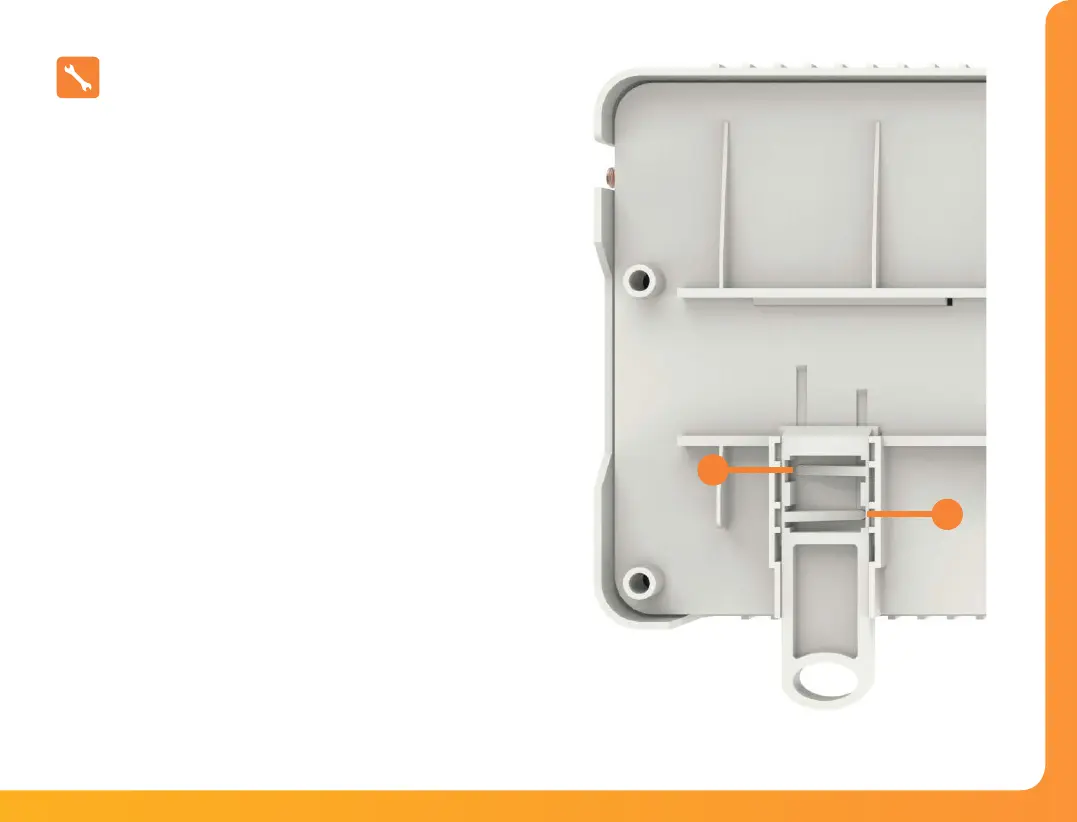
When DIN Rail mounting, you first need to insert the two clips
provided on the back of the UH4, as shown in the image;
• On the back of the UH4, position the clip in the middle
and slide down.
• Points A and B locate in the corresponding holes and
lock into place.
• Locate the UH4 onto the DIN rail from the top.
• Pull the clip down and push the bottom of the UH4 onto
the DIN rail.
• Releasing the clip will lock the UH4 in place on the DIN rail.
To remove the UH4, pull both clips down and remove from the DIN rail.
B
A
Insert clip here.
Then Slide down to lock in place.


 To Next Page