EasyManua.ls Logo

Hella APS-R-PoE - User Manual

Hella APS-R-PoE
65 pages
Print Icon
To Next Page IconTo Next Page
Loading...
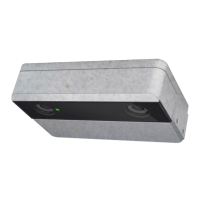
Advanced People Sensor
APS-R and APS-R-PoE, SW 1.2
Installation and configuration manual
HAGL-120-00079, 2017-06, APS-R, APS-R-PoE, SW 1.2

Questions and Answers

  • M
    Melanie TrujilloAug 10, 2025
    What to do if Hella APS-R-PoE device has no connection to the master system?
    • K
      Kenneth ThomasAug 10, 2025
      If your Hella Accessories device isn't connecting to the master system, there are several potential causes and solutions: * **Power Supply:** Verify the power supply is working correctly. * **Wiring:** Inspect the Ethernet cabling for any issues. Check the status LEDs on both the Ethernet switch and the device itself. The LED should be red during startup for about 25 seconds, off for approximately 15 seconds, then green for about 3 seconds before turning off again. * **Network Router:** Examine the DHCP, DNS, and firewall settings, especially if the device uses DHCP. * **Unknown (after reboot):** Try a factory reset.
  • W
    wsalasAug 17, 2025
    Why are the counting results inaccurate with my Hella APS-R-PoE Accessories?
    • N
      nicolekingAug 17, 2025
      Inaccurate counting results with your Hella Accessories can stem from a few reasons: 1. **Modified Environment:** Double-check the user interface to ensure counting lines are correctly placed, the In/Out direction is properly set, and any obstructions are accurately masked within the floor area. If any checks fail, reconfigure the device. 2. **Modified Mounting Position:** Verify in the user interface that the adjusted pitch and yaw angles, as well as the applied height, still match the values measured on the device. If there are discrepancies, reconfigure the device. 3. **Dirty Lens Cover Plate:** Clean the lens cover plate.
  • T
    Tristan JacobsAug 26, 2025
    What to do if Hella Accessories show no counting results?
    • M
      Matthew FlowersAug 26, 2025
      If your Hella Accessories device is showing no counting results, consider the following: * **Wrong Configuration:** Check the user interface to confirm that counting lines are defined correctly in the passageways, located within the defined floor area, and positioned at least 40 cm from the floor area's edge on both sides. Also, verify the configuration of the correct trigger source and signal. * **No Trigger Signal:** Ensure correct installation and check for a correct trigger signal.
  • J
    James ClarkSep 1, 2025
    How to fix an Optical Self Diagnosis (OSD) status error on Hella APS-R-PoE Accessories?
    • R
      Robert ParkSep 1, 2025
      An Optical Self Diagnosis (OSD) status error on Hella Accessories can be caused by: * **Covered optics:** Inspect the condition of the optics. Look for any damage or obstructions, such as stickers, and ensure the camera view is unobstructed. * **Too dark:** Illuminate the scenery with at least 7 lx.

Summary

Overview

General Information

Structure and Function

Hardware

Description of the physical components and interfaces of the APS.

Functionality

Overview of the device's operational capabilities like counting and diagnostics.

Technical Data

Installation

Configuration

Basic operations

Overview of the web-based user interface, login, and navigation.

Start Page - live view

How to view live data, configure values, areas, and lines.

Camera Position

Setting up the device's view, floor area, and obstructions for accurate counting.

Counting

Configuring counting lines, directions, and delays for person counting.

Data Recording

Settings for video recording and saving counting data to files.

Network

Configuring IP settings, DNS, proxy, and push services for network communication.

Service Tools

Accessing HMI settings, updates, common tasks, and diagnostic data.

Diagnostics

Viewing network status, system health, contact info, and track object settings.

Cleaning, Maintenance, and Troubleshooting

Troubleshooting

Common faults and their remedies for connection, OSD errors, and counting issues.

Hella APS-R-PoE Specifications

General IconGeneral
BrandHella
ModelAPS-R-PoE
CategoryAccessories
LanguageEnglish

Related product manuals