5
HEADSET AND NOISE ATTENUATING HEARING PROTECTOR
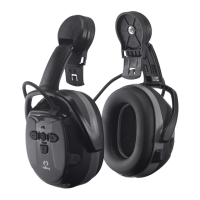
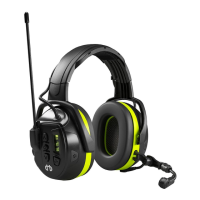
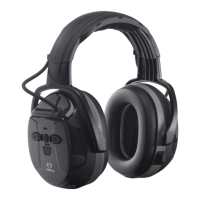
This hearing protector allows communication and music streaming via Bluetooth®. The headset features wireless
communication and music streaming via units that are compatible with Bluetooth® and A2DP.
Warning!
instruction. Any other use is not intended and therefore not permitted. It is important that the instructions for use are followed.
Failure to do so could result in a drastic decrease of the noise attenuation and may lead to serious injury.
Read these user instructions carefully!
• The hearing protector must be worn at all times in noisy environments to provide full protection! Only 100% wear time provides
full protection.
•
protector with too high a noise attenuation performance in relation to the noise environment.
• When using hearing protection with entertainment audio features, remember to adjust the volume when working in noisy
environments so that any warning signals etc. can be heard.
• In some individuals, excessive sound pressure from earphones and headphones may cause hearing loss.
• This hearing protector features the level-limiting of audio signals from the speakers to a maximum of 82 dB(A) at the ear.
• Do not use this product in a potentially explosive atmosphere.
•
manufacturer.
• Ensure that the hearing protectors are regularly inspected for serviceability.
• The hearing protector’s noise attenuating properties can dramatically decrease when used with, for example, thick eyeglass
frames, ski masks/balaclavas, etc.
• Use of perspiration/hygienic protection over the sealing rings can reduce the hearing protector’s noise attenuation properties.
•
leakage.
• Immediately discard the product if it shows any signs of cracking or damage.
• Hygiene kit should be changed at least twice a year. Make sure you choose the correct hygiene kit for your hearing protector.
• Clean the product with mild soap. You must be sure that the detergent you use does not irritate the skin. Do not dip the product
in water.
• The hearing protector must be stored in a dry, clean environment out of direct sunlight, e.g. in its original packaging.
• Warning! Performance may deteriote with battery usage. The typical period of continuous use that can be expected from the
hearing protector is 50 hours.
Fitting & adjustment
Headband (pic. C1)
Adjust the headband size so that it rests lightly against the crown of your head.
Helmet/Cap mount (pic. C2)
Push the hearing protectors’ helmet attachment into the helmet slot until it locks into position.
Place the hearing protectors over your ears and press inwards until you hear a click.
USER INSTRUCTIONS FOR BLUETOOTH® FUNCTIONS
See Charging section of the user manual.
Depending on the phone model and application, some functions may not be supported or may have to be operated on the
phone.
PAIRING: Press and keep holding down
The pairing link is automatically established with the phone the next time the headset is switched on.
ON
OFF
Music streaming from a Bluetooth® unit
1. Switch on the headset (see earlier steps).
2. Start the music player on the phone (or other unit).
3.
4. Adjust the volume by pressing the volume buttons UP/DOWN (A12, A13).
5. Move to the next track by pressing and holding down the Volume UP button for 2 seconds.
6. Play the song from the beginning by pressing and holding down the Volume DOWN button for 2 seconds.
7. Move to the previous track by pressing and holding down the Volume DOWN button for 4 seconds.
Instruction manual
GB US CA


 To Next Page